Gutenberg est le constructeur de contenu idéal par défaut pour un nouveau site WordPress axé sur le contenu, surtout si vous utilisez un thème par blocs. Elementor convient mieux aux sites au design soigné, dont les rédacteurs privilégient une interface visuelle sans code et acceptent l'ajout d'une extension et un éventuel abonnement annuel. WPBakery reste pratique pour un site ou un thème qui l'utilise déjà, mais son système de shortcodes augmente le coût d'un éventuel changement de constructeur ultérieurement.
Voici, en résumé, la comparaison entre Gutenberg, Elementor et WPBakery. La question plus complexe est de savoir si vous partez de zéro ou si vous reprenez un site existant. Un nouveau site vous permet d'opter pour la solution la plus simple et adaptée à vos besoins. Un site WPBakery déjà en place peut contenir des dizaines de modèles et de pages qu'il faudra recréer avant de pouvoir désinstaller l'extension.
Choisissez en fonction de votre site actuel et de votre budget. Une longue liste de fonctionnalités ne vous renseigne que peu sur la manière dont le site sera modifié, maintenu et, à terme, refondu.
Gutenberg vs Elementor vs WPBakery : la réponse courte
Ce comparatif de constructeurs de pages WordPress ne désigne pas de vainqueur universel. Il propose une solution plus adaptée à chaque situation courante. Le choix entre Gutenberg et WPBakery repose principalement sur l'opposition entre le modèle de contenu natif de WordPress et un outil de création de pages éprouvé. La comparaison entre WPBakery et Elementor oppose deux systèmes visuels basés sur des extensions, avec des conséquences différentes en matière de licences et de migration.
| Ta situation | Meilleur point de départ | Pourquoi | Principale précaution |
|---|---|---|---|
| Nouveau blog, site de publication ou de documentation | Gutenberg | Flux de travail WordPress natif, contenu structuré, modèles et aucune licence de constructeur séparée | La modification complète du site nécessite un thème de bloc |
| Nouveau site marketing avec des mises en page visuelles détaillées | Elementor | Édition visuelle directe, commandes réactives et fonctionnalités optionnelles du générateur de thèmes | La dépendance aux plugins et les coûts récurrents de la version Pro peuvent augmenter avec le site. |
| Site existant construit avec WPBakery | Conservez et mettez à jour WPBakery en premier | Évite une reconstruction inutile et permet de conserver la possibilité de modifier les mises en page actuelles | Vérifiez la licence, les conditions du thème intégré, les codes courts et les modules complémentaires non pris en charge. |
| Refonte prévue d'un ancien site WPBakery | Gutenberg ou Elementor d'après un prototype | Permet au prochain système de s'adapter aux nouvelles exigences en matière de contenu et de conception. | Considérez la conversion comme une reconstruction avec étapes et assurance qualité. |
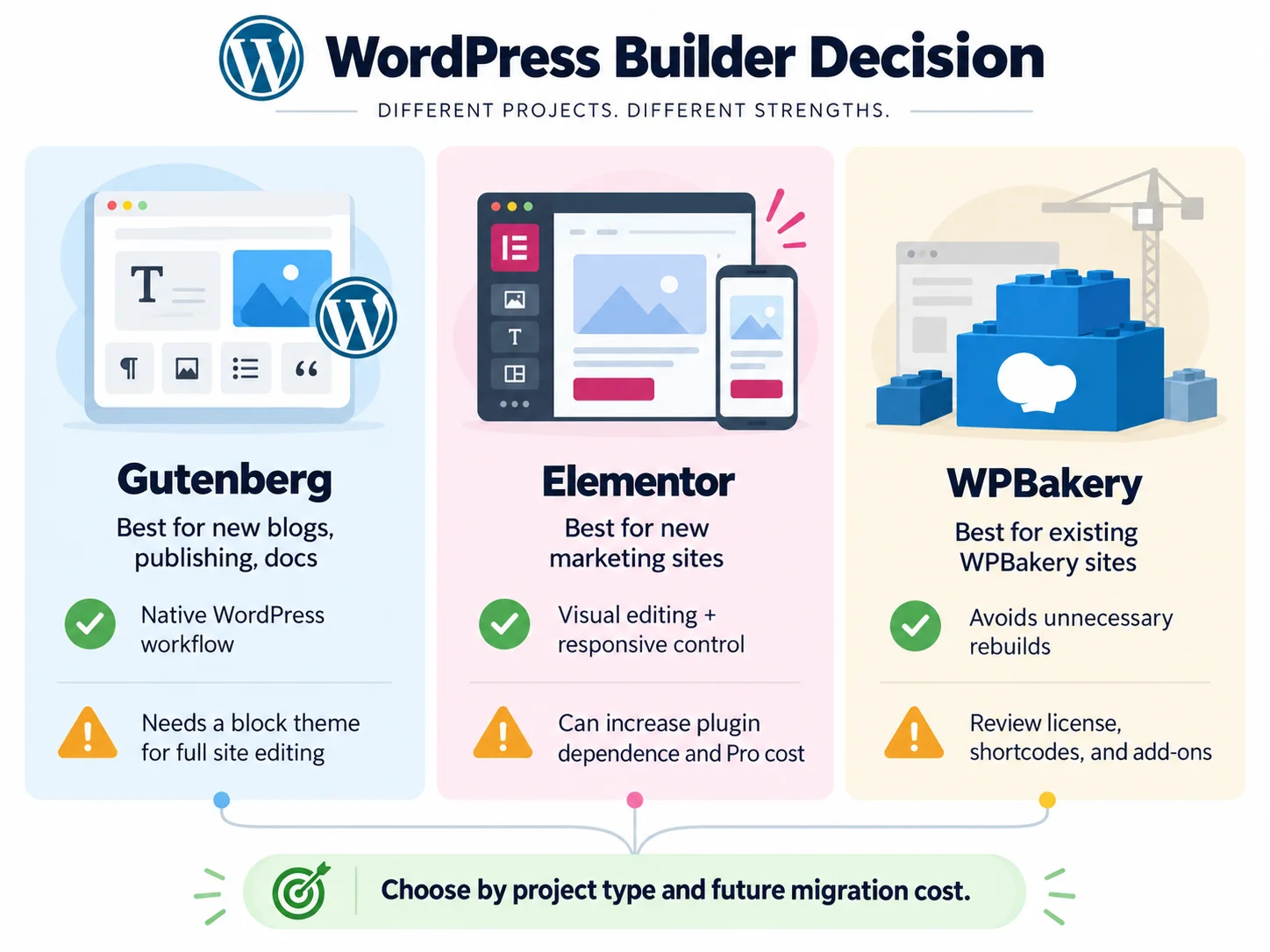
Pour un projet vierge, commencez par tester Gutenberg. Passez à Elementor lorsque le flux de travail de conception ou les contrôles visuels à l'échelle du site le justifient. Choisissez WPBakery pour un nouveau site uniquement si un thème requis, un processus d'équipe établi ou l'environnement client l'utilise déjà.
À quoi comparez-vous exactement ?
Gutenberg, Elementor et WPBakery combinent un système d'édition natif et deux extensions. Bien qu'ils présentent des similitudes, leurs fondements diffèrent. Une comparaison pertinente des constructeurs de pages WordPress repose sur cette distinction.
Gutenberg et l'éditeur de site WordPress
Gutenberg est le nom commun du projet d'édition par blocs de WordPress et de l'expérience d'édition qu'il a introduite. Cet éditeur est l'éditeur par défaut depuis WordPress 5.0. Il permet de créer des articles et des pages à partir de blocs tels que des paragraphes, des titres, des images, des colonnes et des galeries.
L'éditeur de blocs ne permet pas automatiquement à chaque site de contrôler visuellement l'en-tête, le pied de page et les modèles. Cette fonction est assurée par l' éditeur de site WordPress , disponible lorsqu'un thème de blocs est activé. Un thème de blocs permet d'afficher la navigation, les modèles, les parties de modèles, les motifs et les styles globaux via l'éditeur.
Cette distinction est importante. Si quelqu'un affirme que Gutenberg ne permet pas de modifier un en-tête, vérifiez d'abord le thème actif. Si quelqu'un prétend que Gutenberg peut remplacer tous les constructeurs visuels, vérifiez si les éléments de mise en page et les commandes d'interaction nécessaires sont présents dans les blocs et le thème choisis.
Elementor
Elementor est une extension WordPress indépendante offrant une interface d'édition intuitive par glisser-déposer. La version gratuite permet la création visuelle de pages et propose une collection de widgets. Les abonnements payants Editor Pro ajoutent des fonctionnalités supplémentaires, telles que le constructeur de thèmes, le contenu dynamique, les formulaires, les pop-ups, le CSS personnalisé et les fonctionnalités e-commerce.
Élément de Documentation du générateur de thèmes décrit les modèles de parties de site pour les en-têtes, les pieds de page, les articles, les archives et WooCommerce Les conditions d'affichage permettent au concepteur de contrôler l'emplacement d'un modèle. Elementor est ainsi plus adapté aux équipes qui souhaitent concevoir l'intégralité de leur site à partir d'un seul système visuel, sans avoir à créer de thème personnalisé.
WPBakery Page Builder
WPBakery est un constructeur de pages commercial doté de modes d'édition front-end et back-end. Il est particulièrement répandu sur les sites dont le thème intègre le constructeur ou dont les mises en page existantes utilisent ses éléments de contenu et ses shortcodes.
WPBakery et Elementor proposent tous deux un éditeur visuel, des modèles, des contrôles responsifs et un écosystème d'extensions. Cependant, leurs modèles de contenu, leurs structures de licences et les relations entre les thèmes influencent l'expérience utilisateur sur le long terme.
WPBakery est toujours maintenu. Le fournisseur a publié WPBakery 9.0 En juillet 2026, l'entreprise a annoncé avoir repensé l'interface, reconstruit la fonction glisser-déposer, mis à jour les éléments de contenu, amélioré la compatibilité et introduit un chargement CSS plus sélectif. Il s'agit de modifications annoncées par le fournisseur, et non du résultat d'une mise à jour. Webnus test de performance.
| Dimension | Gutenberg | Elementor | Boulangerie WPB |
|---|---|---|---|
| Modèle du produit | Faisant partie du noyau WordPress | Extension gratuite et abonnements annuels payants | Plugin commercial avec options de licence à vie |
| Modèle d'édition principal | Blocs dans l'éditeur WordPress | widgets et conteneurs visuels | Éléments de contenu dans les éditeurs front-end ou back-end |
| Modification à l'échelle du site | Éditeur de site avec thème bloc | Les fonctionnalités du générateur de thèmes dépendent de l'abonnement choisi. | Généralement partagés via des modèles, l'intégration de thèmes et des extensions |
| Contenu réutilisable | Motifs et motifs synchronisés | Modèles et composants réutilisables, selon la version et le forfait | Modèles et éléments enregistrés |
| Risque de sortie | Généralement le plus bas lorsque les blocs centraux sont utilisés | Les pages restent liées aux structures et au style d'Elementor. | Les pages complexes peuvent afficher des codes courts ou perdre leur mise en page lorsque le plugin est supprimé. |
Quel éditeur est le meilleur pour un nouveau site WordPress ?
Pour un nouveau site, comparez Gutenberg, Elementor et WPBakery en fonction des mêmes exigences. Gutenberg est la solution recommandée par défaut pour un projet axé sur le contenu. Les rédacteurs restent dans l'éditeur natif de WordPress, le contenu conserve une structure de blocs claire et les modèles de blocs permettent de standardiser les mises en page répétitives. Les modèles synchronisés se mettent à jour partout où ils sont utilisés, ce qui est pratique pour les annonces, les appels à l'action et autres sections partagées.
La recommandation change lorsque le cahier des charges visuel dépasse les capacités du thème et des blocs disponibles. Elementor permet de raccourcir le processus, de la conception à la création d'une page responsive, car l'espacement, le positionnement, les points de rupture et les effets visuels sont accessibles depuis une interface unique. Il est souvent plus adapté aux pages de campagne, aux portfolios et aux sites de petites entreprises gérés par des rédacteurs à l'orientation visuelle marquée.
WPBakery peut encore constituer un choix judicieux pour un nouveau site web si le projet nécessite l'utilisation d'un thème ou d'un système d'agence conçu autour de cette plateforme. Dans le cas d'un site vierge, Gutenberg présente généralement moins de contraintes liées à la désinstallation du constructeur. Avant d'accepter la dépendance à WPBakery, créez une page de démonstration et renseignez-vous sur les conséquences de la désinstallation du constructeur. Une version préinstallée peut également gérer les mises à jour et le support différemment d'une licence achetée directement auprès de WPBakery.
Le test le plus pertinent pour comparer Gutenberg, Elementor et WPBakery consiste à créer une page réelle conforme au cahier des charges. Pour chaque outil sérieusement envisagé, créez la page d'accueil principale, une page interne riche en contenu, un formulaire et une section réutilisable. Une comparaison des constructeurs de pages WordPress basée sur ces tâches révèle des lacunes que les tableaux de fonctionnalités marketing masquent.
Lequel est le plus facile pour les éditeurs et les clients ?
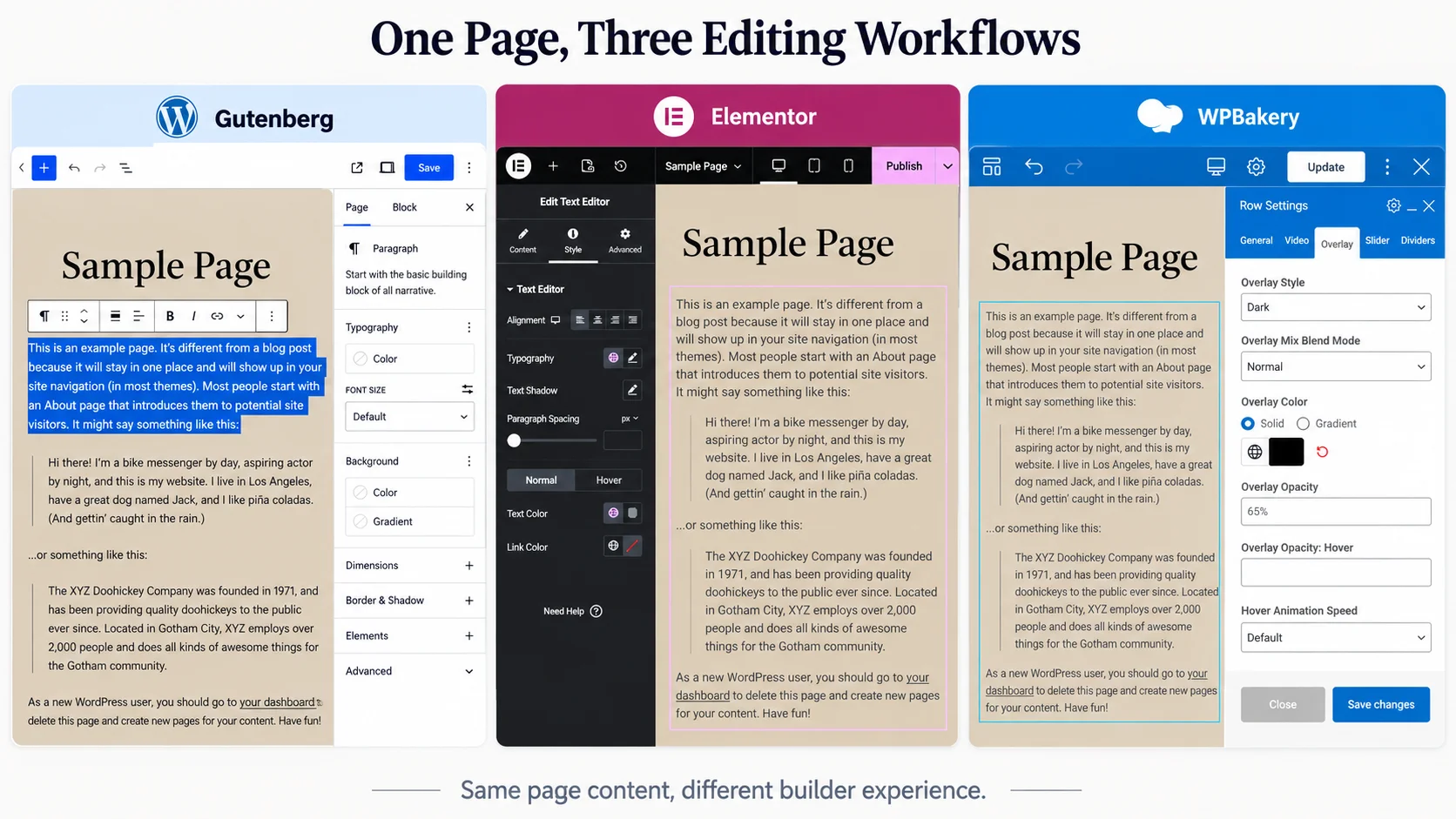
Dans Gutenberg, Elementor et WPBakery, la facilité d'utilisation dépend de la tâche. Un designer qui conçoit une page d'accueil et un rédacteur qui corrige un paragraphe n'ont pas besoin de la même interface.
| Tâche de routine | Gutenberg | Elementor | Boulangerie WPB |
|---|---|---|---|
| Rédigez et mettez en forme un article | Flux de travail natif direct | Plus d'interface que la plupart des articles n'en nécessitent. | Le mode back-end peut fonctionner, mais la page reste dépendante du générateur. |
| Protéger une mise en page répétée | Utilisez des modèles verrouillés ou contenant uniquement du contenu lorsque cela est possible. | Afficher le contenu sélectionné dans des modèles ou des composants | Utilisez des modèles et des contrôles de rôle, puis testez ce que les clients peuvent modifier. |
| Effectuer des modifications visuelles de la page | C'est bien lorsque la bibliothèque de blocs couvre la conception | Retour visuel puissant et commandes détaillées | L'éditeur frontal offre un contrôle visuel ; l'éditeur dorsal aide à la structuration. |
| Réutiliser une section à l'échelle du site | Éléments de modèles ou de gabarits synchronisés | Modèles et composants | Modèles et éléments enregistrés |
| Passage de relais à un nouveau rédacteur en chef | Connu des utilisateurs de WordPress | Nécessite une formation spécifique à Elementor | Nécessite une formation spécifique à WPBakery et une connaissance des éléments du thème du site |
Pour les équipes éditoriales, un nombre réduit d'options de contrôle peut s'avérer avantageux. Un thème de blocs bien configuré permet de limiter les modifications accidentelles de la mise en page tout en simplifiant la mise à jour du contenu. Pour un concepteur-propriétaire, la plus grande surface de contrôle d'Elementor peut sembler plus intuitive, car la page elle-même constitue le canevas.
La comparaison entre WPBakery et Elementor est plus nuancée qu'il n'y paraît dans les anciens comparatifs, car les deux offrent l'édition visuelle. Pour les rédacteurs d'articles, le choix entre Gutenberg et WPBakery est plus marqué, car Gutenberg intègre la rédaction courante dans l'interface de blocs native de WordPress. Le choix pratique dépendra néanmoins de l'écosystème existant du site. Il est important de vérifier quel thème propose des éléments personnalisés, qui détient les licences, comment les sections réutilisables sont gérées et si les rédacteurs utilisent le mode front-end ou back-end au quotidien.
Lequel vous offre un contrôle plus étendu sur la conception à l'échelle du site ?
Gutenberg, Elementor et WPBakery représentent trois approches pour le contrôle de la conception à l'échelle d'un site. La source et les limites de ce contrôle diffèrent.
Gutenberg offre la meilleure expérience native lorsqu'il est associé à un thème de blocs performant. L'éditeur de site permet de gérer les modèles, leurs composants, la navigation, les motifs et les styles. La qualité du thème reste primordiale. Un thème classique peut laisser l'en-tête et le pied de page dans l'outil de personnalisation ou dans un panneau de thème propriétaire.
Elementor offre un contrôle visuel précis grâce à son éditeur. Theme Builder étend ce flux de travail aux éléments du site, tandis que les conditions d'affichage déterminent leur emplacement. Certaines fonctionnalités globales nécessitent un abonnement payant ; vérifiez donc les conditions de l'abonnement plutôt que de supposer que toutes les installations d'Elementor proposent les mêmes outils.
WPBakery gère la mise en page via des éléments de contenu et permet un contrôle plus étendu du site grâce aux intégrations de thèmes et aux extensions. Cette flexibilité implique également que deux sites WPBakery peuvent se comporter de manière très différente. Il est donc conseillé d'examiner les éléments personnalisés et les modèles du thème avant de comparer le constructeur de pages seul.
Pour la conception globale d'un site, le choix entre WPBakery et Elementor dépend du degré de contrôle offert par le constructeur plutôt que par le thème. Le choix entre Gutenberg et WPBakery dépend de la capacité d'un thème de blocs à répondre aux besoins sans éléments de constructeur personnalisés.
Comment comparer les performances et le résultat du code ?
Les performances de Gutenberg, Elementor et WPBakery ne se résument pas à leur nom. Le thème actif, la conception de la page, le poids des images, les polices, les scripts tiers, la mise en cache, l'hébergement, les extensions et la configuration du constructeur ont tous une incidence sur le résultat.
Un test de performance équitable entre Gutenberg, Elementor et WPBakery nécessite un contenu et un rendu visuel identiques. Il doit également utiliser le même hébergeur, la même version de PHP, les mêmes règles de cache, les mêmes formats d'image, les mêmes fichiers de police, les mêmes scripts d'analyse, le même emplacement et le même appareil de test. Ainsi, on obtient une comparaison contrôlée des constructeurs de pages WordPress, et non trois pages de démonstration sans lien entre elles.
Utilisez ce processus :
- Créez la même page représentative dans chaque éditeur.
- Harmonisez les images, les polices, les sections, le comportement adaptatif et les fonctionnalités interactives.
- Videz les caches et répétez l'opération pour chaque page de test.
- Effectuez plusieurs tests sur mobile et ordinateur, puis indiquez la valeur médiane plutôt que la meilleure performance.
- Comparez les octets transférés, le nombre de requêtes, la taille du code HTML rendu, le travail JavaScript et les données du champ Core Web Vitals lorsque le trafic est suffisant.
- Il faut examiner la maintenabilité autant que la vitesse. Une page plus petite que l'équipe ne peut pas mettre à jour en toute sécurité n'est pas forcément un meilleur système.
WPBakery indique que la version 9.0 charge le CSS modulaire en fonction des éléments de contenu utilisés sur une page. La page du plugin Elementor décrit également une réduction de la taille du DOM et un chargement des ressources à la demande. Il convient de considérer ces informations comme des arguments marketing tant que leur efficacité n'a pas été mesurée sur le site en question.
La conclusion concernant les performances de WPBakery et d'Elementor peut varier en fonction des widgets et des extensions utilisés. Il en va de même pour Gutenberg et WPBakery lorsque la version Gutenberg repose sur une importante suite de blocs tiers.
Combien coûtent Gutenberg, Elementor et WPBakery ?
La tarification de Gutenberg, Elementor et WPBakery comporte deux niveaux : la licence facturée et la main-d’œuvre nécessaire pour construire, maintenir et remplacer ultérieurement le système.
| Produit | Modèle de tarification vérifié le 6 septembre 2026 | Que vérifier avant d'acheter |
|---|---|---|
| Gutenberg | Inclus avec le noyau WordPress ; aucune licence d’éditeur supplémentaire n’est requise. | Les thèmes de blocs, les blocs premium, le travail de conception, la formation et le développement personnalisé peuvent toujours engendrer des frais. |
| Elementor | Extension gratuite disponible ; abonnements Editor Pro à partir de 5 €/mois | L'offre Essentielle couvre 1 site ; l'offre Solo Avancé couvre 1 site professionnel ou e-commerce ; l'offre Avancé couvre 3 sites ; l'offre Expert couvre 25 sites. Veuillez vérifier les prix lors du paiement et du renouvellement, car la page officielle applique des promotions et une tarification variable selon la localisation. |
| Boulangerie WPB | Licence standard : 69 € à vie pour 1 site ; 5 sites : 256 € ; 10 sites : 499 € | Un an d'assistance et des fonctionnalités exclusives sont inclus. Les mises à jour sont à vie, mais les mises à jour automatiques nécessitent un abonnement Support Plus actif ; les mises à jour manuelles restent disponibles pour les détenteurs de licence. |
Il est conseillé de consulter la page des tarifs d'Elementor avant l'achat, car les offres et taxes affichées peuvent avoir changé. La page de licence de WPBakery indique les prix en euros et propose une garantie de remboursement de 15 jours au moment de la rédaction de cet article. Ce comparatif WPBakery vs Elementor inclut donc un choix entre une licence à vie et un abonnement annuel, ainsi qu'une comparaison des fonctionnalités.
Pour un site existant, ajoutez le coût de la migration à cette comparaison de constructeurs de pages WordPress. Reconstruire trente pages WPBakery personnalisées peut coûter plus cher que plusieurs années de licences logicielles. Pour un nouveau site, tenez compte de la maintenance de chaque pack de widgets premium, bibliothèque de modèles et extension spécifique au thème. Dans la comparaison Gutenberg vs WPBakery, un éditeur de base gratuit ne rend pas la refonte gratuite.
Portabilité de Gutenberg, Elementor et WPBakery
La portabilité est la principale différence stratégique entre Gutenberg, Elementor et WPBakery.
| Système actuel | Si l'éditeur est supprimé ou remplacé | Risque migratoire typique |
|---|---|---|
| Blocs Gutenberg de base | Le contenu principal reste généralement dans WordPress, même si les blocs tiers et le style du thème peuvent changer ou disparaître. | Faible à moyenne, selon la dépendance au bloc et au thème |
| Elementor | Le contenu et les médias restent dans la base de données, mais les mises en page, les widgets et le style créés avec Elementor doivent être remplacés. | Niveau de difficulté moyen à élevé pour les sites web à forte composante graphique. |
| Boulangerie WPB | Les mises en page et les éléments du thème peuvent ne plus s'afficher correctement ; le texte des codes courts peut apparaître sur les pages concernées. | Niveau de difficulté moyen à élevé, notamment avec les éléments personnalisés intégrés au thème. |
Ne désactivez pas un outil de construction en production pour observer les dysfonctionnements. Clonez le site en environnement de test, effectuez une sauvegarde que vous pouvez restaurer et examinez le résultat.
Le même avertissement s'applique aux bibliothèques de blocs tierces. Gutenberg présente un avantage natif, mais une page construite à partir de blocs propriétaires peut tout de même devenir dépendante de plugins. La portabilité s'améliore avec l'utilisation des blocs natifs, des modèles de contenu documentés, d'un CSS personnalisé limité et d'un petit nombre d'extensions maintenues.
WPBakery et Elementor peuvent engendrer une charge de remplacement similaire sur un site web complexe, même si les modalités de nettoyage diffèrent. Gutenberg, comparé à WPBakery, privilégie généralement Gutenberg pour la portabilité du contenu lorsque les blocs natifs et un thème de blocs répondent aux exigences. Cette comparaison de constructeurs de pages WordPress nécessite néanmoins une vérification des widgets, blocs ou éléments de thème propriétaires.
WPBakery et Gutenberg peuvent-ils fonctionner ensemble ?
Oui. La documentation de compatibilité Gutenberg de WPBakery indique que la version 5.5 et les versions ultérieures permettent d'ajouter des blocs Gutenberg dans une mise en page WPBakery. Elle propose également une option pour désactiver Gutenberg dans les paramètres de WPBakery.
La compatibilité ne convertit pas une page WPBakery en blocs natifs. La mise en page environnante peut toujours dépendre des shortcodes WPBakery, des éléments de contenu et des intégrations de thème.
Dans la mesure du possible, utilisez un éditeur principal par page. Une page contenant plusieurs éditeurs augmente le nombre de systèmes qu'un éditeur doit maîtriser et le nombre d'interactions qu'un développeur doit tester. Le recours à plusieurs éditeurs peut se justifier lors d'une transition progressive ou pour un bloc intégré spécifique, mais il est essentiel de documenter sa raison d'être.
Lors d'une migration de WPBakery vers Gutenberg, cet état mixte peut être temporaire et utile. Veillez à bien définir la propriété de chaque page afin que les rédacteurs sachent quelle interface contrôle chaque section.
Dans le cas d'une décision opposant Gutenberg à WPBakery, la coexistence est un pont, et non la preuve que le travail de migration a disparu.
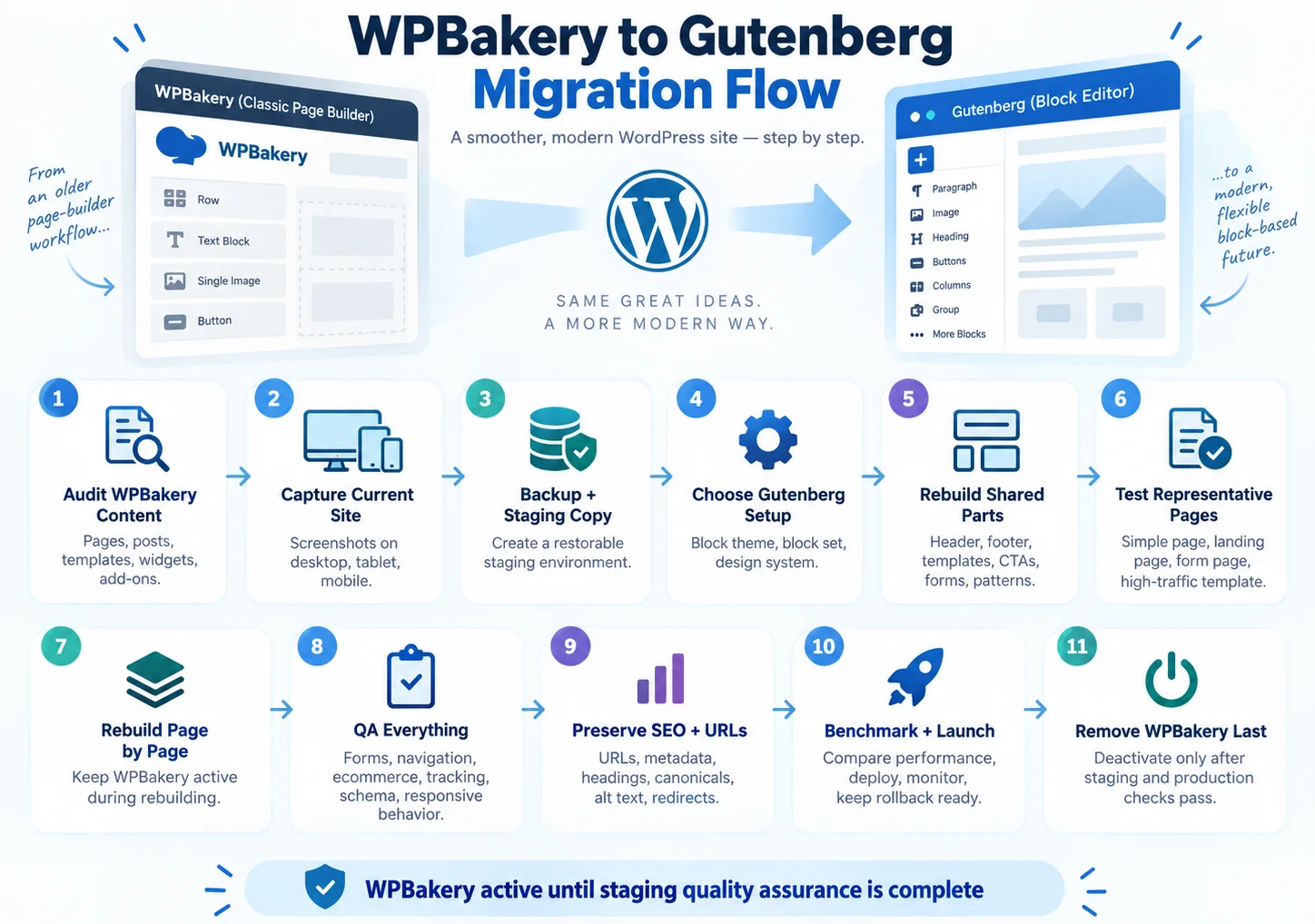
Comment migrer de WPBakery vers Gutenberg en toute sécurité ?
Liste de contrôle pour la migration de WPBakery vers Gutenberg
La migration de WPBakery vers Gutenberg se fait généralement par une reconstruction progressive, et non par une conversion instantanée. Les pages de texte simples peuvent être reconstruites rapidement. En revanche, les pages d'accueil comportant des éléments de thème personnalisés, des lignes imbriquées, des diaporamas, des formulaires et des adaptations responsives nécessitent un travail plus approfondi.
- Contenu dépendant du générateur d'inventaire. Identifiez les pages, articles, modèles, types de publications personnalisés, widgets et sections réutilisables qui utilisent WPBakery. Notez chaque élément de contenu et extension spécifique au thème.
- Enregistrez le site actuel. Capturez des captures d'écran de pages entières sur ordinateur, tablette et mobile. Exportez les paramètres lorsque cela est possible et sauvegardez les fichiers CSS ou JavaScript personnalisés liés à la mise en page.
- Créez une copie de test restaurable. Effectuez une sauvegarde de la base de données et des fichiers, restaurez-la dans un environnement de test et vérifiez que la copie fonctionne avant de la modifier.
- Choisissez le système de remplacement. Choisissez un thème de blocs et le plus petit ensemble de blocs maintenus capable de reproduire les composants requis. Commencez par définir les couleurs, les polices, les espacements et les largeurs de contenu globales.
- Créez les composants partagés. Recréez les en-têtes, pieds de page, modèles, formulaires, appels à l'action et sections répétées avant de reconstruire les pages individuelles. Utilisez des modèles lorsque cela facilite les modifications ultérieures.
- Commencez par des pages représentatives. Reconstruisez un article simple, une page de destination complexe, une page de formulaire et un modèle à fort trafic. Cela permettra de déceler les lacunes avant de valider le devis global.
- Reconstruire le contenu page par page. Laissez WPBakery actif pendant la préparation des nouvelles pages. Supprimez les restes de shortcode inutilisés uniquement après avoir vérifié la page reconstruite.
- Effectuer un contrôle qualité fonctionnel et visuel. Tester la navigation, les formulaires, la recherche, le commerce électronique, le contenu dynamique, le suivi, les données structurées, les mises en page réactives, l'utilisation du clavier et le comportement du navigateur.
- Conserver les URL et les métadonnées. Conservez les URL existantes, sauf raison particulière de les modifier. Conservez les titres, descriptions, en-têtes, URL canoniques, entrées de schéma, textes alternatifs des images et redirections.
- Mesurer avant le lancement. Comparez les modèles importants dans des conditions de cache et de test équivalentes. Notez tout compromis qui subsiste.
- Lancement avec une fenêtre de restauration. Déployez la version approuvée, videz les caches, testez les parcours critiques, surveillez les erreurs et les analyses, et conservez la possibilité de récupération de l'ancien système jusqu'à la fin de l'examen.
- Supprimez WPBakery en dernier. Désactivez et supprimez le générateur uniquement une fois que chaque page, modèle et intégration dépendants ont passé les tests de préproduction et de production.
Les outils de conversion automatisés peuvent faciliter la conversion du contenu de base, mais ne présumez pas qu'ils puissent reproduire les éléments personnalisés, les codes courts du thème, les paramètres responsifs ou les extensions tierces. Une migration de WPBakery vers Gutenberg ou Elementor nécessite toujours des tests en amont et une inspection des blocs générés avant toute utilisation de l'outil sur l'ensemble du site.
La même séquence de migration de WPBakery vers Gutenberg s'applique lors du passage à Elementor : audit préalable, définition du nouveau système, reconstruction des parties partagées, migration des pages représentatives, puis assurance qualité complète avant de supprimer l'ancien constructeur.
Décision finale par type de projet
| Projet | Recommandation |
|---|---|
| Publication axée sur le contenu | Commencez par Gutenberg et un thème de blocs bien pris en charge. N'ajoutez des blocs tiers qu'en cas de besoin précis. |
| Site de marketing axé sur le design | Comparez Elementor et Gutenberg sur une même page. Choisissez Elementor lorsque ses commandes visuelles permettent de réaliser des économies substantielles en matière de conception et de maintenance. |
| Site WPBakery existant sans refonte prévue | Mettez à jour WPBakery, vérifiez les licences et les modules complémentaires, corrigez les problèmes et conservez-le. Une migration sans justification commerciale engendre des risques. |
| Le site WPBakery existant doit être refondu. | Le prix comprend la refonte et la migration. Comparez Gutenberg pour un système de contenu natif et Elementor pour un système de conception visuelle. |
| Agence gérant plusieurs sites hérités | Conservez le même prestataire pour chaque site jusqu'à une refonte planifiée. Standardisez la documentation, les sauvegardes, les licences et les contrôles de préproduction pour l'ensemble du portefeuille. |
Si vous souhaitez choisir Elementor et un thème construit autour de cet éditeur, Kata Ajoute des constructeurs de sites basés sur Elementor tout en conservant la compatibilité avec Gutenberg.
Pour la plupart des nouveaux sites de contenu, Gutenberg l'emporte par sa simplicité et son intégration native. Elementor trouve sa place lorsque le contrôle visuel est essentiel au projet. WPBakery s'impose lorsqu'une modification du système WPBakery existant coûterait plus cher que sa maintenance.
Le choix final entre Gutenberg, Elementor et WPBakery doit se fonder sur un prototype, et non sur une simple promesse. Cette comparaison de constructeurs de pages WordPress n'est complète que lorsque l'équipe a créé une page réelle, analysé le flux de travail d'édition, listé toutes les dépendances et estimé le coût d'une migration.
Foire aux questions
1. Gutenberg est-il un constructeur de pages ?
Gutenberg est le système d'édition par blocs de WordPress. Il permet de créer des mises en page sophistiquées, et l'éditeur de site peut gérer les modèles de site lorsqu'un thème par blocs est actif. Il ne propose cependant pas toutes les fonctionnalités ni tous les flux de travail d'un éditeur visuel dédié.
2. WPBakery est-il encore pertinent en 2026 ?
Oui, surtout pour les sites et thèmes qui en dépendent déjà. WPBakery 9.0 est en développement actif. Pour une nouvelle version, la pertinence n'est qu'un critère parmi d'autres. L'équipe doit également évaluer la portabilité des shortcodes, la dépendance au thème, les licences et le coût d'une future migration.
3. Que se passe-t-il si WPBakery est désactivé ?
Les mises en page concernées peuvent ne plus s'afficher correctement et le texte des codes courts peut devenir visible. Le résultat exact dépend du thème, des extensions et des éléments utilisés. Testez la désactivation sur une copie de test sauvegardée, jamais en production.
4. WPBakery peut-il être converti automatiquement en Gutenberg ?
Il n'existe aucune garantie de conversion entièrement automatique. Une migration de WPBakery vers Gutenberg peut transférer le contenu de base après un nettoyage limité, mais les mises en page complexes et les éléments personnalisés nécessitent généralement une reconstruction manuelle et un contrôle qualité.
5. Quel éditeur WordPress est le meilleur pour les débutants ?
Gutenberg est généralement le point de départ le plus simple pour les articles et les pages simples, car il est intégré à WordPress. Une personne ayant une mémoire visuelle et souhaitant créer un site web au design complexe préférera peut-être Elementor. WPBakery peut être facile à utiliser pour quelqu'un qui gère un site existant dont les modèles et la formation sont déjà en place.
6. WPBakery ou Elementor : lequel est le meilleur pour un site existant ?
Utilisez le constructeur de sites déjà en place, sauf si une refonte ou un problème de maintenance justifie une migration. Dans le cas d'une comparaison entre WPBakery et Elementor pour un site existant, le coût de reconstruction et le risque de régression sont plus importants que l'apparence de l'interface. Ce même principe permet de fonder le choix entre Gutenberg, Elementor et WPBakery sur les dépendances réelles du site.