
التي WooCommerce product feed plugin should you use?
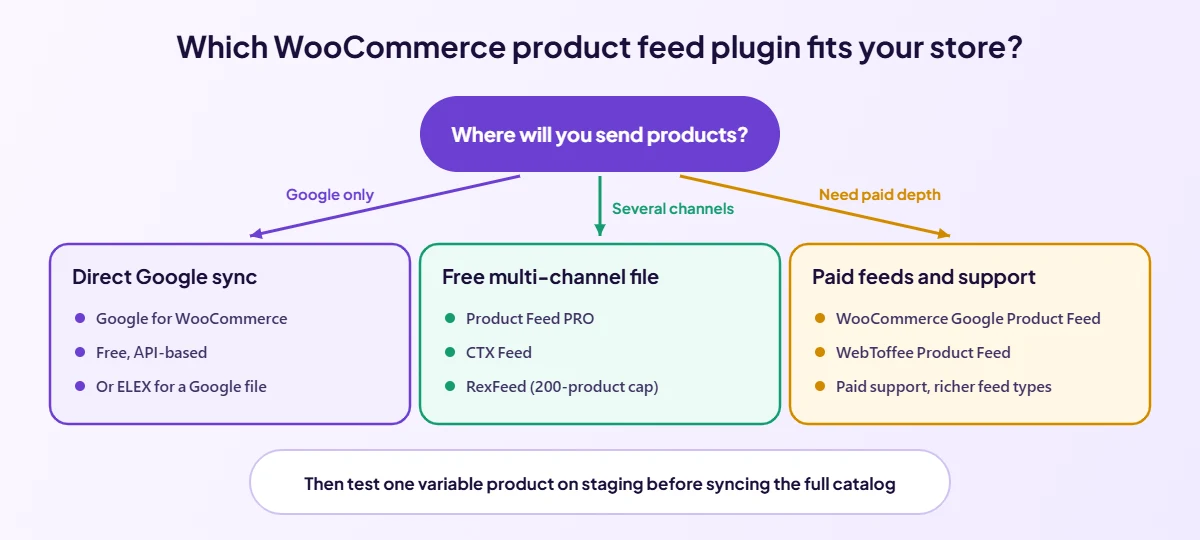
It depends on where your products need to go. Google for WooCommerce is the clearest starting point when you only need to sync a store with Google. Product Feed PRO and CTX Feed suit stores that need a reusable feed for Google, Meta, TikTok, Bing, or other channels.
RexFeed offers another template-led multi-channel route, while ELEX is a narrower Google feed-file option. WooCommerce Google Product Feed and WebToffee add paid support or more specialized controls.
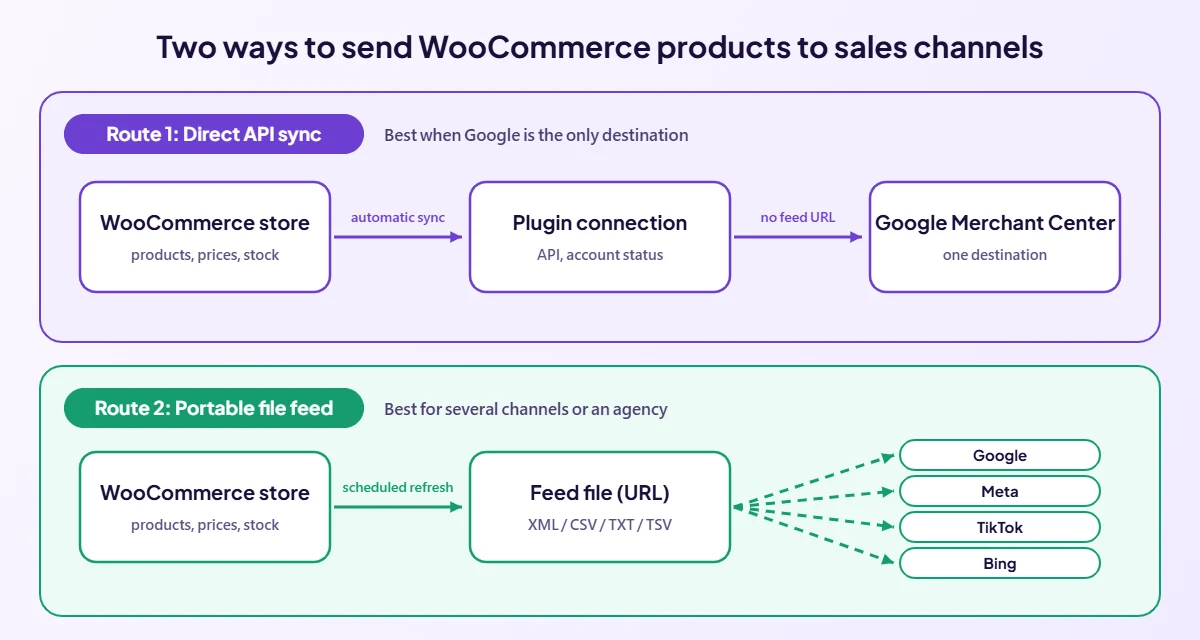
Choose the feed method before the brand. A direct API connection is convenient for a Google-only store. A hosted XML, CSV, TXT, or TSV feed is more portable and gives you a file that several platforms can fetch.
Either way, the plugin still depends on accurate titles, prices, stock, identifiers, images, and landing pages.
اللقطات السريعة
Worth comparing when channel coverage, export formats, and frequent scheduled refreshes matter.
Supports local inventory, promotions, and product review feeds.
How this list was checked: we compared official documentation and current WordPress.org listings on October 20, 2026. We did not run a documented test store for this update, so the recommendations reflect verified capabilities and plan boundaries, not hands-on test results. Prices, versions, and plan limits change, so confirm them before you buy.
WooCommerce product feed plugins compared
The table compares seven of the best WooCommerce product feed plugins by the decision that matters most: what the plugin sends, where it can send it, and what restriction may show up after setup.
| المساعد | الأنسب | طريقة التغذية | خيار مجاني | Destinations and formats | طريقة التحديث | القيد الرئيسي |
|---|---|---|---|---|---|---|
| جوجل ل WooCommerce | Google-only stores that want direct synchronization | API-integrated product sync | نعم | Google Merchant Center and Google Ads tools | التزامن التلقائي | Built for Google, not a portable multi-channel feed workflow |
| تغذية المنتج PRO | Free multi-channel feeds with detailed rules | Hosted feed files | Yes, with unlimited products and feeds | More than 100 channel templates; XML, CSV, TXT, and TSV | Hourly, twice daily, or daily refresh | Several multilingual and multi-currency integrations require a paid plan |
| تغذية CTX | Large catalogs or teams comparing many destinations and formats | Hosted feed files | Yes, with unlimited products and feeds | Vendor lists 220+ channels; XML, CSV, TSV, XLS, TXT, and JSON | Scheduled intervals, with some faster options depending on plan | Advanced attributes, custom templates, and some integrations are paid |
| RexFeed | A template-led setup for many marketplaces | Hosted feed files | Yes, up to 200 products in the current free release | Vendor lists 200+ channels | Scheduled regeneration | Unlimited products and several advanced controls are reserved for Pro |
| شركة Elex WooCommerce جوجل تسوق | A free Google feed file with mapping rules | XML, CSV, or TSV file | نعم | جوجل مركز التجار | Daily, weekly, or monthly jobs | Its directory listing lagged the newest WordPress release when checked |
| WooCommerce موجز منتجات Google | Paid Google and Bing feeds with richer feed types | Feed URL and scheduled feed generation | No; $79 per year when checked | Google product, local inventory, review, and promotion feeds; Bing product feed | Full and incremental feeds | Paid and focused mainly on Google and Bing |
| WebToffee Product Feed | Supported multi-channel feeds with free and paid paths | XML or CSV in the free edition; more controls in paid plans | نعم | Google, Meta, TikTok, Pinterest, Bing, and other listed channels | Manual or scheduled, depending on edition | Custom feeds, some automation, and multilingual or multi-currency features are paid |
The channel totals come from vendor listings. A listed template doesn’t prove that every attribute or regional requirement will fit your catalog, so check the exact destination template before committing to a plugin.
How we evaluated the plugins
We used six filters to keep the shortlist useful rather than long:
- The plugin had a current official listing or vendor documentation.
- Its feed method was clear enough to tell direct synchronization apart from a generated file.
- The free and paid boundary could be described without guessing.
- The documentation covered product variations, attribute mapping, category mapping, filters, or scheduled updates.
- The tool served a distinct store type, such as Google-only, multi-channel, or paid supported use.
- A material limitation could be identified from the same official sources.
We did not score setup speed, feed-generation time, server load, support response time, or output accuracy. Claims like that need the same store, server, catalog, and plugin versions to mean anything. The list is grouped by use case instead, so the first plugin isn’t automatically better than the seventh.
Should you use API sync or a product feed file?
A WooCommerce product feed plugin usually takes one of two routes: it sends product data through an API connection, or it generates a file that a sales channel fetches. This choice narrows the field faster than comparing long feature lists.
| If your store needs… | أبدا ب… | لماذا |
|---|---|---|
| مركز جوجل للتجار فقط | Direct API sync | Fewer moving parts and no feed URL to maintain |
| Google plus Meta, TikTok, Bing, or comparison sites | A portable file feed | One store can generate separate channel-specific files |
| A file another service or agency can inspect | A portable file feed | XML, CSV, TXT, or TSV can be reviewed outside the plugin |
| Google-specific status and issue screens in WooCommerce | Direct Google sync | The connection is built around Google account and product status workflows |
| Full control over mapping and filters | Usually a file-feed manager | File tools tend to expose more field, category, and exclusion rules |
Google Merchant Center accepts TXT, XML, and TSV product files. A file can be uploaded once or fetched from a URL. Google also supports platform connections and APIs, so a visible XML file isn’t mandatory.
Direct sync is a good fit when Google is the only destination. It gets less attractive once your marketing team also needs a Meta catalog, a TikTok feed, or a file an agency can inspect. At that point a portable feed manager is usually the cleaner starting point.
جوجل ل WooCommerce: best fit for a Google-only store
جوجل ل WooCommerce is the most direct free choice for a store that wants to send its catalog to Google and manage Google-related product status from WooCommerce. Skip it if you need reusable files for several unrelated channels.
جوجل ل WooCommerce uses an API-integrated product sync. WooCommerce says the extension automatically sends product data to Merchant Center and shows product and account issues under Marketing in WordPress. The same extension also connects Google Ads and Google tag features.
That scope is both the reason to choose it and the reason to pause. A small team that wants one Google connection may like the combined workflow. A store with an established Google Tag Manager and Ads setup should review the requested permissions and tracking settings on staging before connecting a production account.
WooCommerce documents attribute mapping for data that isn’t sent by default. That matters for apparel, media, books, and other products that need category-specific fields or identifiers. The extension also checks for products that are nearing expiration and resubmits them.
اختره عندما:
- Google is the only destination.
- You prefer account and product-status information inside WooCommerce.
- You don’t need to hand an XML or CSV URL to another platform.
Look elsewhere when you need several sales channels, custom feed files, or a feed-only setup that stays separate from advertising and measurement tools.
Product Feed PRO: best free option for several channels
Product Feed PRO is a strong free starting point for store owners who want portable feeds, unlimited products, and practical mapping and filter controls without paying at the first step.
Product Feed PRO by AdTribes generates XML, CSV, TXT, and TSV files. Its official directory listing says the free edition supports unlimited products, unlimited feeds, product variations, category mapping, field mapping, filters, and more than 100 channel templates.
The free scheduling choices are unusually clear: hourly, twice daily, or daily. That makes it easier to match feed refreshes to a catalog where price and stock change several times a day. Still, an hourly file job isn’t the same as an instant API update. WordPress Cron, server resources, catalog size, and the receiving platform’s fetch schedule all affect when a change appears.
The paid boundary matters for international stores. The listing assigns WPML, WooCommerce Multilingual, Polylang, TranslatePress, and several currency-switcher integrations to paid editions. Check that boundary before you build a multilingual feed workflow around the free plugin.
Choose Product Feed PRO when you want a capable free WooCommerce product feed plugin and can work with file URLs. It’s a weaker fit when you want a single official Google account connection or need paid integrations for languages and currencies.
CTX Feed: best for many destinations and export formats
CTX Feed belongs on the shortlist when a store has a large catalog, several sales channels, or a format requirement beyond basic XML and CSV. Treat its performance claims as vendor claims until you test them on your own server.
تغذية CTX says its free edition supports unlimited products and feeds. The current listing advertises templates for more than 220 shopping, social, marketplace, and affiliate destinations, and lists XML, CSV, TSV, XLS, TXT, and JSON output.
Those numbers are useful, but channel count shouldn’t decide the purchase. Check whether the template contains the attributes your destination and country require. A store selling variable apparel needs dependable color, size, item-group, brand, and identifier mapping. A template name alone doesn’t tell you that.
CTX Feed documents scheduled intervals of 1, 6, 12, or 24 hours. Its directory page says the Pro edition adds computed attributes, custom XML templates, and multi-vendor support. Some faster schedules, notifications, upload methods, language tools, and currency behavior also depend on the installed paid version.
Compared with Product Feed PRO, CTX Feed deserves a closer look when output formats and destination breadth are the deciding factors. Product Feed PRO makes the simpler verified case when the free requirements are unlimited feeds, common channel templates, mapping rules, and hourly refreshes.
RexFeed: best for a guided multi-channel setup
RexFeed fits teams that want a template-led feed builder with mapping, validation, filters, and schedules for many destinations. Check the free product limit before importing a production catalog.
RexFeed lists templates for more than 200 channels, including Google Shopping, Meta, TikTok, Amazon, eBay, and regional comparison sites. It supports simple and variable products, category and attribute mapping, product filters, and scheduled feed regeneration.
The current directory listing separates the free and Pro editions. Core merchant templates and feed management are free. Unlimited products, advanced rules, combined attributes, extra identifier controls, error notifications, and premium templates are listed as Pro features.
RexFeed is easier to justify when its template for your target channel is strong and the guided setup saves your team time. It’s harder to justify on channel count alone, because CTX Feed and Product Feed PRO cover similar ground. Install the candidates on staging and compare the actual fields each one produces for the same variable product.
شركة Elex WooCommerce Google Shopping: best Google feed file for a simpler catalog
ELEX is a narrower free option for generating Google-focused XML, CSV, or TSV files. Its slower update cadence and compatibility position make staging tests especially important.
شركة Elex WooCommerce جوجل تسوق generates file feeds for Google Merchant Center. Its official listing includes category mapping, attribute mapping, rules, multiple feeds, and daily, weekly, or monthly scheduled jobs.
It can suit a smaller store that wants a Google feed URL without the wider Google Ads and tracking connection that comes with Google for WooCommerce. You also get a file you can inspect before submission.
WooCommerce Google Product Feed: best paid Google and Bing option
WooCommerce Google Product Feed is the paid option for stores that want detailed Google fields plus product, local inventory, promotion, review, and Bing feed types. You don’t need it for a basic free Google sync.
Google Product Feed for WooCommerce is sold through the WooCommerce Marketplace and developed by Ademti Software. It generates a product feed for Merchant Center and adds fields that WooCommerce doesn’t normally store. Store-wide defaults, category-level values, product values, and variation-level data can all fill those fields.
What sets it apart is feed depth, not marketplace count. The current product page lists Google product, local inventory, product review, and promotion feeds, plus a Bing product feed. It also describes full feeds and daily or weekly incremental feeds for review data.
Choose it when those Google-specific feed types, variation-level controls, and paid support matter. Don’t buy it just because it appears in the WooCommerce Marketplace. Google for WooCommerce already covers the simpler direct-sync case at no plugin cost.
WebToffee Product Feed: best paid multi-channel workflow
WebToffee is a practical paid candidate for teams that want multi-channel feeds, scheduled jobs, filters, and vendor support. Its free edition is useful, but several features that shape the buying decision sit in the paid plan.
WebToffee Product Feed supports Google, Meta, TikTok, Pinterest, Bing, and other listed channels. The vendor’s documentation for the free edition covers XML and CSV feeds, attribute and category mapping, product filters, additional fields such as GTIN and MPN, and automatic refresh choices.
When checked, its paid product page listed 35 or more sales channels, server Cron scheduling, advanced filters, and multilingual or multi-currency support. A current vendor comparison also places automated scheduling, advanced conditional filters, automatic Meta catalog sync, and multilingual or multi-currency support in the paid edition.
WebToffee is a better fit than WooCommerce Google Product Feed when the store needs several channel families. The WooCommerce Marketplace extension is the more focused choice when Google-specific feed types are the reason you’re paying.
What can’t a feed plugin fix?
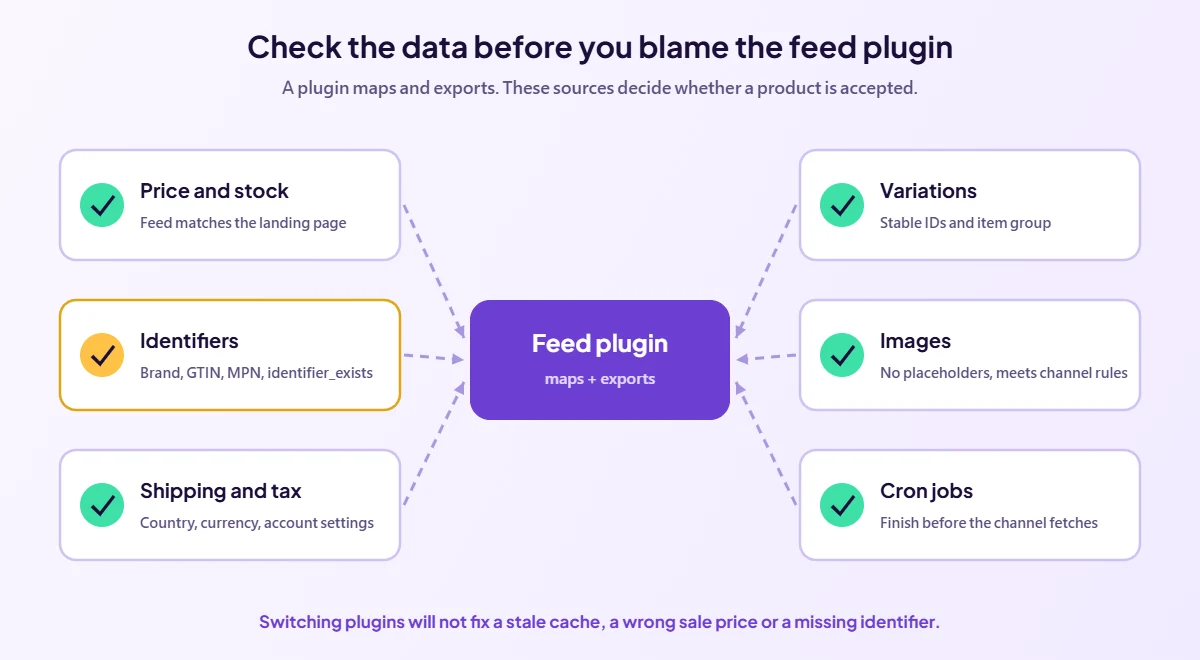
A plugin can map and export data. It can’t create trustworthy catalog data that your store doesn’t have.
جوجل product file guidance identifies core attributes such as ID, title, description, link, image, price, condition, and availability. Product categories can add requirements. Apparel often needs color, size, gender, and age group. Branded products may need GTIN and بيانات العلامة التجارية.
Check these points before blaming the feed tool:
Google states that structured product data must match what the shopper sees on the landing page. A mismatch can stop Google from matching the page with the submitted product data. Switching plugins won’t repair a stale cache, an incorrect sale price, a missing identifier, or a broken Cron job unless the new tool addresses that exact cause.
كيفية اختيار أ WooCommerce product feed plugin in five minutes
- List every destination you’ll use in the next year. If the answer is only Google, start with Google for WooCommerce. If the list includes unrelated channels, begin with a file-feed manager.
- Check one simple product and one variable product. Confirm that the plugin can map the exact brand, identifier, color, size, price, availability, and category fields you need.
- Compare the real free boundary. Look for product caps, feed caps, paid schedules, language restrictions, currency restrictions, and Pro-only identifiers.
- Match refresh frequency to the catalog. A weekly feed is a poor fit for stock that changes every hour. An hourly WordPress Cron schedule still needs a server that runs jobs reliably.
- Test on staging. Generate a feed containing a normal product, a sale item, an out-of-stock item, and a variable product. Validate it in the destination account before syncing the full catalog.
This small test will tell you more than a list of 200 channel logos.
التوصية النهائية
The feed method usually settles the decision. Use Google for WooCommerce when the store is committed to Google and wants a direct connection. Compare Product Feed PRO and CTX Feed when you need reusable files for several destinations. Add RexFeed when its guided template matches a channel your team uses. Choose ELEX only after a careful compatibility test. Pay for WooCommerce Google Product Feed or WebToffee when their specific feed types, controls, and support are worth more than a free starting point.
Whichever tool you choose, test the data before the full catalog goes live. One variable product with a sale price and an out-of-stock variation can expose mapping and refresh problems while they’re still cheap to fix.
الأسئلة المتكررة
ما هو الافضل مجانا WooCommerce product feed plugin?
جوجل ل WooCommerce is the clearest free choice for direct Google synchronization. Product Feed PRO is a strong free file-feed choice because its official listing includes unlimited products and feeds, common formats, mapping, filters, variations, and scheduled refreshes. CTX Feed is another strong free candidate when channel and format coverage matters.
Do I need an XML feed for Google Merchant Center?
No. Merchant Center accepts supported product files, platform connections, and API-based methods. If you use a file, Google accepts XML, TXT, and TSV formats. A direct connection such as Google for WooCommerce can send products without giving you a portable XML file.
Can these plugins send variable products?
Several can, including Product Feed PRO, CTX Feed, RexFeed, Google for WooCommerceو WooCommerce Google Product Feed. Variation support is only the first check. Confirm that IDs, item groups, prices, availability, size, color, images, and landing-page selections stay correct for each variation.
كم مرة يجب أن WooCommerce Google Shopping feed update?
Often enough to keep price and stock accurate. A store with occasional catalog changes may be fine with daily refreshes. A fast-moving inventory may need hourly file regeneration or a direct sync. The destination’s fetch timing and your WordPress Cron reliability also affect freshness.
Does a product feed plugin guarantee Merchant Center approval?
No. Approval depends on the submitted data, landing page, store policies, account settings, and Google’s requirements. A plugin can help generate or synchronize the data, but it can’t guarantee approval or campaign results.
Which plugin is best for a large catalog?
Start by testing Product Feed PRO and CTX Feed, because both advertise unlimited products in their free editions and document background or batch-oriented feed generation. Don’t accept a vendor’s scale claim without testing the same catalog on your hosting. Record peak memory, job duration, failed batches, and the final item count.