


Quick Answer: What is the best medical appointment booking system in 2026?
The best medical appointment booking system depends on where your practice keeps its official schedule. NexHealth is a strong candidate when a supported EHR must remain the source of truth.
Zocdoc combines patient discovery with booking. Tebra, Jane, and SimplePractice put scheduling inside a broader practice platform. Acuity can handle a controlled, stand-alone scheduling workflow.
Modern Events Calendar, Amelia, and Bookly give a WordPress team more control over the booking experience, but they do not become an EHR.
Choose the architecture before the brand. Then ask each shortlisted vendor to demonstrate a new booking, a change, a cancellation, and a disconnected integration using your exact systems. This approach exposes workflow gaps that a polished booking page can hide.
This guide focuses on independent medical practices in the United States. Practices elsewhere can use the workflow advice, but should verify local privacy, healthcare, tax, hosting, and contracting requirements. This is operational guidance, not legal or clinical advice.
Start with the system that owns your schedule
A medical appointment booking system lets patients request or reserve a visit while the practice controls providers, locations, visit types, availability, confirmations, cancellations, and reminders.
The public page is only the visible part. The more important question is what happens to the appointment after the patient clicks.
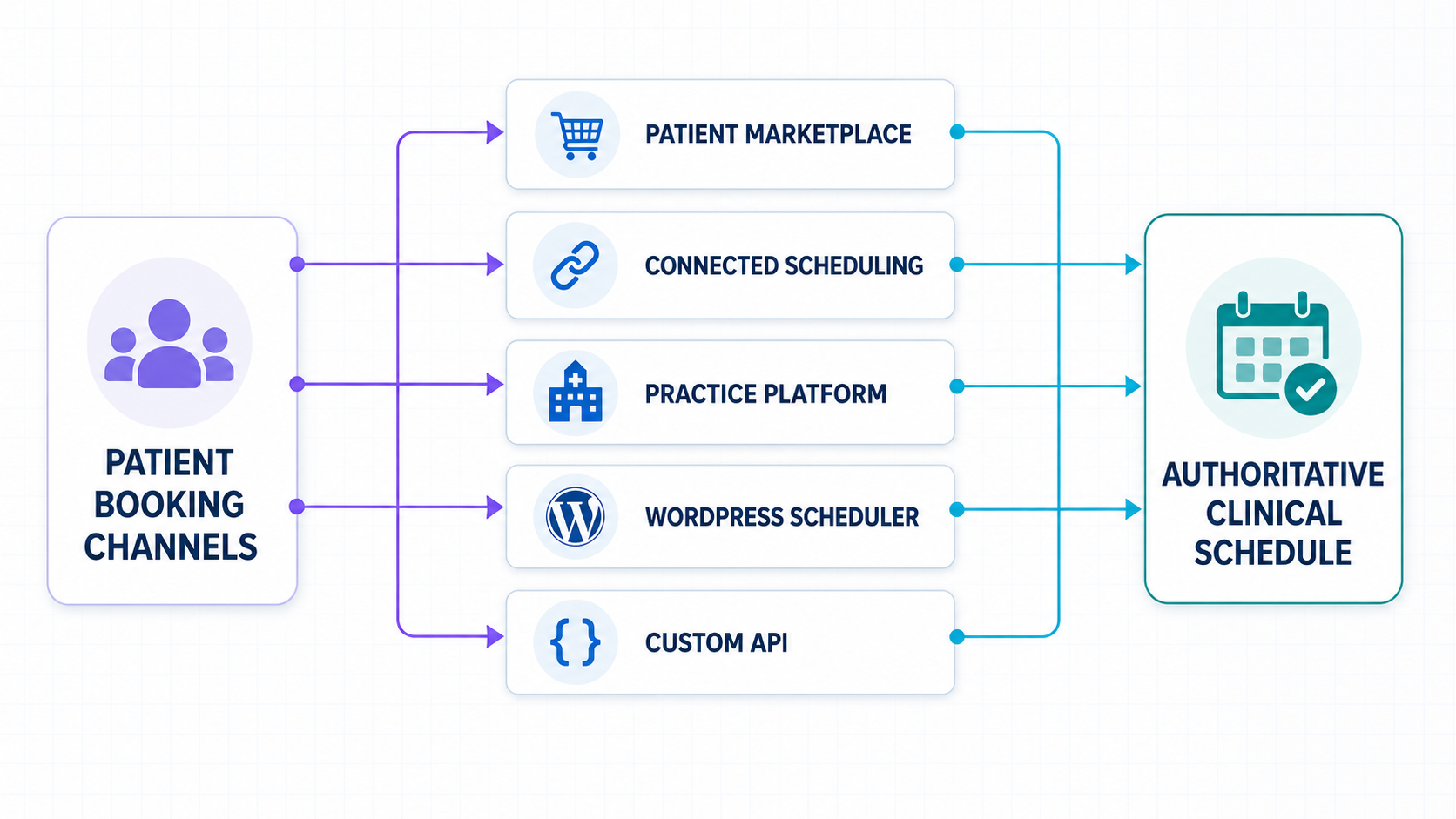
Keep the EHR with a connected scheduling layer
This approach fits a practice that wants a better patient-facing booking experience without replacing its current EHR or practice-management system.
The connection should read real availability and write confirmed appointments back. Support often varies by product, version, provider, location, and appointment type, so a vendor logo on an integrations page is not enough.
Add a marketplace when patient discovery matters
A marketplace can introduce the practice to people who are actively looking for a provider. That reach comes with a separate profile, marketplace rules, and a commercial model that may depend on new-patient bookings.
Confirm how its calendar connection behaves and what happens when a patient cancels or does not attend.
Replace several tools with an all-in-one platform
An all-in-one platform can combine scheduling with intake, records, billing, telehealth, or patient communication.
Fewer connections can simplify daily work, but migration, training, contract scope, data export, and implementation become larger parts of the decision.
Use a general scheduler for a narrow workflow
A general scheduling service can suit consultations or a limited set of visits. It needs careful boundaries. Check the healthcare contract, form fields, integrations, access controls, notifications, and what changes when healthcare-specific settings are enabled.
Use WordPress when site ownership is the priority
A WordPress plugin keeps the booking experience on the practice website. It can be appropriate when staff intentionally manage the WordPress calendar or have a tested integration.
The plugin does not turn WordPress into an EHR. Hosting, backups, email, payments, analytics, user accounts, and every installed extension become part of the review.
WordPress is a good option for simple and straightforward setups that only want an appointment booking.
Consider custom development only for unusual rules
Complex referral networks, routing logic, or triage rules may justify an API-led build. The practice then owns more testing, monitoring, access control, maintenance, and outage planning.
Exhaust supported vendor integrations before accepting that responsibility.
Four booking terms that vendors use differently
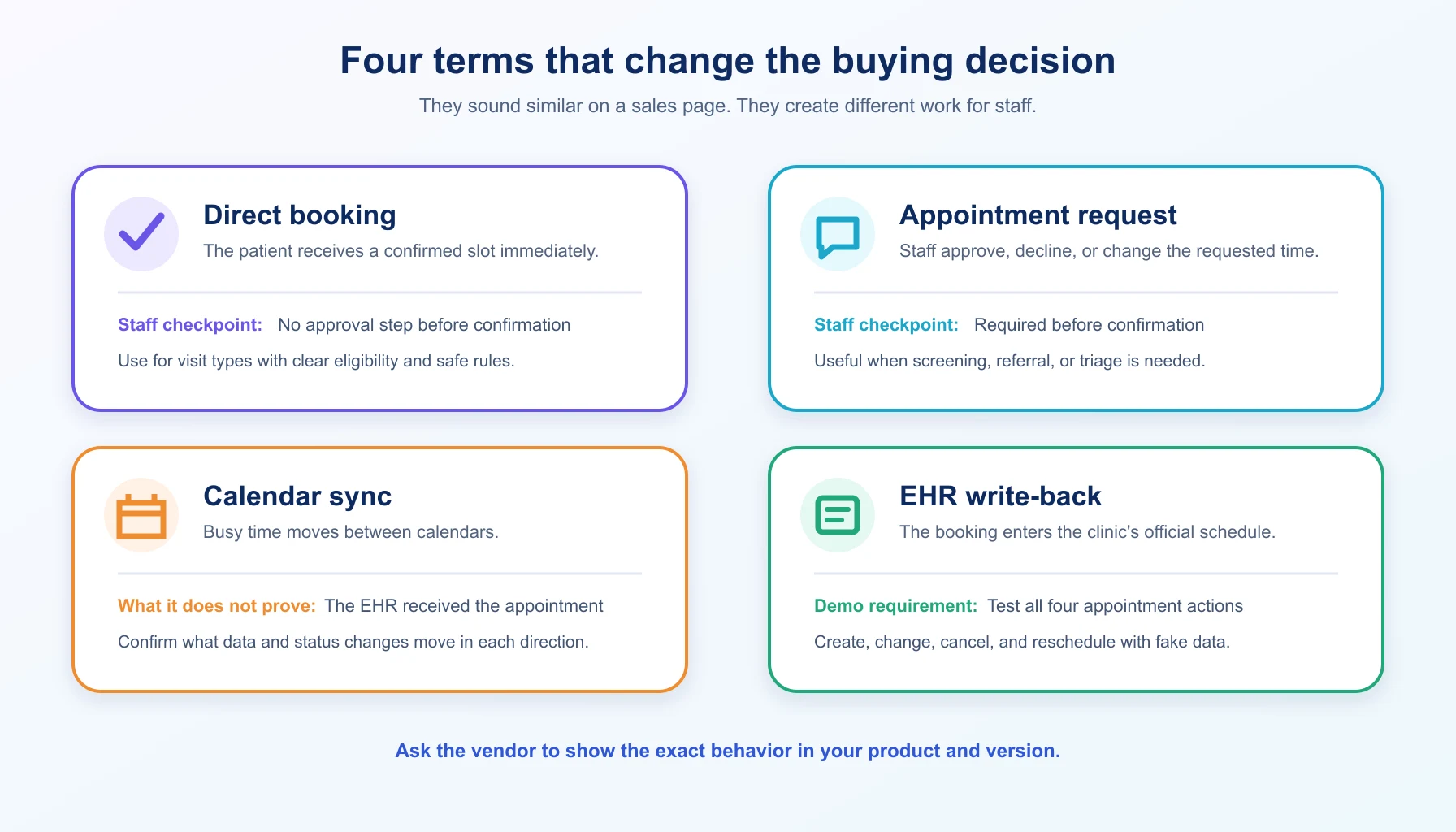
- Direct booking: The patient chooses an available slot and receives confirmation without staff approval.
- Appointment request: The patient proposes a time, but staff must approve, decline, or change it.
- Calendar sync: Busy times move between calendars such as Google Calendar and Outlook. This does not necessarily create an appointment in the EHR.
- EHR write-back: The appointment is inserted into the clinical or practice-management system used as the official schedule.
Ask vendors to use these definitions in demonstrations and proposals. Words such as “integration,” “sync,” and “real time” are too broad on their own.
How we evaluated the systems
We reviewed current first-party product, pricing, legal, and support pages on July 19, 2026.
The shortlist represents distinct buying paths: connected medical scheduling, a patient marketplace, broader practice platforms, a general scheduling service, and WordPress booking plugins.
We compared each option by:
- the type of system and intended practice fit;
- whether patients book directly or submit a request;
- where the official schedule lives;
- whether an EHR connection is documented;
- the route to a Business Associate Agreement, when applicable;
- public pricing and the costs that still require a quote;
- implementation work and important limitations.
Testing disclosure:This is a documentation-based comparison. Webnus did not install all nine products in live clinics, inspect private contracts, or test every EHR connection.
Confirm capabilities in a demonstration, test environment, written quote, and contract before purchase.
Product disclosure:Webnus develops Modern Events Calendar. It is included as one WordPress option and assessed with the same fit and limitation questions as the other products.
The best medical appointment booking systems at a glance
The prices below were publicly visible on July 19, 2026.
They are starting prices or standard listed prices, not total cost estimates. Taxes, payment processing, messaging, implementation, add-ons, extra clinicians, claim volume, and promotional discounts can change the amount.
| System | Type and best fit | Booking and official schedule | Public price checked July 19, 2026 |
|---|---|---|---|
| NexHealth | Connected scheduling for practices keeping a supported EHR | Direct booking; supported setups write to the existing system | No fixed amount. Custom monthly or annual plan |
| Zocdoc | Marketplace for patient discovery and bookings | Marketplace booking; connection depends on practice setup | Basic $0; Growth has a variable new-patient fee; Advanced adds $250 per provider per month |
| Tebra | Broader platform for independent practices | Native Tebra scheduling | Public range of $49 to $799 per provider per month; bundle price depends on practice type and volume |
| Jane | Practice platform for allied health and multidisciplinary clinics | Direct booking in Jane | Balance $54, Practice $79, or Thrive $99 per month |
| SimplePractice | Practice platform for behavioral health and private practice | Appointment requests managed in SimplePractice | Starter $49, Essential $79, or Plus $99 per month |
| Acuity Scheduling | General scheduler for controlled visit types | Direct booking in Acuity | With annual billing: $16, $27, or $49 per month. Month to month: $20, $34, or $61 |
| Modern Events Calendar | WordPress scheduling for practices also managing site events | Booking in WordPress and MEC | Pro version required, $99 per year for one site |
| Amelia | WordPress appointment booking with medical-style scheduling rules | Booking in WordPress and Amelia | Annual Starter starts at $49; higher plans and lifetime licenses have separate prices |
| Bookly | Modular WordPress scheduling | Booking in WordPress and Bookly | Free version; Pro was on sale for $49 per year or $129 lifetime for one site |
Sources: NexHealth pricing, Zocdoc for providers, Tebra pricing, Jane pricing, SimplePractice pricing, Acuity pricing, Modern Events Calendar pricing, Amelia pricing, and Bookly pricing.
Pricing is not the final selection test. A less expensive tool that creates manual reconciliation can cost the practice more in staff time and scheduling errors.
1. NexHealth: best when a supported EHR must stay in charge
NexHealth sits between the patient experience and supported health-record or practice-management systems. Its public pricing page says its Synchronizer can read and write health-record data, which is the key distinction from a simple embedded calendar.
Practices can combine online booking with forms, messaging, payments, and other modules rather than replacing the underlying system.
This makes NexHealth a sensible shortlist choice for an established practice that wants online self-scheduling but cannot accept a second calendar. The important qualifier is supported.
Ask NexHealth to demonstrate availability, new bookings, rescheduling, cancellations, provider mapping, locations, and appointment types with the exact product and version your practice runs.
NexHealth does not publish a fixed dollar amount. Its pricing page offers customized monthly or annual plans, so compare a written quote with the modules, implementation, messaging, payment costs, and contract term included.
Review the security documents and make sure the BAA and every connected service are covered by the signed agreement.
Official references: pricing and Synchronizer description and security information.
2. Zocdoc: best when discovery is part of the purchase
Zocdoc is both a provider marketplace and a booking channel. It can help a practice appear when a patient searches by location, specialty, insurance, and availability. That makes it different from software used only by people who already reached the clinic website.
The public provider page lists three models. Basic is free. Growth has no monthly platform fee but charges a variable fee for new-patient bookings. Advanced uses the same variable fee and adds $250 per provider per month.
Zocdoc says the booking fee varies by specialty and location, so the practice needs its own written amount before calculating acquisition cost.
Confirm which calendar or EHR connection applies to your setup and how changes, cancellations, duplicate appointments, and no-shows affect staff work and fees.
The privacy policy explains that Zocdoc may act as a business associate for some provider services, but contract scope still needs review. A marketplace can be valuable without becoming the clinic’s only booking route.
Official references: provider plans and privacy policy.
3. Booktics: A WordPress Appointment Booking Solution for Clinics and Healthcare Professionals
Booktics is a WordPress appointment booking plugin that helps clinics, healthcare professionals, and service providers manage online appointments directly from their websites. It allows patients to view available schedules, book appointments, and helps businesses organize their appointment workflow without sending visitors to an external booking platform.
For small clinics, private practitioners, and healthcare professionals who use WordPress, Booktics provides a simple way to add appointment scheduling functionality to an existing website. Instead of managing appointments manually through phone calls or messages, healthcare providers can offer patients a more convenient online booking experience.
The plugin is designed for businesses that need essential appointment management features, including service-based scheduling, availability management, and a centralized way to handle upcoming bookings. This makes it useful for doctors, consultants, therapists, and other healthcare providers who want to simplify their appointment process.
Booktics works best for healthcare websites looking for a lightweight WordPress-based scheduling solution. It helps providers maintain their own branded booking experience while giving patients an easier way to schedule appointments online.
For medical organizations that need advanced healthcare infrastructure such as electronic health record (EHR) integration, patient portals, or specialized compliance features, a dedicated healthcare scheduling platform may be a better fit.
Official reference: pricing and plan comparisons.
4. Tebra: best for independent practices replacing more than scheduling
Tebra combines practice operations and patient-facing tools. It is a better fit for a practice evaluating a broader platform than for one that only wants to add a lightweight calendar. The implementation discussion should cover scheduling, patient communications, intake, billing or claims workflows, data migration, user access, and exit terms.
Tebra now publishes substantial pricing detail. Its overview shows a range from $49 to $799 per provider per month. For example, standard physician platform bundles are listed at $599 per month for Essentials and $799 for Automation.
Lower-volume, non-physician, therapist, and individual-solution prices differ. That is useful for budgeting, but it is not a substitute for a practice-specific quote because provider type, claim volume, modules, and implementation affect the package.
If Tebra will replace an existing system, request a migration plan and sample exports before signing.
If it will connect to an external EHR, ask for a demonstration rather than assuming native Tebra scheduling equals external write-back. Tebra publishes a BAA, but the practice should confirm that the executed agreement covers its selected services.
Official references: pricing overview and Business Associate Agreement.
5. Jane: best for allied health and multidisciplinary clinics
Jane combines online booking, charting, payments, telehealth, and practice administration. Its product and pricing structure is particularly relevant to allied health, wellness, and multidisciplinary clinics that want staff and patients working in one platform.
The U.S. pricing page lists Balance at $54 per month, Practice at $79, and Thrive at $99. Balance is limited to one practitioner and 20 appointments per month. Extra practitioners and selected features can add cost, so model the actual team instead of comparing only the first plan price. Jane provides a demo clinic rather than a conventional free trial.
Jane’s U.S. terms say a standard BAA is available on request. That addresses one contract question, not the whole practice workflow.
Confirm specialty support, insurance and billing requirements, regional availability, data migration, exports, telehealth, and any services connected to Jane.
If another EHR remains in use, do not assume Jane appointments will write into it without a documented integration.
Official references: U.S. pricing and terms of use, including the BAA route.
6. SimplePractice: best for behavioral health and private practices
SimplePractice is designed around private-practice operations, with scheduling, client communication, documentation, telehealth, billing, and related tools in one environment. It deserves a close look from behavioral health practices and other small practices whose workflow matches the platform.
The standard public prices are $49 per month for Starter, $79 for Essential, and $99 for Plus.
Promotional rates can apply to the first few months. Features, additional clinicians, payment processing, claims, and other services can change the total, so build the comparison from the normal renewal cost and the features the practice actually needs.
SimplePractice’s online appointment workflow should be demonstrated carefully. Public support materials describe client appointment requests that staff can approve or decline, which is not the same experience as an immediately confirmed slot.
That may be helpful when clinicians need control, but it should be explained clearly to patients. Confirm which plan includes each required feature, what records can be imported and exported, and how the BAA applies to the account.
Official references: pricing and online appointment requests.
7. Acuity Scheduling: best for a limited, stand-alone booking workflow
Acuity is a general scheduling product rather than a medical practice platform.
It can fit a narrow group of visits when the practice is comfortable keeping Acuity as a separate operational calendar and has reviewed the data path. It does not provide native EHR write-back.
Current plan names are Starter, Standard, and Premium.
With annual billing, their monthly equivalents are $16, $27, and $49. Month-to-month prices are $20, $34, and $61. Acuity offers a seven-day trial. Its healthcare guidance says the BAA and HIPAA-enabled settings are available on the Premium plan.
Healthcare mode involves tradeoffs. Acuity’s support page says several connections and features are unavailable when the required settings are enabled, including some external calendar sync options, email marketing, invoices, and Reserve with Google.
Review the current restriction list before purchase and treat every third-party integration as a separate vendor decision. Keep intake fields minimal unless the full workflow has been approved for the information collected.
Official references: pricing and Acuity and HIPAA.
8. Modern Events Calendar: best for WordPress sites that also manage events
Modern Events Calendar can place appointment booking and public event management in the same WordPress environment.
The Appointments feature supports service durations, buffers, availability, daily limits, booking windows, confirmations, and other scheduling rules.
It may suit an organization that already maintains WordPress carefully and wants more ownership of the page experience.
MEC Lite is free. Pro starts at $99 per year for one site, with higher site-license tiers and optional add-ons.
The Appointments feature is included in Pro. The documentation also lists incompatibilities with some event features, including repeating events, hourly schedules, and selected event schema or status functions. Test the intended combination on a staging site.
MEC is not an EHR, a clinical record, or a managed healthcare environment. It has no healthcare-specific BAA route of its own.
A medical practice must review hosting, WordPress administration, backups, email and SMS delivery, payments, analytics, form fields, extensions, and user access as one data path. Use it only when that operational model is deliberate.
Official references: plans and Appointments documentation.
9. Amelia: best for a polished WordPress appointment flow
Amelia is a WordPress appointment plugin with services, employees, locations, schedules, payments, notifications, and customer-facing booking forms.
Its structure is closer to a service-booking application than a general event calendar, which can make setup familiar for clinics that plan to manage appointments in WordPress.
The public page lists annual Starter pricing from $49. Standard, Pro, Elite, and lifetime licenses have separate prices, and sale prices may replace the regular amounts.
Check the feature matrix before choosing a tier because required capabilities can move the practical starting price. Amelia offers a limited free version and a money-back period rather than a standard free trial.
No public U.S. healthcare BAA route was established in the reviewed pricing and product materials. Ask the vendor directly if a BAA is required, then review the rest of the WordPress stack.
Do not describe Amelia as connected to an EHR unless the exact connection has been built, documented, and tested. A staging test should include time zones, staff availability, buffers, notifications, payments, changes, and cancellations.
Official reference: pricing and plan comparison.
10. Bookly: best for a modular WordPress setup
Bookly offers a free base plugin and paid tiers for WordPress appointment scheduling. Its modular model can suit a team that wants to start with a defined workflow and add capabilities as requirements become clear.
That flexibility also makes the full cost and plugin inventory important parts of the comparison.
On July 19, 2026, the public page showed Bookly Pro on sale for $49 per year or $129 lifetime for one site. Business and Ultimate tiers were also listed, along with regular prices and a 30-day money-back period.
Promotions can change, and add-ons or cloud services may be needed for the desired workflow. Price the complete configuration, not the base plugin alone.
As with other WordPress options, Bookly does not provide native EHR write-back simply by being installed on the clinic site. The practice remains responsible for the full data path and maintenance plan.
Before launch, test staff calendars, booking status, notifications, payments, form fields, time zones, cancellations, updates, plugin conflicts, backups, and recovery from a failed connection.
Official reference: Bookly pricing.
How to test an integration before signing
Do not settle for a slide showing two vendor logos. Ask the vendor to run four actions in a test environment that matches your proposed setup.
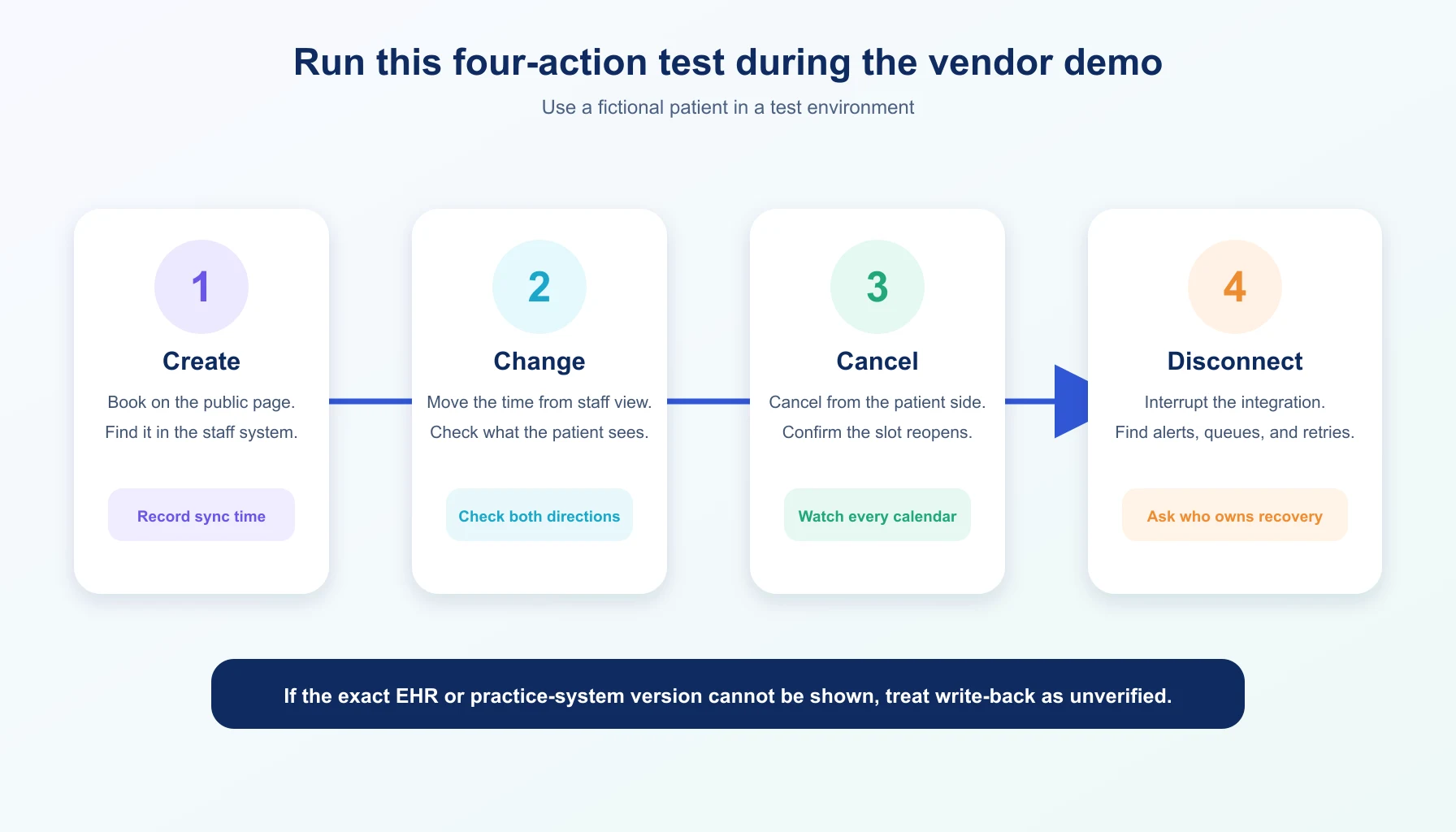
- Create: Book an appointment from the public page. Confirm the right provider, location, visit type, duration, and patient status appear in the official schedule.
- Change: Reschedule it from the patient side and then from the staff side. Check both directions, notifications, time zones, and audit history.
- Cancel: Cancel from each side. Confirm the slot reopens correctly and that staff are not left with a duplicate or stale appointment.
- Disconnect: Disable the integration or test a failure. Find out whether the patient can still book, how staff are warned, whether changes queue, and how reconciliation works after recovery.
Also test two people attempting to take the same slot, a phone booking created by staff, a provider absence, daylight-saving time, and any recurring or multi-location rules the practice uses. Write the accepted behavior into the implementation plan.
What medical practices should review before collecting patient data
A BAA is important when a vendor handles protected health information for a U.S. covered entity, but signing one product’s BAA does not make the entire booking workflow compliant.
HHS explains that covered entities need written assurances from business associates and that the agreement must define permitted uses, safeguards, incident reporting, subcontractors, return or destruction of information, and termination rights.
See the HHS business associate guidance.
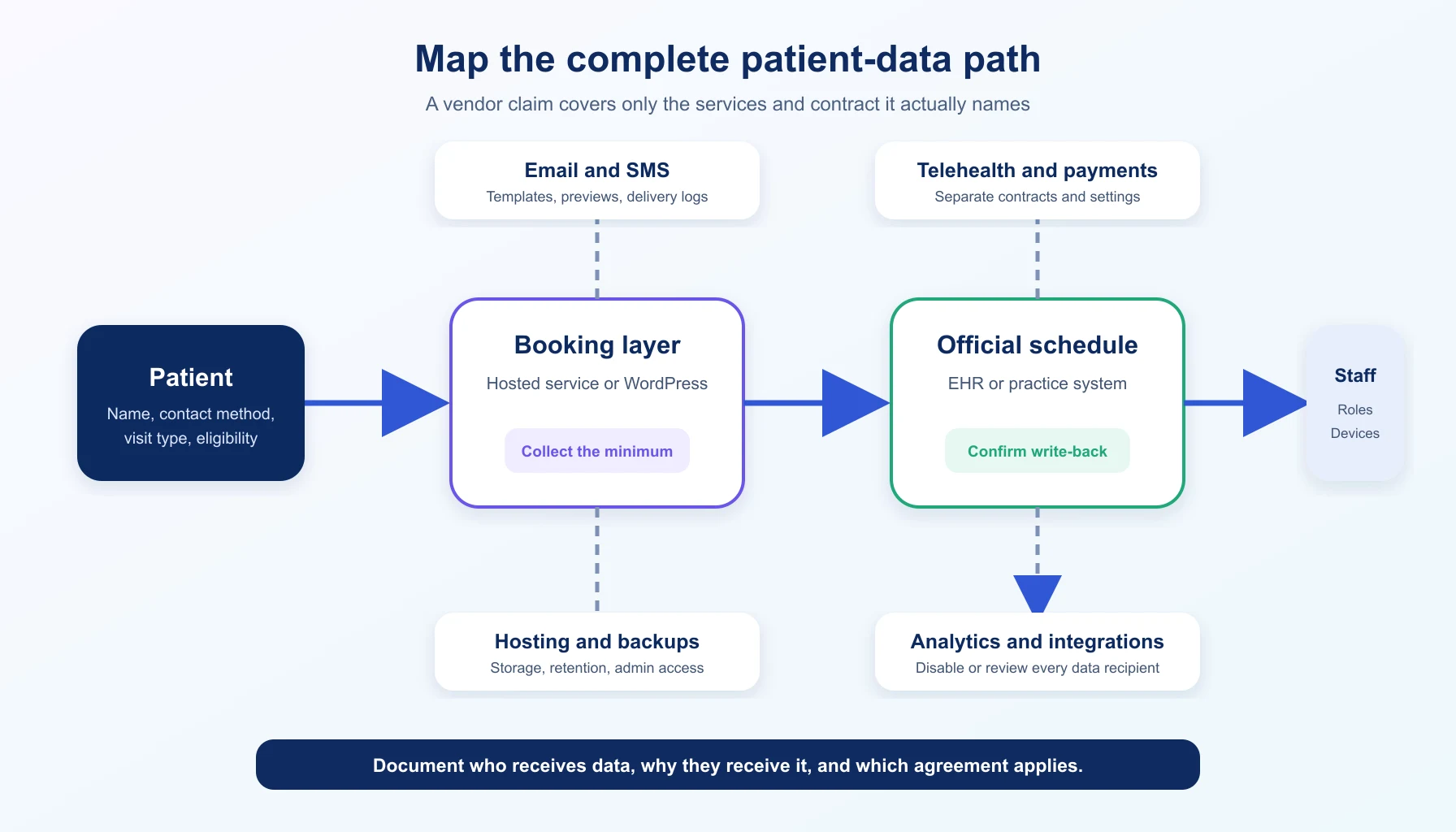
Map the actual path before deciding what to collect:
- booking page, plugin, or marketplace;
- EHR, practice platform, or staff calendar;
- hosting, database, logs, backups, and administrators;
- email, SMS, telehealth, and payment services;
- analytics, session recording, advertising tags, and embedded content;
- integrations, automation services, exports, and staff devices.
Collect the minimum needed to schedule the visit. Keep clinical histories, diagnoses, and detailed symptoms out of a general booking form unless the approved system and workflow are designed to receive them.
Use role-based access, multifactor authentication where available, staff training, and a documented process for access removal.
Appointment reminders can be permitted under HIPAA, but content and delivery still require judgment. HHS recommends limiting the information disclosed in messages. See the HHS appointment reminder guidance.
A practical launch plan
The safest rollout starts with workflow decisions, not page design.
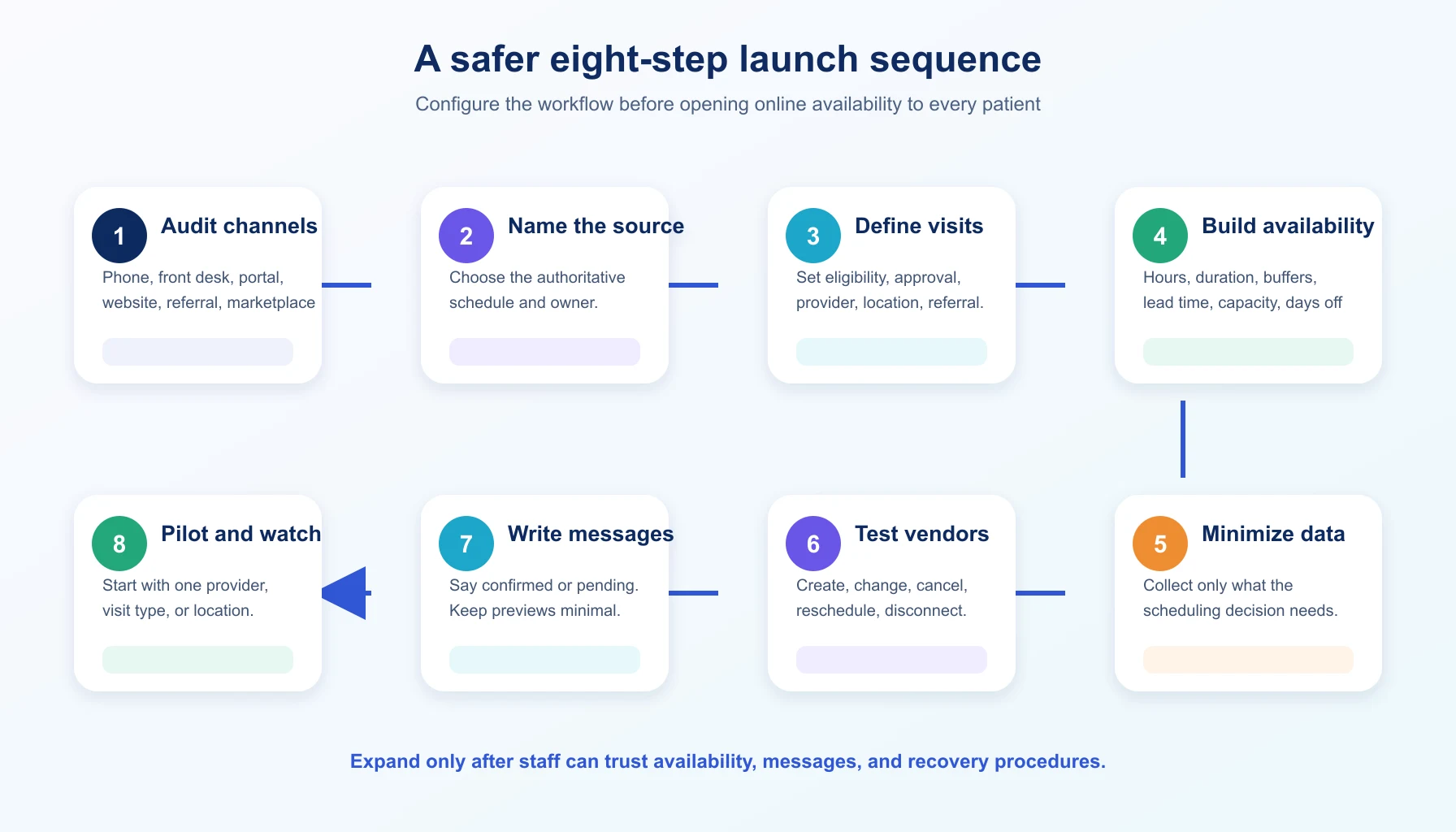
- Audit booking channels. List the phone, front desk, portal, website, referral, and marketplace routes that can create or change an appointment.
- Name the source of truth. Decide which schedule staff must trust during daily work and outages, and assign an owner.
- Define bookable visits. List the eligible patients, providers, locations, visit types, referral rules, durations, and approval steps.
- Build availability. Set hours, buffers, lead time, booking windows, capacity, time zones, cancellations, and days off.
- Minimize data. Record every service that receives appointment information, remove unnecessary fields, and document the applicable contract.
- Test vendors and connections. Run the four-action test plus duplicate attempts, staff-created appointments, absences, and outages.
- Write messages and train staff. State whether a slot is confirmed or pending, keep previews minimal, and document exception handling.
- Pilot and watch. Start with one provider, visit type, or location. Review errors and manual work before expanding.
Useful launch measures include booking completion rate, appointment-request approval time, duplicate appointments, manual corrections, cancellation and no-show rates, staff handling time, and integration failures.
Define each measure before rollout so the comparison is meaningful.
The right choice prevents a second schedule
Start by deciding where the official appointment must live.
Keep an existing EHR with a proven connected layer, choose a broader platform when the practice is ready to migrate, use a marketplace when discovery justifies the commercial model, or choose WordPress only when the practice intentionally owns that separate workflow and data path.
Then make the vendor prove the ordinary actions that create real operational problems: a booking, a change, a cancellation, and a connection failure. A system that handles those actions cleanly is more useful than one that only looks polished in a patient demo.
If you decided to go ahead with Modern Events Calendar, then check out its appointment feature.
Frequently asked questions
1. Can a medical practice use a WordPress booking plugin?
Yes, when WordPress is an intentional part of an approved workflow.
The practice must review the plugin, hosting, backups, administrators, messages, payments, analytics, extensions, and any information collected. A WordPress plugin does not become an EHR or provide EHR write-back by default.
2. Does a BAA make booking software HIPAA compliant?
No. A BAA addresses the relationship and responsibilities between covered entities and business associates.
The practice still needs suitable configuration, access control, staff procedures, security measures, vendor oversight, and a reviewed end-to-end data path.
3. Is calendar sync the same as EHR integration?
No. Calendar sync commonly moves busy times or calendar events.
EHR integration may read structured availability and write appointments, patient details, provider mappings, locations, and statuses into the clinical or practice-management system.
Ask for a live demonstration of the exact behavior.
4. Should patients book instantly or submit a request?
Instant booking reduces friction when visit types and eligibility rules are simple. Requests give staff more control when referrals, records, triage, insurance, or special equipment must be checked.
The patient-facing page should state clearly which outcome to expect.
5. How often should pricing and integrations be reviewed?
Check pricing immediately before purchase and at each renewal.
Review integrations before launch, after major product updates, when an EHR version changes, and whenever the workflow starts creating manual corrections or duplicate appointments.