
Choosing the right WordPress marketing theme is one of the most important tasks when setting up a website.
A marketing site needs a theme that helps you win leads and sales, not just one that looks nice. Start with the features that matter.
These are the main things to check.
Key Takeaways
- Try Before You Buy: Test demos and explore features to confirm alignment with your vision and technical skill level.
- Understand Your Website Goals: Choose a theme based on your site’s purpose, such as a landing page, eCommerce store, or blog.
- Prioritize Mobile Optimization: Ensure your theme adapts seamlessly to mobile devices for better user engagement.
- Evaluate Marketing Tools Integration: Look for built-in features like social media support and email opt-ins to streamline your strategy.
- Test Speed and SEO Performance: Fast-loading, well-coded themes are essential for user retention and search engine rankings.
- Ensure Plugin Compatibility: Check for support with key plugins like WooCommerce or Elementor to enhance functionality.
User-Centric Design
Many themes pile on features. Choose one that does what you need in the simplest way.
It should be easy to use, through a clear dashboard or a drag-and-drop builder.
Responsiveness and Mobile Optimization
Being responsive is not selective anymore.
The site has to work well on phones, with navigation that’s quick to use.
Most web traffic now comes from mobile devices, so a theme that adapts to every screen is essential.
Marketing Tools Integration
Social sharing, email opt-ins and analytics are basic tools for an online business.
They help you bring in traffic and turn visitors into leads.
Themes with these integrations built in save you setup time.
Speed and SEO optimization
Page speed matters for visitors and for rankings.
Heavy JavaScript and unoptimized images slow pages down, but the theme’s code quality matters too.
Compatibility with Plugins
Some plugins you’ll need from day one, such as Yoast SEO, WooCommerce or Elementor.
Make sure the theme supports them so you don’t run into conflicts later.
Modern and Professional Design
Speed and responsiveness come first, but design still matters.
Pick a theme that looks good out of the box, so you don’t spend hours fixing CSS.
The 6 Best WordPress Marketing Themes
Here are six themes that do well on design, features and speed.
Divi: Ideal for Marketing Agencies

Divi suits marketing agencies that want full control over their website design.
Its visual drag-and-drop builder works for businesses of any size.
It has built-in split testing and conversion tracking, plus many landing page templates.
Divi costs $89 a year or $249 for lifetime access.
Support is good and the feature set is broad, but beginners may find it complex, and using too many features can slow pages down.
Astra: Budget-Friendly yet Powerful

Astra is a lightweight, fast theme at a low price.
Marketers who care about load times like it for that reason.
It has prebuilt marketing templates and works with Elementor and other page builders.
There’s a free version, and the Astra Pro add-on costs $69 a year.
Headers and layouts are flexible, though the free version is limited.
Visit their official site to learn more.
OceanWP: Best for Marketplace Websites
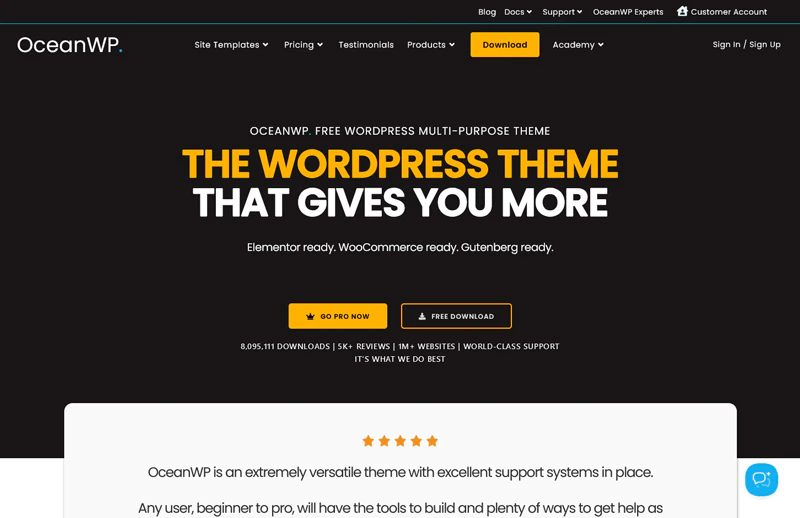
OceanWP is a flexible theme for online stores, used by small businesses and larger companies alike.
It adds product quick view, a floating add-to-cart bar and WooCommerce widgets, which makes it a good choice for stores.
OceanWP has a free version, and premium extension bundles start at $43 a year.
Some features, such as sticky headers and popup login forms, need premium extensions, which can make it cost more than Astra.
Hestia Pro: Advanced Marketplace and WordPress Themes for Digital Marketing Agency

Hestia Pro is a one-page theme for clean, professional landing pages.
It’s WooCommerce ready, responsive and easy to set up, so beginners can use it.
If you run a digital marketing agency, Hestia is a good fit for your own site.
Pricing starts at $69 a year. It can feel limiting for larger multi-page sites.
Neve: Versatile Digital Marketing Wordpress Theme

Neve is a fast, lightweight theme from ThemeIsle that suits beginners and experienced users.
It’s made for clean, minimal sites, and it’s AMP ready and SEO friendly.
It works with Elementor and Beaver Builder, so you can build landing pages and call-to-action sections easily.
Its modular structure scales from small to large projects.
Neve has a free version, and premium plans start at $69 a year.
GeneratePress: Perfect for Affiliate Marketing Sites

GeneratePress is our pick for affiliate sites because it’s light, fast and flexible.
Speed matters a lot on affiliate sites, and GeneratePress has clean code and very little overhead.
Its modules let you switch on only the features you need.
It works with all the major page builders and keeps the design simple.
The theme is free, and GP Premium costs $99 a year, with frequent discounts.
The free version has limited design options.
How to Choose the Right Marketing Theme for Your Needs
The right theme depends on your goals, your budget and your technical skills.
If your website needs features beyond what a WordPress theme can provide, a development team such as TeknoFlair can help.
They build custom functionality, third-party integrations, and scalable solutions around your business needs.
Using Custom WordPress development you can also create a website that better supports your long-term goals.
Now, back to the main topic.
Any of the themes above can work. These questions help you pick one.
First, what kind of site are you building?
A one-page landing site for a product, or a multi-page site with a shop?
Hestia Pro is good for one-page designs, and OceanWP is better for full online stores.
Next, think about your audience.
If most visitors come from phones, Astra and Neve are strong mobile choices.
If speed is the priority, look at GeneratePress or Astra.
Then be honest about your skills and resources.
Beginners without coding skills will find Divi or Astra easier, thanks to their visual builders.
If you have developers, GeneratePress gives you a clean base to build on.
Try the demo before you commit. Most themes have a live preview where you can check layouts and settings.
Check plugin compatibility too.
The theme should support WooCommerce if you sell online, Elementor if you build pages with it, and your SEO plugin.
Lastly, budget is a critical consideration.
Free themes are tempting, but a premium license usually brings better support, regular updates and more features.
Final Thoughts
The right theme makes your site faster, easier to use and better at turning visitors into leads.
Focus on responsiveness, speed, plugin support and marketing tools, and check that the theme fits your audience.
Divi gives you the most design control, Astra is the fastest all-rounder, and Neve is the simplest to set up.
Remember, experimentation is key.
Use the demos and test each theme with the plugins you plan to use.
Finally, choose a theme that gets regular updates from a reliable developer.
We’d love to hear your thoughts!
If another theme has worked well for your marketing site, tell us in the comments.
1. Why is choosing the right WordPress marketing theme so important?
The theme determines your website’s design, functionality, and user experience. A well-chosen theme aligns with your goals, attracts visitors, and enhances usability.
2. What features should I prioritize when selecting a theme?
Focus on user-centric design, responsiveness, marketing tool integrations, speed, SEO optimization, plugin compatibility, and modern aesthetics.
3. How do I know if a theme is mobile-friendly?
Check if the theme advertises responsiveness or mobile optimization. Test the demo on different devices to confirm smooth navigation and design adaptation.
4. Can I use free themes for marketing purposes?
Yes, but premium themes often provide advanced features, better support, and regular updates, which can significantly improve your site’s performance and reliability.
How can I test a theme before purchasing?
Most themes offer live demos or free versions. Use these to explore customization options, test performance, and gauge compatibility with your needs.
How to Choose the Right WordPress Marketing Theme!
Here you will learn how to choose the right WordPress marketing theme easily in 7 simple steps!
Define Your Goals
Identify your website’s purpose (e.g., landing page, blog, eCommerce).
Know Your Audience
Consider user preferences, especially mobile usage and design expectations.
Test Demos
Explore live demos to check layout, features, and ease of use.
Check Compatibility
Ensure the theme supports essential plugins like WooCommerce or Elementor.
Evaluate Performance
Look for speed, SEO optimization, and responsive design.
Set Your Budget
Decide between free or premium themes based on your resources and needs.
Experiment and Decide
Test themes with your preferred plugins and tools to find the perfect fit.