

Disclosure: Webnus develops Modern Events Calendar. This article explains MEC’s ticketing and check-in features and states the required products and services so readers can evaluate the complete setup.
Quick answer:Event platforms such as Eventbrite and Zoho Backstage, along with WordPress plugins such as FooEvents, Eventin, and Modern Events Calendar, offer QR tickets and attendee check-in.
For organizers who want QR code event check-in on their own WordPress site, MEC connects event booking with customizable attendee tickets, mobile scanning, and check-in records.
With MEC Pro ($99) and the Ticket and Invoice Addon ($119), attendees can receive individual QR code tickets that can be displayed on a phone, downloaded on any device, converted to PDFs through a supported rendering service, or printed.
The tickets can use available templates and be customized with company information, a logo, and event styling, allowing a printed ticket to function as an entry badge. Staff can then scan it with a phone and automatically update the attendee’s status in WordPress.
An event organizer searching for QR check-in rarely needs a QR generator. The real requirement is a system that knows who booked, which ticket belongs to them, whether that ticket is valid, and what should happen when staff scan it.
That is the ticket-to-door workflow this article covers. We will briefly place the available platforms in context, then look closely at how Modern Events Calendar handles tickets, printable badges, staff access, and QR code event check-in in WordPress.
Which event platforms offer QR code tickets and check-in?
Organizers can choose a hosted event platform or run ticketing through WordPress. Hosted products such as Eventbrite and Zoho Backstage combine ticketing and check-in within the vendor’s platform. WordPress options include FooEvents, Eventin, Venuera, and MEC, each with its own plugin and add-on requirements.
This article will not repeat a full platform comparison. If you are still deciding between a hosted service and an event site you control, see our guide to the best event management software platforms.
Here, the focus is narrower: how MEC provides downloadable event tickets, printable badges, and WordPress event check-in.
What should a QR ticketing and check-in solution provide?
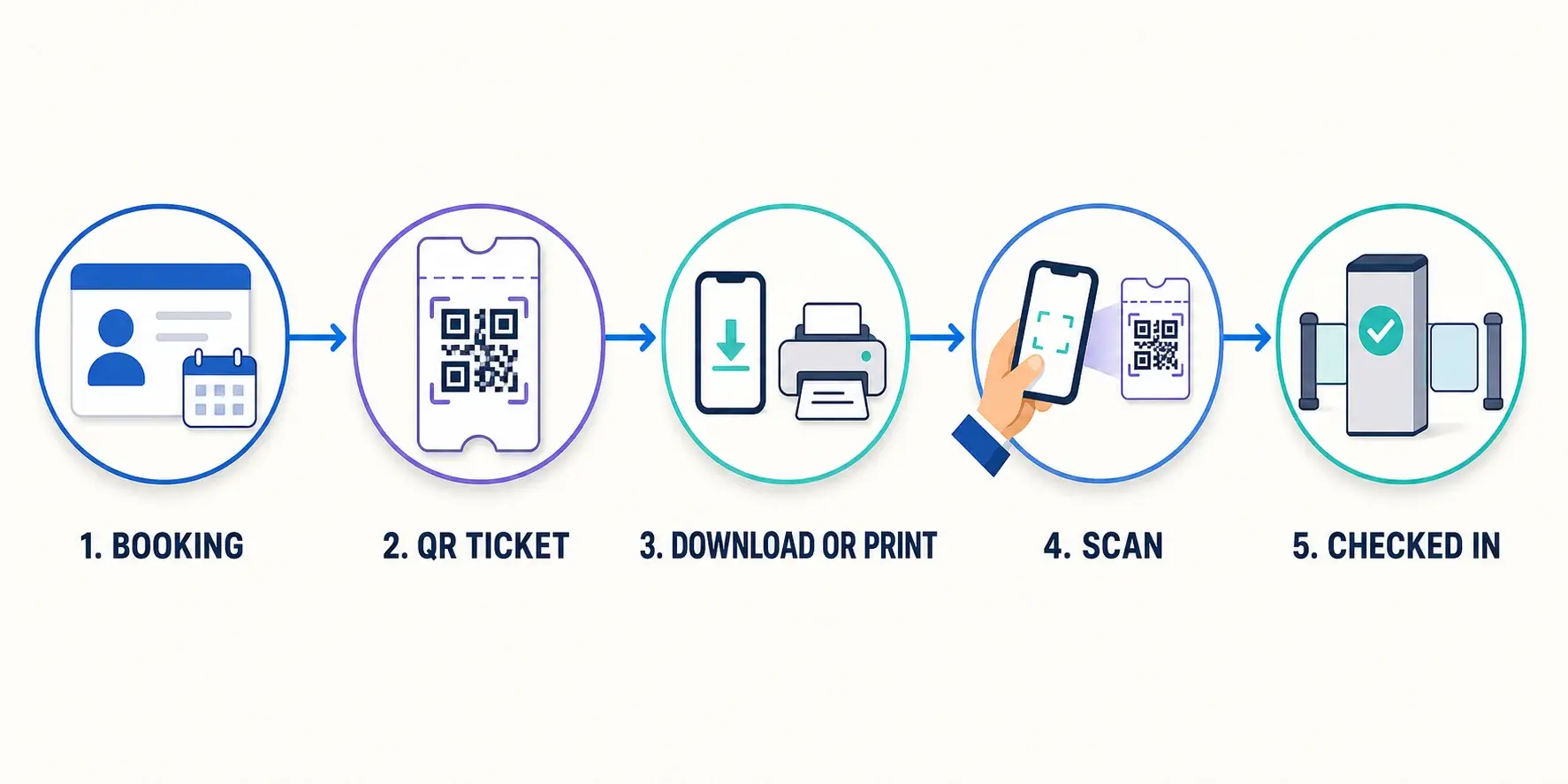
A useful ticketing system must connect the code on the ticket to an attendee record and an entry action. When comparing an event platform or WordPress event ticketing plugin, check for the following capabilities:
- A unique credential for each admission. If one buyer purchases several tickets, each guest may need an individual event ticket QR code so they can arrive separately.
- Reliable ticket delivery. Attendees should be able to find their credential in an email, download it, show it on a phone, or bring a printed copy.
- Usable ticket design. The ticket needs the event details, attendee information where required, visible branding, and a code that remains easy to scan.
- A connected scanner. The scanner should validate the ticket against the event system, rather than merely display the information stored in the code.
- Clear scan results. Door staff need an immediate answer when a ticket is valid, invalid, or already checked in.
- Attendance updates. A successful scan should update the attendee’s check-in status so other staff devices and the WordPress record reflect the same result.
- Controlled staff access. Temporary check-in staff should not need unrestricted access to the website.
- A manual fallback. Staff should be able to find an attendee when the ticket is missing or the code cannot be read.
These requirements form one chain:
Booking → individual QR ticket → download or print → staff scan → validation → updated attendance status
If any part lives in a disconnected tool, event-day staff may end up reconciling ticket files, customer orders, and attendee lists at the entrance.
For QR code event check-in to work as intended, the event check-in QR code must lead back to the current ticket record and return a clear admission result.
Why is MEC a strong WordPress option for QR ticketing?
Modern Events Calendar is designed for organizers who want events, bookings, tickets, and attendee records connected to their WordPress site. The organizer does not have to move ticket holders into a separate public event marketplace to run the entry workflow.
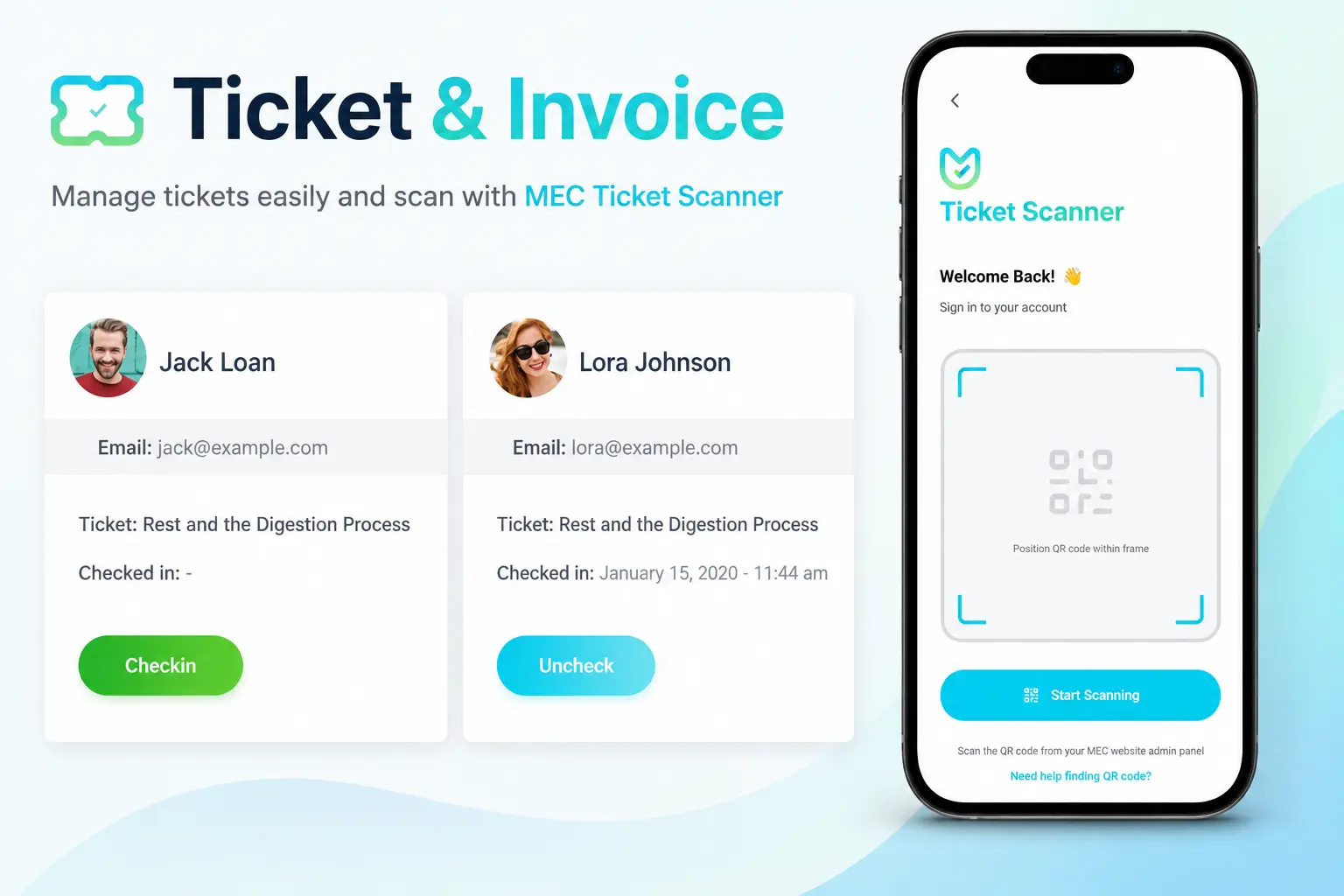
MEC Pro provides the booking foundation. The Ticket and Invoice Addon adds the attendee-facing ticket or invoice, its QR code, PDF generation, ticket customization, and check-in capabilities. On event day, staff can scan through a smartphone camera or use the MEC Events App.
This is the central MEC advantage for this use case: the ticket begins with an MEC booking and returns to the same booking record when it is scanned. Organizers can see who registered and who has arrived without building a separate validation database.
The MEC QR code check-in flow therefore stays connected to the calendar, booking, and attendee data already managed in WordPress. That connection is the practical value of choosing MEC for QR code event check-in.
If you need broader information about selling and managing tickets, you can also review MEC’s event ticketing software page. This article stays with the credential and entrance experience.
How does MEC create downloadable and printable QR tickets?
For QR code event check-in, MEC Pro and the Ticket and Invoice Addon can turn a confirmed booking into a ticket or invoice containing a QR code. That event ticket QR code is tied to the attendee or booking record used during check-in.
For group purchases, MEC includes an option to send a separate ticket and invoice to each attendee. Each person receives their own details and QR code. This matters when several guests are included in one purchase but will not reach the venue together.
MEC supports printable event tickets, and attendees can carry the credential on paper or display it on a phone. The add-on also supports downloadable PDF files through a compatible rendering service.
The current version supports html2pdf and SelectPdf as options, so the rendering service is part of the required setup when PDF downloads are needed, but keep in mind that such services are paid and are not included in MEC or its add-ons.
This gives organizers several practical delivery choices:
- a ticket or invoice sent after booking;
- an individual credential for each attendee in a group purchase;
- a QR ticket displayed on a phone;
- a printable ticket before the event;
- a downloadable PDF when a supported rendering service is connected;
- an Apple Wallet pass for attendees who prefer a mobile wallet.
The QR code remains the link between the visible credential and the booking record. The paper, PDF, email, and wallet pass are simply different ways to carry it.
Can MEC tickets work as event badges?
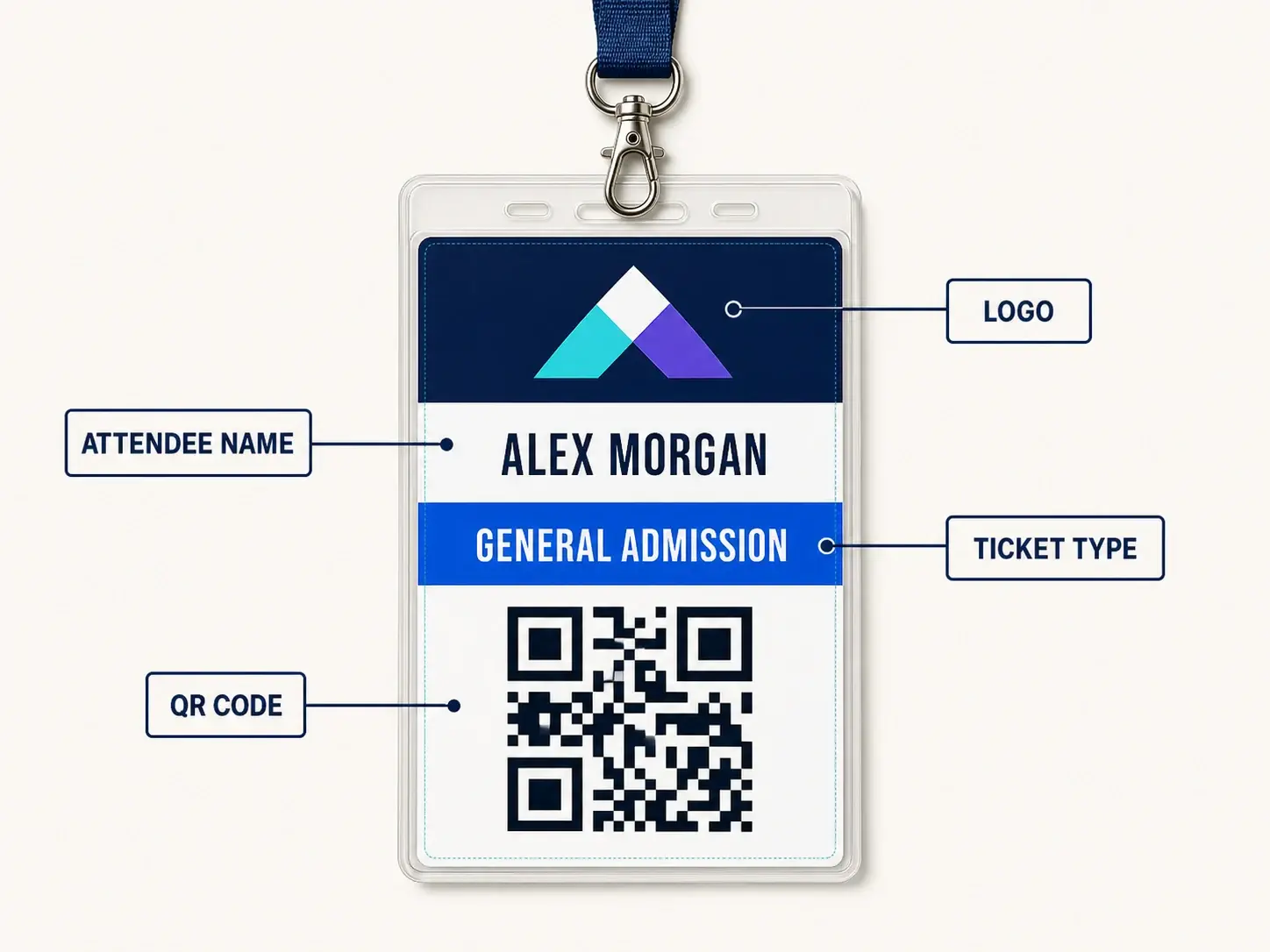
Yes. A customized and printed MEC ticket can function as an event badge with QR code, particularly when the event needs a branded entry credential rather than a specialist on-site badge-production system.
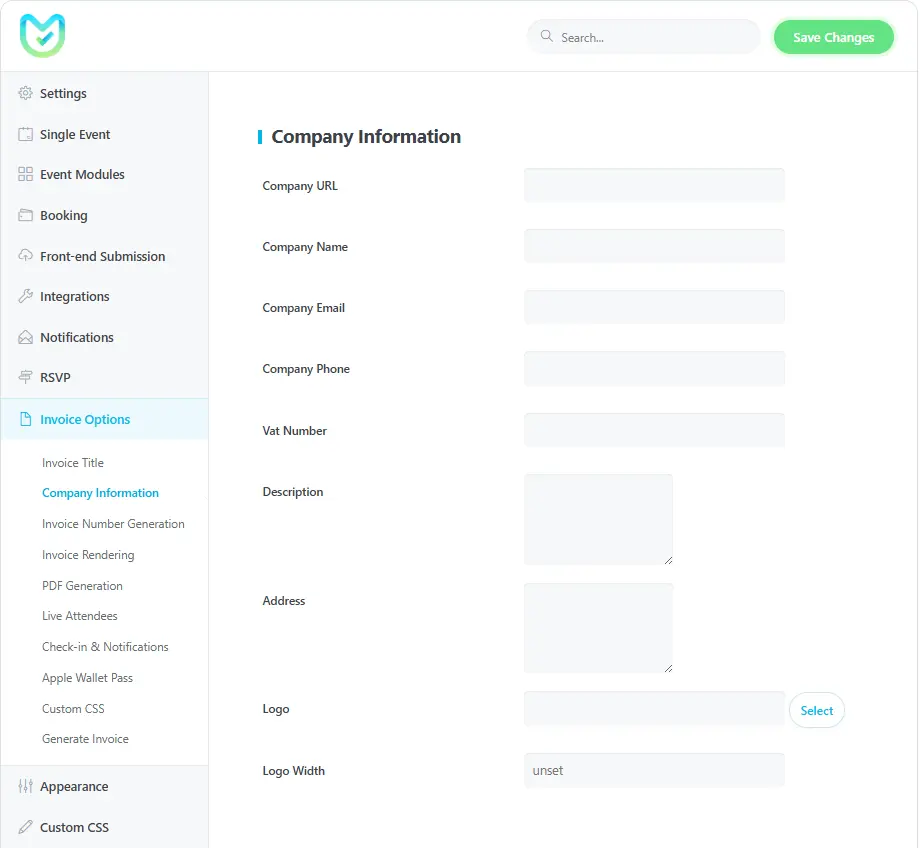
The Ticket and Invoice Addon includes ticket templates and lets organizers add company information, a logo, and their own design choices.
Custom CSS can change the appearance of ticket elements, and those changes can carry into the PDF and attendee email. The result can match the event identity instead of looking like an unrelated receipt.
A practical badge-style ticket might include:
- the attendee’s name;
- the event name and date;
- the ticket type or access category;
- the organizer’s logo and colors;
- the attendee’s unique QR code;
- a visible ticket or invoice number for manual lookup.
The ticket does not lose its check-in role when it is redesigned. It remains connected to the same attendee record and can be scanned at the entrance.
Organizers can therefore use the ticket templates as a starting point, customize the credential, and print it as an event badge.
These printable event tickets carry the organizer’s design while retaining the unique code used at the door.
This article uses “badge” in that practical sense: a branded, printable attendee ticket used for entry. We do not suggest that MEC controls specialist thermal badge printers or an on-demand badge-production desk.

How does MEC handle QR code event check-in at the entrance?
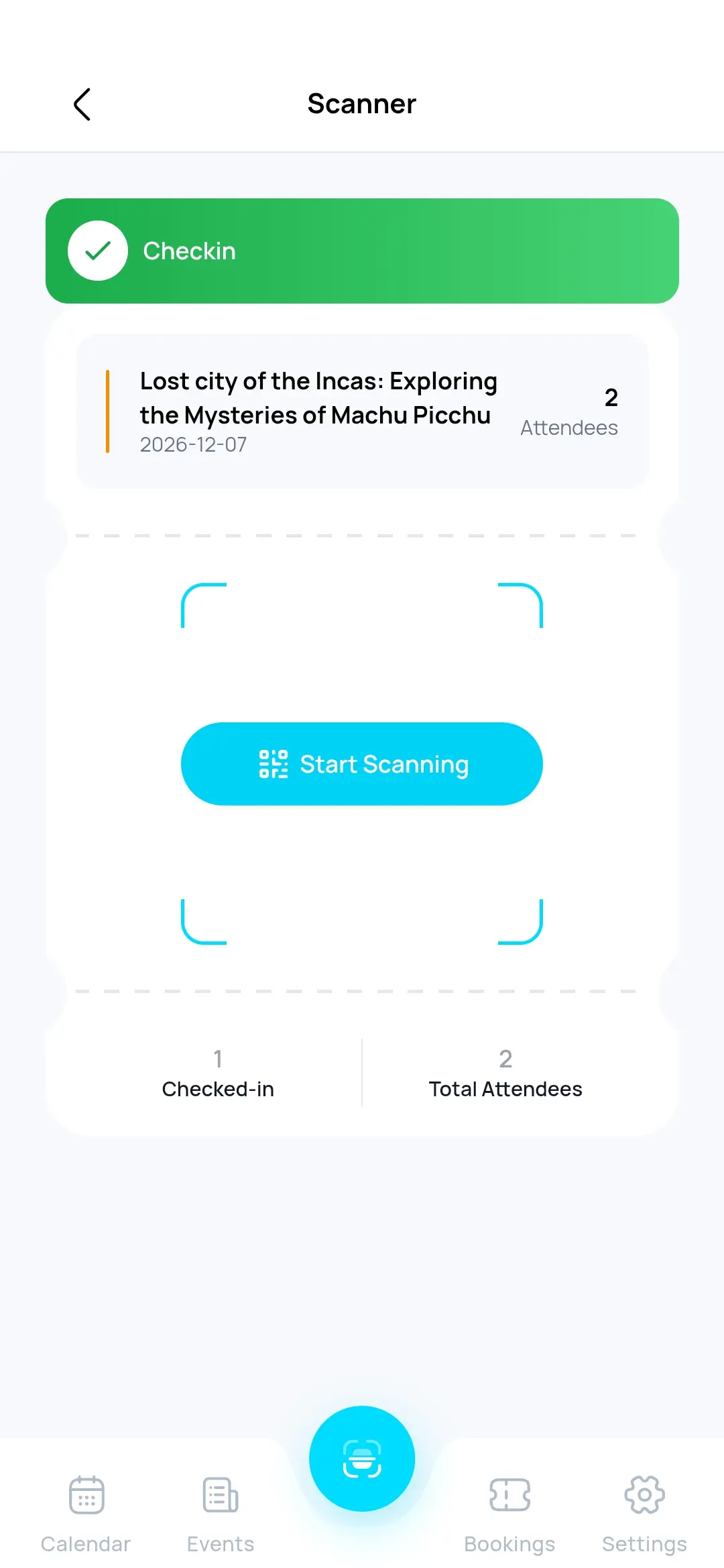
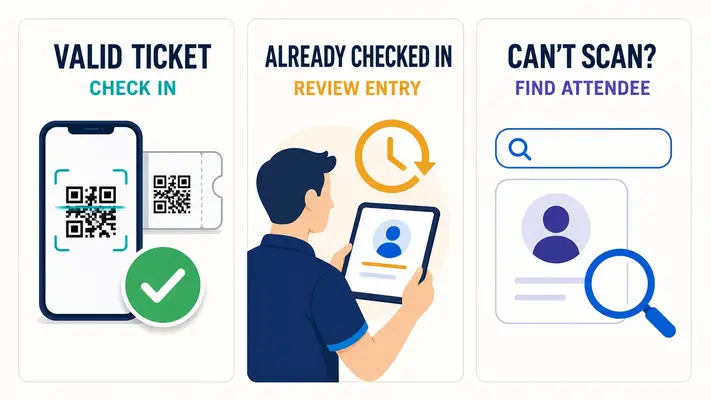
MEC lets staff scan an attendee’s ticket from a phone screen or printed copy. The scan validates the ticket against the MEC record and, when accepted, changes the attendee’s status to Checked in in WordPress.
The response matters as much as the scan. If the same credential has already been used, MEC returns an Already Checked In message. Staff can distinguish a first valid entry from a repeat scan without maintaining a separate paper list.
The MEC Events App gives the door team a mobile interface for this work. It can scan tickets with the phone camera, show attendee and ticket details, and keep the result synchronized with the WordPress site.
If a guest forgot the ticket or the code cannot be scanned, staff can open the attendee list, search for the booking, and check the person in manually.
That fallback is easy to overlook when evaluating a QR code scanner for events. A camera may fail because of a damaged printout, a dim phone screen, or a missing email. The event system still needs another way to locate the guest.
MEC therefore supports both paths:
- Scan and validate the attendee’s QR ticket.
- Find and check in the attendee manually when the credential is unavailable.
Both paths update the event record rather than creating a second attendance list.
How can event staff check tickets without full WordPress access?
The MEC Utility connector controls how the MEC Events App accesses a WordPress site. An administrator can create app access for a staff member and assign only the permissions required for the job, including check-in and check-out.
This matters when volunteers, venue staff, or temporary workers are scanning QR code tickets. They may need the attendee list and check-in action, but they do not need permission to change event pages, payment settings, or the rest of the website.
MEC Utility generates an API key and a QR code that connects the staff app to the site. This staff-access code should not be confused with an attendee’s ticket.
It contains connection credentials for the app and should be shared only with authorized users. Administrators can revoke access when it is no longer needed.
This separation gives the organizer two distinct credentials:
- Attendee QR ticket: Presented at the entrance and checked against a booking.
- Staff app-access code: Used to connect an authorized staff device to MEC.
Keeping those roles separate is part of a controlled WordPress event check-in process.
What do you need to use MEC QR code event check-in?
MEC’s QR ticket workflow uses several connected components. The requirements should be considered together when evaluating the product.
The MEC QR code check-in capability depends on the ticketing and app components listed below. It is a product stack built around the Ticket and Invoice Addon, rather than a feature hidden inside the core calendar.
| Component | Role in the workflow | Requirement note |
|---|---|---|
| MEC Pro | Provides booking and ticket configuration | Required by the Ticket and Invoice Addon |
| Booking module | Creates the booking and attendee record | Must be enabled for ticketed bookings |
| Ticket and Invoice Addon | Creates QR tickets, printable credentials, ticket templates, and check-in functions | Required for QR ticket scanning |
| MEC Events App | Gives staff a mobile scanner and attendee interface | The app is free for iOS and Android |
| MEC Utility | Connects the app to WordPress and controls permissions | Free connector required for app access |
| Supported PDF rendering service | Produces downloadable PDF ticket files | Needed when attendees must download tickets as PDFs |
This section is intentionally limited to product requirements. The linked MEC documentation covers installation, configuration, ticket templates, PDF rendering, and app connection.
Who is MEC’s QR ticketing workflow best for?
MEC is a good fit when the event already belongs on a WordPress site and the organizer wants ticketing and entry to stay connected to it. Likely use cases include:
- training companies issuing branded tickets for recurring classes;
- venues managing scheduled performances or workshops;
- conferences using a customized event badge with QR code;
- associations running member and public events from the same website;
- agencies building event sites for clients who need ticket delivery and check-in;
- organizers who want attendees to carry downloadable event tickets or printed credentials.
It is less suited to a team whose main requirement is a fully staffed enterprise registration operation with specialist on-site badge hardware, travel logistics, or complex accreditation across many controlled zones.
Those buyers should compare dedicated event platforms before deciding.
For a WordPress-based event business, however, MEC brings the important parts into one product family: the event calendar, booking record, ticket, branded badge-style credential, staff app, and attendance status.
Keep the whole ticket-to-door workflow connected
Good QR code event check-in starts before the attendee reaches the entrance. The booking must create the right credential, the attendee must be able to carry it, and the staff scanner must return the result to the same event record.
MEC supports that chain inside WordPress. With MEC Pro and the Ticket and Invoice Addon, organizers can issue individual QR code tickets, customize and print them as entry badges, and validate them from a phone.
MEC Utility and the MEC Events App then give event staff controlled access to the attendee list and check-in status.
If that matches the event workflow you are building, explore Modern Events Calendar and review the Ticket and Invoice Addon documentation before choosing the complete setup.
For buyers comparing a WordPress event ticketing plugin, the useful test is simple: can the same system create the ticket, present it as a branded credential, validate it at the entrance, and update attendance? MEC is built to keep those parts together.
Frequently asked questions
1. Does MEC generate a different QR code for each attendee?
MEC can send a separate ticket and QR code to each attendee in a multi-ticket booking when the corresponding Ticket and Invoice option is enabled. This lets guests from the same purchase carry individual credentials and arrive separately.
2. Can downloaded or printed MEC tickets be used for QR code event check-in?
Yes. The event check-in QR code on an MEC ticket can be scanned from a printed copy or a phone. Downloadable PDF tickets require a supported rendering service, currently documented as html2pdf or SelectPdf.
3. Can I add my logo and design to an MEC ticket?
Yes. The Ticket and Invoice Addon includes ticket templates and supports company information, logos, design changes, and Custom CSS. Organizers can adapt the ticket to match the event and use the printed result as a badge-style credential.
4. Is the Ticket and Invoice Addon required for QR check-in?
Yes. The MEC Events App can manage events with MEC Lite or Pro, but scanning attendee tickets requires the Ticket and Invoice Addon. The add-on itself requires MEC Pro.
5. Can staff check in an attendee without scanning a ticket?
Yes. The MEC Events App includes the attendee list and manual check-in. Staff can search for a booking when an attendee cannot present a readable QR ticket.
6. Does MEC QR code event check-in work offline?
No. Since verification requires a connection to the live event website, offline check-in is not possible.