UGC at events is the photos, short videos, posts, and reviews attendees create around an experience. To make it usable, decide what you need after the event, give people one simple way to contribute, record whether you can reuse each asset, then publish what fits the job.
A branded hashtag helps people find each other’s posts, but it rarely gives you a clean library of approved assets. A small, documented process does.
Most event teams don’t have a shortage of content. What they’re short on is content they can find, approve, and actually use when the recap, the registration campaign, or the sponsor report is due.
So start with the asset you need after the doors close. A 15-second attendee reaction for next year’s registration page needs a different prompt, collection route, and permission record than a gallery of crowd photos for an email recap.
Connect the request to its eventual use from the start, and you get a library your team can publish without second-guessing instead of a few lucky posts. Attendees benefit too: they know what you’re hoping to see, so they have a clearer reason to take part.
What counts as UGC at an event?
UGC at events means content made by attendees, participants, or community members rather than the organizing team. It can include a phone-shot clip of a talk, a photo at a sponsor activity, a short review, a social post, a written takeaway, or a submitted testimonial.
The source matters. A polished video commissioned from a paid creator can be useful, but it is not the same thing as spontaneous attendee-created content. Treat paid creator work as a separate arrangement with its own brief, contract, and disclosure considerations.
The practical test is simple: could someone on your team identify who made the asset, how it arrived, and what you are allowed to do with it? If the answer is no, the asset belongs in a discovery pile, not in your publish queue.
An event UGC strategy gives that content a route from the attendee’s phone to a specific editorial use. The route can be simple, but someone on the team has to own it.
Start with the asset you need after the event
The most common mistake is starting with a tactic. Someone prints a hashtag, runs a giveaway, or puts up a photo wall before anyone has decided what the resulting content is supposed to do.
Begin with one destination. For example:
| If you need this after the event | Ask attendees for this | Collect it through | Record before reuse |
|---|---|---|---|
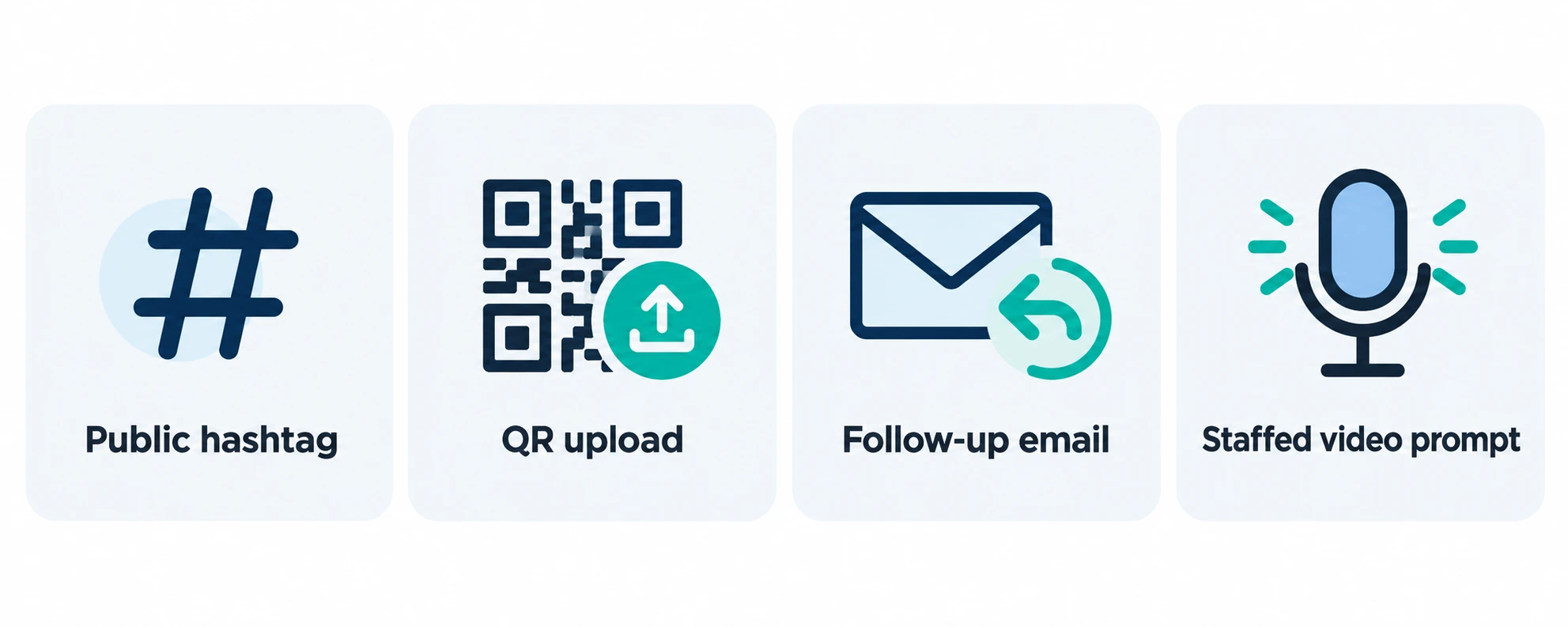
| A next-year registration page | Short, specific reaction clips | QR code to a mobile upload form or follow-up email | Creator, people shown, permission scope, chosen quote or clip |
| A recap email | Wide venue photos and one-sentence takeaways | Hashtag monitoring plus an upload link | Source post or upload, creator, permission status, credit preference |
| A sponsor wrap-up | Interactions with the activation or booth | A clear, opt-in prompt at the activation | Event, sponsor use if applicable, approved asset, restrictions |
| A community gallery | Photos that show different sessions and attendees | Moderated shared album or submission form | Contributor, visible people, acceptance rules, removal contact |
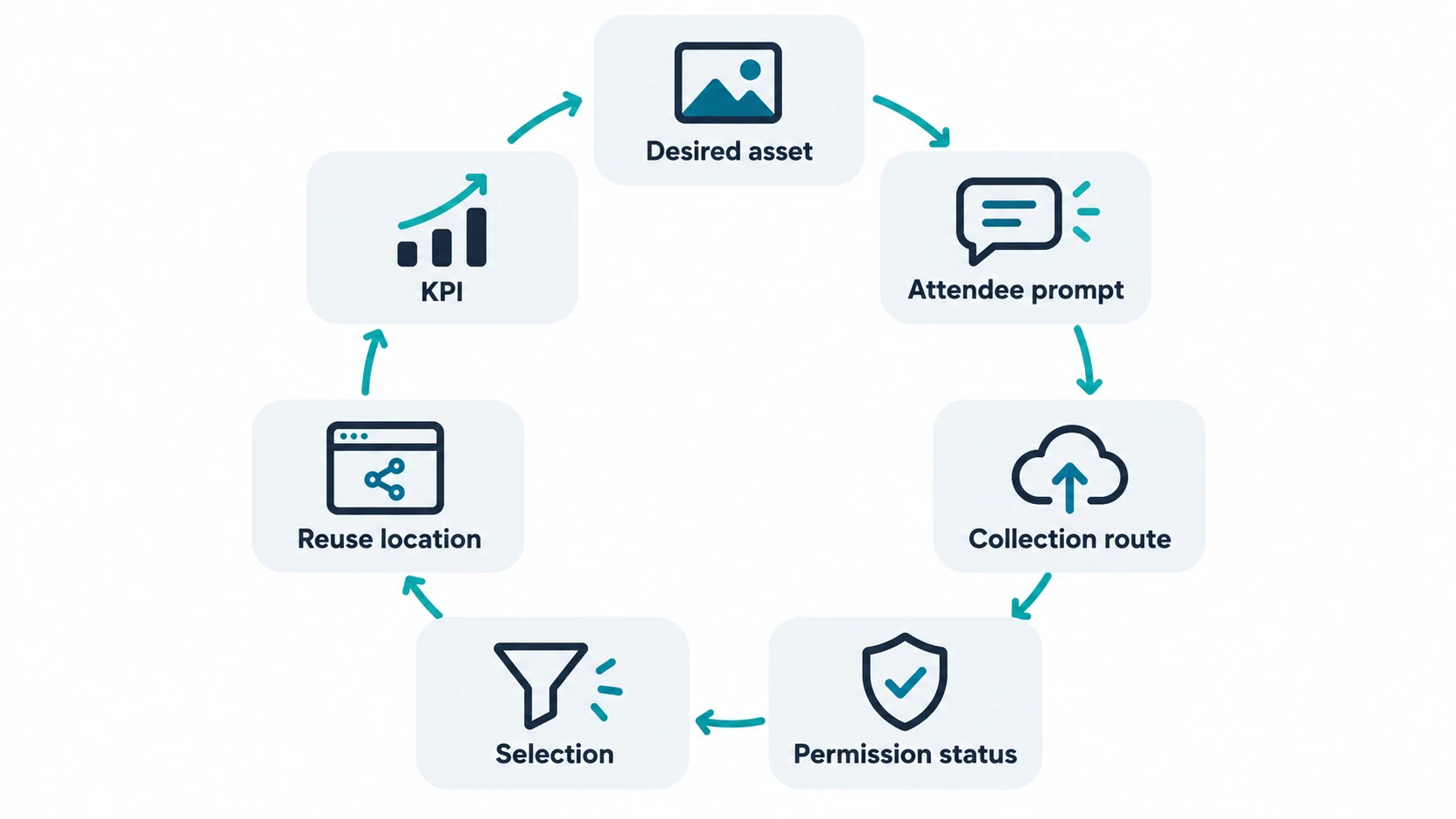
We call this the asset-ready loop. Every planned content type gets a purpose, a prompt, a collection route, a permission status, a destination, and a metric. It’s a modest amount of planning, and it saves a lot of chasing later.
It also prevents the familiar post-event scramble, where someone spends the follow-up week scrolling public feeds for posts nobody can confidently reuse. And when marketing, community, and sponsorship teams all want something from the same event, a written plan keeps each request focused instead of blurring into one vague ask.
Example: one conference, two very different asks
Imagine a WordPress conference with two goals. (If you’re still at the planning stage, our guide on how to plan a conference covers the groundwork.) The marketing team wants five participant quotes for next year’s event page. The community team wants a visual recap for attendees who couldn’t make every session.
Those are different requests. The first needs a quiet place to record a short, prompted reaction and a clear reuse request. The second needs a way for people to share photos quickly, plus a selection rule that avoids posting unflattering or contextless images. Calling both tasks “get more UGC” hides the work that determines whether the material is usable.
In practice, the two requests leave very different records. A quote for the event page might be logged as: recorded at the interview corner on day two, speaker and company named, approved for next year’s registration page, credited by first name and company. A recap photo might read: shared through the upload link, wide shot of the main hall, approved for the recap email and community gallery only. Same event, same week, two very different jobs.
How do you encourage attendees to create useful content?
A good event UGC strategy gives people a reason to contribute and makes the request easy to complete in the moment. It should tell them what to capture, where to send it, and what they may receive in return.
Start with a prompt that has a shape. “Share your experience” is vague. “Show us the one idea you are taking back to work” gives a person something to film. “Take a photo of the session setup you would copy for your own event” gives them a useful angle.
Then put the prompt where the experience happens:
- On the event page before registration closes, so attendees know participation is welcome.
- At the entrance, session room, or activity where the moment is easy to capture.
- In a post-session message when the memory is still fresh.
- In the follow-up email, with one route for people who preferred not to post publicly.
A well-chosen event hashtag can still be useful. It gathers public conversation and gives attendees a shared reference point. Just don’t make it your only collection method if you need files, context, permission records, or a way to reach contributors later.
Leave room for people who don’t want to post publicly. A simple upload option can make the campaign more inclusive while giving the team a clearer collection trail.
Match the activity to the content you need
A photo booth, demo station, attendee interview corner, live question wall, or “show your setup” prompt can all work. The right choice depends on the asset.
If you need people explaining a professional takeaway, give them a quiet prompt and a clear question. If you need visible energy from a festival, capture movement and reactions where the event feels alive. If you need content for a sponsor recap, spell out the sponsor activity and get the relevant permission before you promise anything to the sponsor. If attendee content is part of the package, say so in your event sponsorship deck so expectations are set early.
Name the person who’ll respond to submissions and say how quickly they’ll do it. People who never hear back are far less likely to contribute next time.
Don’t assume an incentive will fix a weak prompt. It may increase participation, but it also creates terms, disclosure, and fairness questions. In the United States, the FTC says material connections, including payment or something of value, should be disclosed with an endorsement. Review the FTC’s disclosure guidance and your event terms before launching a compensated or rewarded campaign.
How should you collect, permission, and select event UGC?
Event UGC becomes useful when the content stays connected to its context. A spreadsheet, shared database, or content library can be enough if everyone uses the same fields.
That record is where attendee-created content becomes an asset rather than a loose collection of links. It gives the person approving a recap enough information to decide without reconstructing the event from memory. A quick test: could a colleague who wasn’t at the event open the record and see why an asset was collected and where it’s allowed to appear?
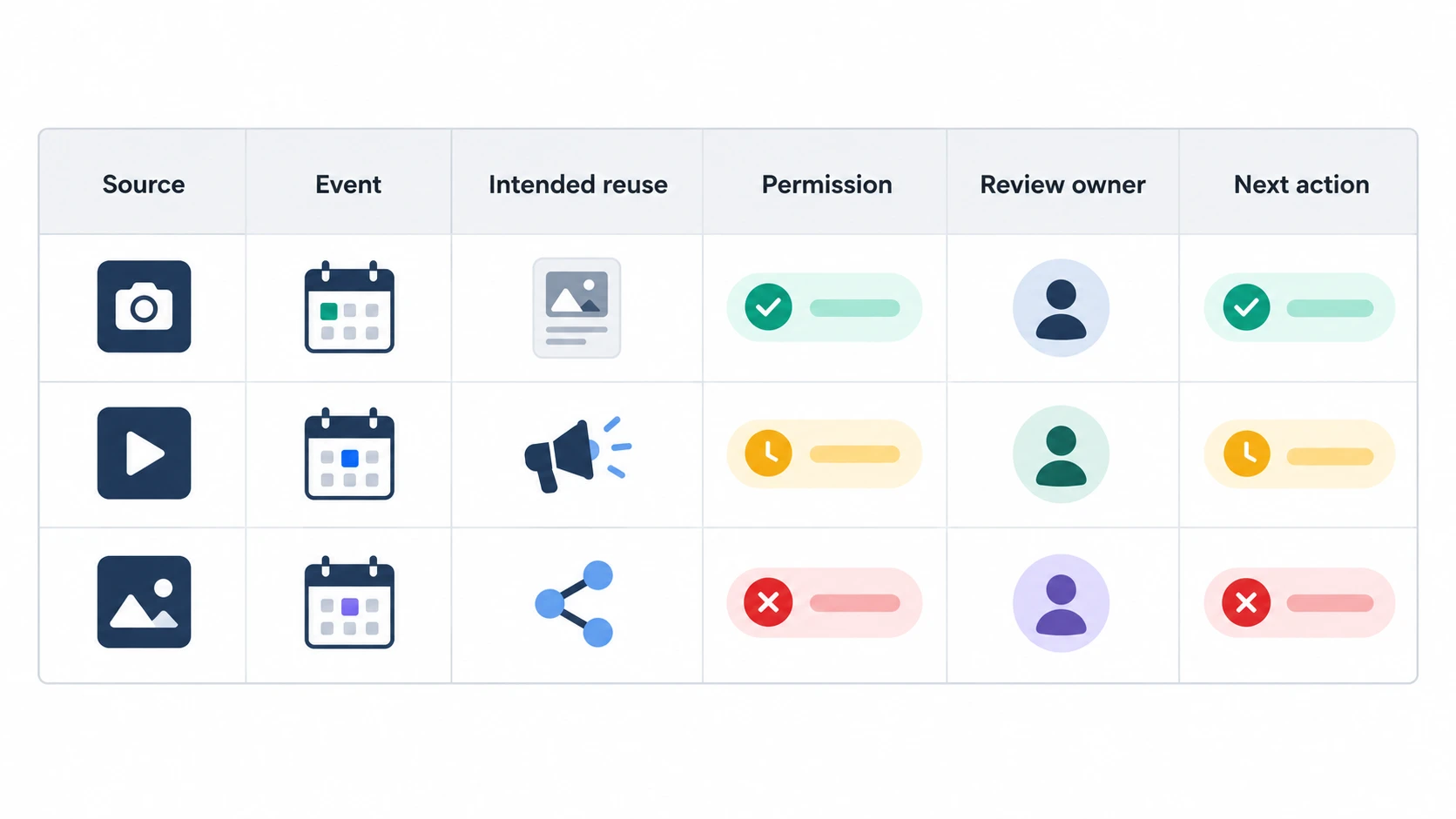
For every asset you may reuse, record:
- The creator or original source.
- The event, date, and collection route.
- The people shown or quoted, where practical.
- The intended reuse, such as a recap, event page, paid promotion, or sponsor report.
- Permission status, scope, and any credit preference or restriction.
- The person responsible for the final approval.
The record doesn’t replace legal advice. It gives the team a way to avoid treating every public post as an approved marketing asset. If your event operates across jurisdictions, includes children, records sensitive settings, or plans paid advertising, have the final approach reviewed against the relevant rules and policies.
Use a selection rule before you start curating
Without a selection rule, the loudest or most polished posts win by default. That can leave the recap looking like a brand ad instead of an honest record of the event.
Choose a few criteria that suit the goal. For a registration page, you may prioritize specificity, recognizable attendee context, and a clear permission record. For a community recap, you may prioritize variety of sessions and representation of the people who took part. A moderation rule also gives the team a consistent way to decline material that is unsafe, irrelevant, poorly contextualized, or outside the permitted use.
A simple “publish, ask again, or decline” status is more useful than an elaborate score. It keeps the selection conversation tied to the planned use.
Where can you reuse attendee-created content?
Attendee content earns its place when it helps a later audience make a decision or feel informed. A strong quote can answer a prospective attendee’s question about the value of a conference. A small gallery can show the atmosphere of a community event. A session takeaway can make a follow-up email more useful than a generic “thanks for coming.”
Not every piece of attendee-created content is a testimonial. A candid image may be perfect for a recap and unsuitable for an event page that needs a clear statement of value.
Match the asset to the reader:
| Reuse location | Best asset | Reader need | Check before publication |
|---|---|---|---|
| Event or registration page | Specific quote, short reaction, relevant photo | “Is this event for people like me?” | Permission scope and context |
| Post-event recap | Mixed photo set, attendee takeaways, selected clips | “What happened?” | Variety, captions, and contributor handling |
| Follow-up email | One useful takeaway or short recap clip | “What did I miss or what should I do next?” | Audience consent and accurate attribution |
| Sponsor report | Approved interaction photos or participant feedback | “How did attendees engage with the activity?” | Sponsor-use permission and agreed reporting scope |
| Future promotion | A time-specific proof point or short reaction | “Why should I register next time?” | Currency, permissions, and whether the event format has changed |
The same clip doesn’t need to appear everywhere. Pick the location where it answers a real question. Overusing a small pool of content makes a campaign feel thin, even when the original event was full of moments.
How do you measure an event UGC strategy?
Shares and likes are easy to count. On their own, they won’t tell you whether the work produced assets the team can use or helped the event reach its goal.
Measure the process first, then the outcome:
| Stage | Useful metric | What it tells you |
|---|---|---|
| Participation | Number of contributors, submissions, or public posts found | Whether the prompt and collection route were easy to act on |
| Usability | Rights-cleared assets, approved quotes, publishable clips | Whether the collection method produced usable material |
| Publishing | Assets placed on an event page, recap, email, or social post | Whether the content made it out of the library |
| Response | Page engagement, email clicks, social replies, or traffic tagged to the campaign | Whether the chosen reuse location reached an audience |
| Event outcome | Registrations, ticket sales, leads, or other pre-defined goal | Whether the work contributed to the event’s intended result |
Use the metric that matches the promised outcome. A festival recap may be judged by contribution volume and completed assets. A registration campaign needs a clearer path from the content placement to sign-ups. If your site tracks event registrations, document the event and campaign naming before publishing the assets so later reporting is not guesswork.
Over time, these records show where people contributed, which assets cleared review, and which placements prompted a response. The lesson may be as small as moving a QR code closer to the activity people were already photographing. That feedback loop is what stops each event from starting from scratch with the same untested guesses about what people will share.
What mistakes make event UGC hard to use?
Most problems with event UGC show up after the event, when someone sits down to build the recap. They usually trace back to a handful of planning gaps:
- Collecting first, deciding later. A folder of a few hundred photos with no planned use takes longer to sort than it took to gather.
- Relying on one public hashtag. Private accounts, people who don’t post, and anyone who misspells the tag all drop out of the picture.
- Treating a public post as permission. Being able to see a post isn’t the same as being allowed to put it on a landing page or in a paid ad.
- Losing the context. A great clip without the creator’s name, the session, or the date is hard to caption and even harder to approve.
- Waiting too long to ask. A request sent two weeks later competes with everything else in people’s inboxes. The same day or the next morning works better.
- Skipping the thank-you. Contributors who never hear back rarely contribute again. A short reply, a credit line, or a link to the finished recap goes a long way.
None of these takes a big budget to fix. Most come down to deciding, before the doors open, who owns the requests, the records, and the replies.
Where does a WordPress event platform fit?
Your event website is a useful home for the event itself: the details, registration path, tickets, and post-event follow-up. It is also where a well-chosen attendee quote or recap gallery can help future visitors understand what the event feels like.
Treat the website as the destination for selected content, not a substitute for the collection and permission process behind it.
Modern Events Calendar lets WordPress site owners create events, sell tickets, manage bookings, and present event information in several layouts. Its Social Auto Poster add-on can publish event details to supported social accounts. Those functions support event promotion and the attendee journey. They don’t replace a route for collecting attendee media, a permission record, or a review process for reuse.
A one-page checklist for UGC at events
Before promotion begins, write down the answers to these questions:
Those seven answers turn attendee content into a repeatable part of event marketing, and they keep the team from discovering too late that its best moments are scattered across personal feeds with no route to reuse.
The plan can stay small. One page is plenty, as long as the team knows the intended use, the collection route, and the approval step before content starts arriving. Treat each piece as a contribution from a real person, with its context attached, not as a free endorsement. Do that, and the next event gets easier to run without asking attendees for more than they can reasonably give.
Frequently asked questions
Is a branded hashtag enough to collect event UGC?
Usually, no. A hashtag helps group public posts, but it doesn’t create a complete asset library, collect files, or record permission for later use. Use it alongside a contribution route that fits the asset you need, such as an upload form or a follow-up request.
User-generated content at events becomes easier to manage when people have one clear route to contribute and the team has one place to review what arrived.
Do I need permission to reuse attendee content?
Public visibility doesn’t automatically answer whether you can reuse an asset in every channel or campaign. Plan how permission will be requested and recorded for the use you intend. Confirm the final process against your organization’s policies and the laws that apply to the event and audience.
Can a giveaway help encourage user-generated content at events?
It can increase participation, but it needs clear terms and a useful prompt. If someone receives something of value in return for an endorsement, disclosure rules may apply. Review the campaign with the appropriate legal and marketing owners before launch.
What is the best metric for UGC event marketing?
There is no single best metric. Start with the event goal. Track approved, usable assets if you need a recap library; track sign-ups or ticket sales if the content supports registration; and use engagement measures to understand response at the location where you publish the content.