Introduction
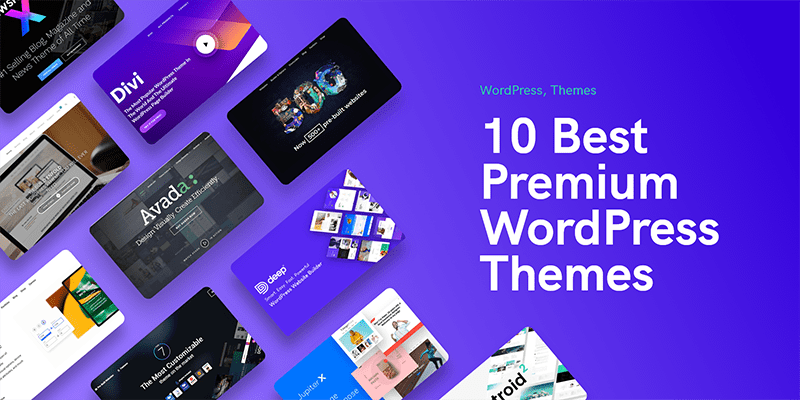
A premium WordPress theme costs money, but you usually get more layouts, more design controls and a support team to ask when something breaks. This list covers 11 premium themes we think are worth paying for in 2026, from all-round multipurpose themes to options for online stores, news sites and communities.
We checked every price on this list against the vendor’s own site in November 2026. Several themes have moved from one-time ThemeForest licenses to yearly plans, so the numbers below may differ from what you remember.
Each entry lists the main features, pros and cons, current pricing, the premium plugins that come bundled, and a few user reviews.
If you build sites for yourself or for clients, a premium theme also saves you from patching together free plugins for headers, mega menus and demo content. Agencies that build many client sites can save with our web agency bundle.
If you build with Elementor, see our list of the best Elementor themes.
Key Takeaways
- Premium themes usually come with more layouts, more design controls and direct support from the developer.
- Kata, Avada, BeTheme, Astra, The7 and Divi are among the most versatile premium themes.
- A theme controls your whole site’s look, while templates are individual page layouts inside it.
- Choose a premium theme by defining your site’s goals, checking customisation options and plugin compatibility, and reading recent reviews.
Why Choose WordPress Premium Themes?
Here is what you usually get for the money.
Advanced Features
Most premium themes include a page builder or close builder integration, more design settings and one-click demo imports, so you can build a finished site without writing code.
Unique Designs
Many premium themes ship with demos made for a specific industry, such as restaurants, agencies or online stores. They give you a better starting point than a generic free layout.
Regular Updates and Support
Paid licenses include updates for new WordPress and WooCommerce versions, plus access to the developer’s support team. Check how long support lasts, because some licenses cover only six or twelve months.
SEO and Performance Optimization
Speed depends more on how a theme is built than on whether it’s free or paid. Many premium themes are fast, but some bundle so many features that pages get heavy. Test a demo with PageSpeed Insights before you buy.
11 Best Premium WordPress Themes
Kata

Kata by Climax Themes is a multipurpose theme with more than 120 ready-made templates, a visual CSS editor called Styler, and dark and light modes. One license costs $29 a year.
Kata is our own theme, so keep that in mind as you read this entry. It is built to handle almost any kind of site, from business pages to online stores.
Kata Fast Mode walks beginners through building a basic site in about five minutes, and the documentation covers installation and everyday use.
The visual page, header and footer builders give you full control over layout. For Elementor users there is also an add-on called Kata Plus.
Kata Plus adds the header, footer and blog builders to Elementor, along with 18 widgets you can style with Styler.
Styler is the main tool in Kata. It lets you change fonts, backgrounds, colors and spacing on almost any element through a visual panel, so you can adjust the CSS without writing it.
Kata Key Features
- Lightweight & Fast: Optimized for high performance
- Advanced Customization: Offers extensive design flexibility
- Pre-built Templates: Includes a variety of ready-made demos
- WooCommerce Ready: Fully compatible with WooCommerce
- Drag & Drop Builder: Supports Elementor
- Live Editing: Real-time preview while making changes
- Header & Footer Builder: Control over header and footer design
- SEO Optimized: Built with best SEO practices
- Mobile Responsive: Fully responsive and retina-ready
- One-Click Demo Import: Quickly set up your site with a single click
- Regular Updates & Support: Provides continuous updates
Kata Pros
- Lightweight & Fast: Quick loading times and smooth performance.
- Highly Customizable: Offers extensive design flexibility
- Pre-built Templates: Saves time with ready-made designs
- WooCommerce Integration: Supports eCommerce
- Beginner-Friendly: Drag-and-drop customization
- SEO Optimized: Clean code and best SEO practices
- Mobile Responsive: Seamless experience on all devices
- One-Click Demo Import: Quick and hassle-free setup
Kata Cons
- Styler option might be confusing for some beginners
Kata Pricing
Regular License (Yearly)
- $29 (One website license)
Kata Premium Plugins
- ACF Pro
- QuForm
- Slider Revolution
- Essential Grid
- Media Folder
- Layer Slider
Kata User Reviews
After a not entirely successful start to getting acquainted with Kata and other products of this developer, they showed that they solve problems quite quickly, so I continue to use their products, the support is very fast, the developers promptly correct detected errors and help with questions that arise.
Demitry
The theme is great, simple and with a lot of features. Then the support is really great, timely and professional.
Giorai
I am not an expert in website design. And I found this Kata’s themes by Climax. This theme amaze me. The layout was great, ease of editing, and user friendly even for someone like me. And the most important thing for me is their supports are five star! Every question I ask, they always help well. And now I decided to have my second license for this theme 😃. Thanks for the great theme and support!
Santoso
BuddyX Pro
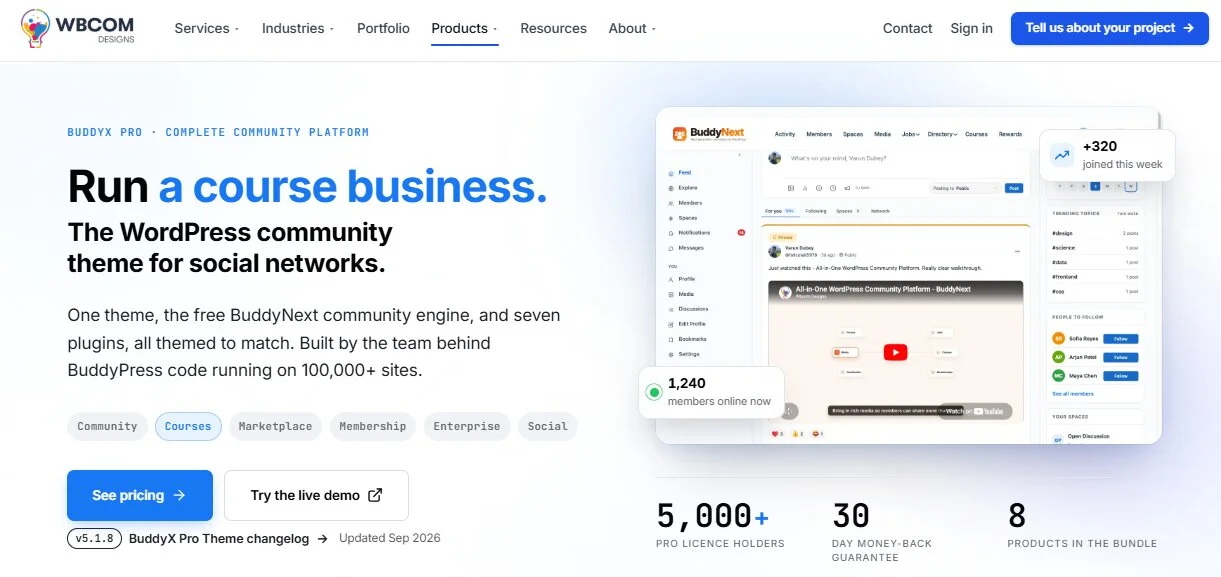
BuddyX Pro is a premium WordPress theme designed for building online communities, social networks, membership websites, and other interactive platforms. Developed by Wbcom Designs, it combines community features with flexible design options, making it suitable for businesses, educators, creators, and organizations.
BuddyX Pro works with BuddyNext, BuddyPress, and BuddyBoss, allowing users to create community websites with member profiles, activity feeds, groups, and directories. It also supports popular plugins for eCommerce, online courses, and marketplaces, helping users combine multiple features on one website.
The theme includes customizable headers, multiple color schemes, typography options, dark mode, and branded login pages. Its bundled plugins can extend website functionality with features such as media sharing, gamification, forums, directories, and online learning.
BuddyX Pro Key Features
- Community website and social network layouts.
- Compatibility with BuddyNext, BuddyPress, and BuddyBoss.
- Member and group directories with customizable layouts.
- Activity feeds, reactions, and social sharing.
- Advanced header customization and mega menus.
- Dark mode, color schemes, and typography controls.
- Custom login, registration, and password-reset pages.
- WooCommerce shop and product page styling.
- Support for LearnDash, Tutor LMS, LearnPress, and LifterLMS.
- Marketplace integrations, including Dokan and WC Vendors.
- Bundled plugins for additional community functionality.
BuddyX Pro Pros
- Designed for community-focused websites.
- Flexible design and customization options.
- Supports eCommerce, learning, and marketplace integrations.
- Works with popular WordPress community plugins.
- Suitable for membership sites and social networks.
BuddyX Pro Cons
- Advanced customization options require a paid license.
- Some features depend on additional plugins.
- Initial setup may take time for beginners.
BuddyX Pro Pricing
BuddyX also has a free version for users who want to start building a community website without an upfront cost.
Free Version
- $0: BuddyX Free
Yearly License
- $79/year: Personal, 1 website
- $119/year: Professional, 5 websites
- $199/year: Agency, unlimited websites
Lifetime License
- $199: Personal, 1 website
- $299: Professional, 5 websites
- $499: Agency, unlimited websites
Check the official BuddyX Pro page for current pricing and license details.
BuddyX Pro Integrations
BuddyNext, BuddyPress, and BuddyBoss
WooCommerce
Learnomy, LearnDash, Tutor LMS, LearnPress, and LifterLMS
Dokan and WC Vendors
Elementor, Gutenberg, and bbPress
Avada

Avada by ThemeFusion is a responsive multipurpose theme with layouts from one to six columns.
It has been the best-selling theme on ThemeForest for years. Avada is still sold there as a one-time license, and avada.com now also sells yearly Avada One plans: $49 a year for one site on Essential, or $99 a year on Pro.
It comes with premium plugins and a large library of prebuilt websites (114 on avada.com today), so it suits both beginners and experienced builders.
Its options panel is one of the most detailed of any WordPress theme, which also means it takes time to learn.
Avada Key Features
- A truly multipurpose theme with 6 layout options: grid, timeline, large, large alternate, medium, medium alternate & 4 different post types
- Built on HTML 5 & CSS3
- Search Engine Optimization & social media-friendly
- WP Multi Site tested
- Cross browser compatibility
- Retina-ready, high resolution graphics
- 1-6 column support
- Great customer support from Theme Fusion
- Multiple Free Premium plugins available within the theme bundle
- 100+ Shortcodes
- Built in Mega Menu
- Unlimited color palette and advanced portfolio options at your disposal, including filterable categories
- Useful custom page templates
- Translatable into 33 languages
Avada Pros
- New Front End Visual Builder
- Large Helpful FaceBook Community
- Includes Several Plugins For Free
- 40+ Templates To Choose From
- Can Use The Theme Customizer While Building Your Website
Avada Cons
- Can Be Bloated, Has Many Extra Plugins To Function
- Leaves Shortcodes If Deactivated
- 1 License Per Website Is Limited
- Has A Learning Curve, Not The Easier For Beginners
- No Theme Builder and No Product Builder
Avada Pricing
Regular License (One Time Payment)
- $69 (One website license)
Avada Premium Plugins
- Slider Revolution
- Layer Slider
- Advanced Custom Fields PRO
- Fusion White Label Branding
- Convert Plus
Avada User Reviews
This is the best template out there. I can do so many things to make my personal website look super professional. I also used Avada to update my architecture firm’s website and people look at me like I’m a genius. It was so easy and we keep getting compliments from all our clients and consultants.
resscu
I am impressed by the customer support of the Avada and Theme Fusion guys. Markus rocks! I am however more impressed by the revolutionary Theme Fusion Builder, which allows designers to focus on UX vs trying to figure out cryptic WP interfaces. I wouldn’t by another product, because it’s not just a template collection (which I never use…) but a robust WordPress development tool. Every site an original.
mlustig
Truth is, Avada ticks all the above boxes and then more. It is a full featured theme, or a theme with full options as car lovers might describe. Easy to use and find your way around if you atually take the trouble to read through the documentation. Support is great as well. On the way to hit 1,000,000 users on Envato! Congratulations are due.
Eusic
BeTheme

BeTheme, made by Muffin Group, is a multipurpose theme known for its very large library of prebuilt websites.
Updates install with one click, and the website installer is quick to use.
BeTheme has a clean look with better readability and light colors.
You can pick from several grid layouts or build a one-page site straight from a prebuilt demo.
The admin panel covers most settings, and the theme includes a shortcode generator, built-in mega menus, custom Google Maps styles, a translation panel and RTL support.
BeTheme Key Features
- Powerful admin panel
- BaseGrid
- Fast and light
- Unlimited Google maps styles
- RTL language support
- Shortcode generator & built-in mega menus
- 4 different grid layouts: 1240px Boxed, 960px Boxed, 1240px Full Width, 960px Full Width
- Widgetized Top Area (click on arrow in right top corner to see how it works)
- Awesome Layouts Generator
- Unlimited menus (you can choose different menus for different pages)
- Customizable entry effects on scroll (choose between 22 different entry effects)
- Custom Font Uploader (upload any font you want and use for website)
- 7 different header versions (Modern, Classic, Stack: Left, Stack: Center, Stack: Right, Simple & Empty)
- Under Construction / Maintenance Mode & Blank Page
- 12 predefined skins
- One page website possibility with nice scroll effect
BeTheme Pros
- 20+ Header Layouts
- 450+ Demo Websites
- Built In Mega Menu
- Various Slide Menu Options
- Demos Are Professional
- Cool Styling Options For WooCommerce
BeTheme Cons
- Uses A Backend Builder Only (No Frontend)
- Licensing Sucks. 1 License Per Domain
- Lacks Blog Layout Options
- Complicated To Learn
BeTheme Pricing
Regular License (One Time Payment):
- $60 (One Website License)
BeTheme Premium Plugins
- WP Bakery
- Layer Slider
- Slider Revolution
BeTheme User Reviews
It is by far the biggest of the premier themes in terms of functionality and number of ready-to-use pre-built websites that cover almost any theme…
speckyboy
All of the Betheme pre-built websites listed above can serve as excellent starting points for your creative journey.
smashing magazine
The best theme. Easy to use, VERY AWESOME SUPPORT and well-programmed too! If you are in doubt about it just forget any concernings…
giancarlobraga
Astra

Astra is a lightweight multipurpose theme from Brainstorm Force.
It is easy for beginners and still flexible enough for developers. The free version has more than 1 million active installs on WordPress.org, which makes it one of the most used themes there.
It works with all the major page builders and comes with a large library of starter templates built with Elementor, Beaver Builder, Gutenberg and other builders.
Astra loads very little CSS and JavaScript by default (the developer quotes under 50 KB), so it is a good base for a fast site.
Astra Key Features
- Fast loading theme fully optimized for performance.
- Pre-built demos, drag-and-drop builder, and responsive design.
- Simple modular approach for customization. All elements are neatly arranged in modules and easy to edit.
- Pro version comes with sticky headers, mobile headers and mega menu features.
- 150+ fully designed and developed websites.
- Adds schema markup to every page by default and optimizes it for SEO.
- Well built documentation and fast support.
- It has in depth video tutorials and blog posts to help you out with any aspect of your website.
- Compatible with all major page builders.
- Supports WooCommerce and EasyDigital Downloads for eCommerce Websites.
- Astra Pro integrates seamlessly with LifterLMS and LearnDash for you to create attractive and high performing online course websites.
- Pro version allows you to add custom header, footer, blog layouts and also control the display conditions.
Astra Pros
- Fast Loading
- 150+ Professional Ready-Made Websites
- WooCommerce Ready
- Perfect for SEO
- Beginner Friendly User Interface
- Custom Layouts
Astra Cons
- Not all templates are free
- Lacks Blog Layout Options in free version
Astra Pricing
Yearly license:
- $0 (Astra Free)
- $69 (Astra Pro add-on)
- $149 (Astra Pro + AI)
- $299 (Essential Toolkit)
- $429 (Business Toolkit)
Lifetime license:
- $349 (Astra Pro add-on)
- $449 (Astra Pro + AI)
- $899 (Essential Toolkit)
- $1,299 (Business Toolkit)
Astra Premium Plugins
- Ultimate Addons for Elementor
- Ultimate Addons for Beaver Builder
- WP Portfolio
- Convert Pro
- Schema Pro
Astra User Reviews
The support team of Astra is really awesome. They answered all my questions in no time. The Astra Pro theme is fast and lightweight with a lot of customization! Definitely worth the money!
Eric Burlet
This is without a doubt the number 1 theme in the world. I have worked with many other themes over the last 7 years but Astra has the best performance of all. I also got incredible support from Sweta who explained everything in a detailed video. I will definitely recommend the Astra theme to all my friends
Brayan Lachowsky
Astra is the best theme I have ever used. It works perfectly with Elementor and I imagine with any other page builder too. This theme just shows the options you need and leaves it up to you to customize however you want. Tech support is top notch too, I always get useful and complete answers within an hour or two.
For $40, this might be the best deal on the internet. Don’t hesitate. Buy it.
Will Patridge
The7

The7, made by Dream-Theme, is a multipurpose theme with deep WooCommerce integration.
It has passed 335,000 sales since 2013. The7 is now sold on the7.io as a yearly license: $49 a year for one site or $249 a year for unlimited sites.
Demo content and the required plugins install in one click. With 1,000+ theme options and 250+ page options it is one of the most configurable themes available, and a white label tool lets agencies rebrand it for clients.
Dream-Theme’s site shows an average buyer rating of 4.76 out of 5. The theme is translation ready and works well on mobile.
The7 Key Features
- $100+ worth premium plugins included
- Multilingual & Translation Ready
- Extend your site with portfolio, photo galleries, team (and more!)
- SEO-Ready & Mobile Friendly
- Unlimited Headers
- Regular Updates
- 100% WooCommerce Compatibility
- First-Class Support
- Fully customizable
- WooCommerce integration
- 1-click easy page contents installation
- White label tool
- Mobile friendly
- Multilingual
- 4 header layouts for use on posts and pages
- 6 skins to change the appearance of the site
- Multiple homepage layouts
- Choice of over 600+ fonts
- Unlimited background and color combinations
- Inclusion of the Visual Composer layout builder plugin
The7 Pros
- Highly customizable.
- Design Wizard included.
- Over 630 options available.
- Ready to use demos.
- SEO optimized.
- Premium plugins included
The7 Cons
- Too complicated for a person not so technical.
The7 Pricing
Regular License (One Time Payment):
- $49 a year (one website)
- $249 a year (unlimited websites)
The7 Premium Plugins
- WP Bakery
- Slider Revolution
- WP Bakery Ultimate Addons
- GoPricing
- Slider Revolution
- Convert Plus
The7 User Reviews
Fantastic theme! Highly customisable, looks great on all devices and absolutely fantastic support. I will not hesitate to buy this theme again. I have already bough it 3 times!
Seventy7_web
Easy to use and a myriad of options to customize your site. I’ve moved all my sites over to this theme. Thank you!
stefaniephan
So amazingly awesome and easy to use. Limitless customization and one of the best user interfaces ever. If you can dream it, this theme can make it come to life.
Vercoquin
Jupiter X

Jupiter X is a multipurpose theme by Artbees, built on Elementor.
Global styles are set in the WordPress Customizer, and a separate shop customizer covers WooCommerce pages, including cart and checkout. You can also design headers and footers visually.
You can customize blog and portfolio archives and single pages, and the same goes for custom post types. That makes it a practical choice for listing and directory sites such as hotels, car rentals, real estate or job boards.
It comes with more than 250 prebuilt websites and hundreds of block templates.
Support includes live chat and a large library of tutorials.
Jupiter X Key Features
- Mobile Support: Responsive & Retina Ready
- Pre-Designed Demos: 290+
- Free Version: Not Available
- Widgets Support: Available
- Mega Menu Support: Available
- Right-To-Left (RTL) Support: Available
- Visual Builder Support: Available
- Easy-To-Use Demo Importer: Available
- White Label Branding: Available
- WooCommerce Customiser: Available
- BuddyPress Support: Available
- Multi-Language Support: Available
Jupiter X Pros
- 15 Premium Plugins
- +290 pre-built Demos
- Fair Price
- Lifetime Auto-Update
- 6 Months Support
Jupiter X Cons
- The bundled plugins add a lot of weight if you activate all of them.
- Some buyers on ThemeForest have reported slow pages.
Jupiter X Pricing
Regular License (One Time Payment):
- $58 (one website, lifetime updates)
- $349 (10 websites)
- $1,999 (100 websites)
Jupiter X Premium Plugins
- Elementor
- WPbakery Visual Composer
- JetElements
- JetPopup
- JetBlog
- JetMenu
- JetEngine
- JetSmartFilters
- JetWooBuilder
- JetTabs
- JetTricks
- Master Slider
- Revolution Slider
- Layer Slider
- Advanced Custom Field
Jupiter X User Reviews
Jupiter was great until you switched to JupiterX. You created a monster by switching to Elementor. You now need a gazillion plugins for the basis functionality. I hope that one day soon you will admit that this was a mistake and try again. This is just not working and I’m unable to explain this to my clients. And this is coming from someone who tried almost all WP themes in the top 10 of Themeforest. Such a shame.
pux-haarlem
Decent theme and not difficult to use.
Problem is the support is poor and documentation is not up to date.
It’s almost impossible to migrate a theme the traditional way. There is no way to export all your theme settings from your development site onto your live one.
So the way you need to develop is create a second site, design your pages, then transfer all your live data over, then change the server to use the second site.
Doesn’t work well for large site because there is constantly new content being created on the live site.xjjon
This was my first time using JupiterX on a project. Had an import issue (I’m sure was caused by my host), but the team at JupiterX was so quick to respond, assess what went wrong, and offer the fixes I need – everything was done in just a few days – Artbees Support responded in less than 24 hours each and every time. Super happy with this theme and the team behind it!
HMiracle
Monstroid2

Monstroid2 is a modular Elementor theme from Zemez that suits many kinds of sites, including web design studios. It installs quickly.
It has customizable layouts for each part of the site and a good set of bundled plugins.
Its weak points are speed and age. Some elements load slowly, a few settings are confusing, and the sliders and counters in the demos look dated.
Monstroid2 Key Features
- Mobile Support: Responsive & Mobile-friendly
- Pre-Designed Demos: 60+ Skins
- Free Version: Available (Monstroid2 Lite)
- Widgets Support: Available
- Mega Menu Support: Available
- Right-To-Left (RTL) Support: Available
- Visual Builder Support: Available
- Easy-To-Use Demo Importer: Available
- White Label Branding: Not Available
- WooCommerce Customiser: Compatible Only
- BuddyPress Support: Available
- Multi-Language Support: Available
Monstroid2 Pros
- Jet Premium Plugins
- +60 pre-built Demos
- Lifetime Auto-Update
- 24/7 Live Chat
- Lifetime Support
Monstroid2 Cons
- Pre-designed demos are not satisfying enough and looks a little bit outdated.
- For extra help, you need buy extended support package, more details here.
Monstroid2 Pricing
Regular License (One Time Payment):
- $82 (One website license)
Monstroid2 Premium Plugins
- Elementor
- Slider Revolution
- JetElements
- JetPopup
- JetMenu
- JetEngine
- JetSmartFilters
- JetBlog
- JetTricks
- JetWooBuilder
- JetTabs
Monstroid2 User Reviews
There are some really nice things about how these modules come together, but for all of it’s features, it also can be very difficult to get the results you’re looking for. When you can’t get what you need, it isn’t as easy to fall back on knowledge of code.
Joshua Schneiderman
Template is amazing. I had some problems with navigating and such, because I didn’t use any template from them before. There was also little problem with displaying icons, but support helped me in like 5 minutes or so.
Anonymous
I really love all Templates made by Zemez because of the awesome customer service. I have both Monstroid 1 and Monstroid 2 and both are great. Monstroid 2, I think has prettier and cleaner design. The pagespeed is amazing! on Gmetrix, it is an A rating which totally helps with SEO. Monstroid 2 is definitely a dream come true for all designers. Now I can get my product pages up and fast. No more headache. No Bugs. Totally worth the price and more!
Michelle Lam
Enfold

Enfold by Kriesi is one of the highest-rated themes on ThemeForest, and Kriesi says it has more than 135,000 customers.
It’s built with speed in mind, though no theme can promise a perfect PageSpeed score. That depends on your hosting, images and plugins.
It’s easy to use, and its responsive grid adapts to each visitor’s screen.
It has a drag-and-drop template builder, a clear admin panel and step-by-step video tutorials. It supports WooCommerce and Retina screens and works with WPML for multilingual sites.
Enfold also includes LayerSlider for 2D, 3D, layered, full-screen and parallax slideshows.
Enfold Key Features
- Amazing speed
- User-friendliest WordPress theme ever
- Great admin panel
- Step by step video tutorials
- WooCommerce and Retina ready
- Awesome slideshows
- Unique Drag and Drop Template Builder
- WooCommerce Ready
- WooCommerce Bookings
- Events Calendar and Events Calendar Pro Integration
- 2D + 3D Layerslider Slideshow (Layerslider Plugin included)
- Video Support
Enfold Pros
- Easy for beginners.
- Drag-and-drop template builder.
- Large demo library.
- Works with WPML and WooCommerce.
- SEO optimized.
- LayerSlider included.
Enfold Cons
- Comes bundled with only one premium plugin
- Does not support custom or typekit fonts
Enfold Pricing
Regular License (One Time Payment):
- $59 (One Website License)
Enfold Premium Plugins
- Layer Slider
Enfold User Reviews
By far the best Themes I have ever used. I’ve purchased 5 of them already and found them to be a delight to work with. I built my own startup website with one of them in no time at all. Highly recommended!
Mathias Schindler
The attention to detail put into every aspect of these WordPress Themes is really amazing. Truly stunning designs and so intuitive and user-friendly, I enjoyed every second of working with them!
Christoph Schreiner
We build high traffic, Search Engine optimized Websites for our customers, and our job got so much easier since we started using Kriesis Themes, its almost ridiculous. Love your work!
Michael Karczewski
Newspaper

The Newspaper theme by tagDiv is built for news, magazine, blog and review sites.
It is one of the best-selling news themes on ThemeForest, and tagDiv reports more than 135,000 customers. YouTube and other video embeds work out of the box.
It’s quick to set up and works well on phones, so it suits both new and experienced publishers.
You get more than 50 demos to start from.
Flex Blocks and the typography settings give you plenty of control over how posts and category pages look.
Newspaper Key Features
- Perfect for news
- WooCommerce and Retina ready
- Unique demos
- Best for small screens
- 1000+ tagDiv Cloud Library elements and pre-made template designs
- Flex Block
- Stunning Articles and Posts
- tagDiv Composer page builder
- Advanced typography
- Responsive and Retina Ready, Ultra-High Resolution Graphics layouts
- Fast, light and performant
- Flexible to the core
- WordPress 5.0+ and Gutenberg Optimized
- Premium widgets such as Weather, Social Counter, Exchange or Newsletter
- Built-in Translation Panel with 90+ language translations
- Built with HTML5 and CSS3
Newspaper Pros
- Lots of high-quality website demos.
- All aspects of Newspaper are highly customizable.
- Good selection of third-party plugins included.
- The theme is regularly updated and improved
Newspaper Cons
- Maybe too many features and options for basic bloggers?
- There are more lightweight themes that might appeal better to minimalists.
Newspaper Pricing
Regular License (One Time Payment):
- $59 (One website license)
Newspaper Premium Plugins
- tagDiv Composer
- tagDiv CloudLibrary
- tagDiv Mobile Theme
- tagDiv Social Counter
- tagDiv AMP
- WPBakery page builder
- tagDiv Newsletter
- Revolution Slider
Newspaper User Reviews
The tagDiv Team provides comprehensive technical support and is always customer oriented thus inspiring our friends and us to develop and to give full scope to our creative potential!
Elena Chepikova
It’s great! We were looking for something super-customizable, solid, magazine-like theme, and Newspaper theme had all the features we needed. Great support team also!
Alex Maltsev
Newspaper is the best premium WordPress theme, with amazing and simple customization, incredible speed and page layouts.
Jiri Kucera
Salient

Salient is a multipurpose theme by ThemeNectar with more than 500 shortcodes and configuration options.
ThemeNectar says Salient has sold more than 130,000 licenses and runs on about 170,000 websites. You can buy it on ThemeForest or directly from ThemeNectar.
Its best-known feature is Nectar full-screen rows, which turn a page into full-screen sections with animated transitions.
Salient is responsive and Retina ready, which means it is compatible with mobile devices.
Adaptive images serve smaller files to smaller screens, which saves bandwidth and speeds up loading.
Salient Key Features
- Ultra performance
- Over 5 million dollar sales
- Nectar full-screen rows
- Advanced adaptive images
- Retina ready
- Multi Layer Mouse Based Parallax
- Masonry Image Galleries
- Megamenu Built In
- High Performance Animations
- Exclusive Sliders
- Advanced Typography
- Customizable Portfolio
- AJAX Search
- SEO Optimized
- Boxed & Wide layouts
Salient Pros
- Multi-purpose theme
- Customize for SEO
- Customize for WooCommerce
- Regularly update
- Excellent documentation
- Good loading time
- Eye-catching UI
- Excellent documentation
Salient Cons
- Many features for simple blogger
- Support average time response
Salient Pricing
Regular License (One Time Payment):
- $60 (One website license)
Salient Premium Plugins
- Salient WPBakery Page Builder
- Salient Core
- Salient Demo Importer
- Salient Social
- Salient Widgets
- Salient Portfolio
- Salient Nectar Slider
- Salient Shortcodes
Salient User Reviews
Absolutely amazing! This theme is updated frequently and every time it gets better and better! This is the true face of what Wordpress should be known for. Top-notch everything, nicely done.
ST4NTR1
NO ONE supports their theme and their customers with as much quality and concern and care as ThemeNectar. I have been building WP websites for 16 years… and no one comes even close.
GET THIS THEME. It’s your greatest weapon.CrucialCounty
The theme is perfect, do not get me wrong, but I feel obliged to give a 5-star rating especially for the customer support Tahir and Andrew are providing us.
Feel free to purchase the theme, these guys are always there for you.questitgr
Divi

Divi is the main product of Elegant Themes and one of the best-known visual builders for WordPress.
You design every page in the visual builder of Divi, so you don’t need design or coding skills.
The theme also includes custom fonts, widgets and a set of webmaster tools.
Divi Key Features
- Super customizable
- Useful webmaster tools
- Hero Content
- Portfolio mode
- Simple drag and drop
- Section Sorter
- Drag & Drop Building
- True Visual Editing
- Custom CSS Control
- Responsive Editing
- Design Options Galore
- Inline Text Editing
- Save & Manage Your Designs
- Global Elements & Styles
- Undo, Redo, & Revisions
Divi Pros
- Access to 100s of premade sites, layouts
- theme builder packs
- easy to use and fully customizable
Divi Cons
- Use of custom shortcodes don’t transfer to other page builders such as Elementor.
Divi Pricing
Unlimited Website Usage:
- $89 (Yearly access)
- $249 (Lifetime access)
Divi Premium Plugins
- Bloom
- Monarch
Divi User Reviews
Elegant Themes is Without a doubt the best service and support I’ve ever met.
The level of willingness to crack and solve problems that arise is above and beyond all expectations.
They do this professionally until the customer is fully satisfied.
highly recommend.Zamir Gomeh
The best support I have ever had. Very quick to respond, usually in a couple of hours and always get a fix within a few attempts. Would recommend them highly.
christian thorne
You guys really are helpful. You saved me so much time with the issue i was experiencing. I love the friendly support team & clear communication you guys have. I would recommend Divi to anyone! Thank you so much!
Cameron Simons
WordPress Themes vs. Templates: What’s the Difference?
People often mix the two words up, but they mean different things in WordPress.
Themes
A theme controls the look and behaviour of the whole site, from colors and fonts to page layouts and menus. Premium themes usually add widgets, builder integration and demo content on top.
Templates
A template is the layout for one kind of page inside a theme, such as the homepage, a blog post or the contact page. You can change a template without changing the theme.
Why Premium Themes Offer More Value
Premium themes are complete solutions compared to limited free templates. They provide:
- Full design control for your entire website.
- Advanced features like drag-and-drop builders, pre-built demos, and SEO optimization.
- Professional support and regular updates to ensure compatibility and security.
How to Choose the Best Premium Theme for WordPress
Four checks will narrow the list quickly.
1. Define Your Website Goals
Start with what the site is for. An online store needs solid WooCommerce support, a portfolio works best with a simple layout, and a news site needs flexible post layouts.
2. Consider Customization Needs
Check how much you can change without code, such as colors, fonts, layouts and headers. If you already use a page builder like Elementor or WPBakery, make sure the theme supports it well.
3. Evaluate Plugin Compatibility
Confirm the theme works with the plugins you rely on, such as WooCommerce, your SEO plugin (Yoast or Rank Math) and your page builder.
4. Check Reviews and Support
Read recent reviews, not just the star rating, and check how long support lasts and how often the theme gets updates. A theme that hasn’t been updated in a year is a risk.
Conclusion
Here are our quick picks.
Kata, Avada and Astra are the most flexible all-round choices. Newspaper is the obvious pick for a news or magazine site, BuddyX Pro is built for community sites, and Divi suits people who want to design everything visually.
Prices change often, especially around sales, so confirm the current price and license terms on the vendor’s site before you buy.