How do you build a first business website without overthinking it?
Decide the one thing visitors should do, pick a domain people can spell after hearing it once, and choose a route: WordPress for control, a website builder for speed, or a developer for custom work. Start with four pages, write in plain language, check every page on your phone, and set up basic SEO and Google Search Console. Then launch your first business website and let real visitors show you what to improve.
I’ve watched a lot of small business owners put off their website for half a year. The logo isn’t ready, the photos aren’t great, or they’re waiting to find the money for a designer. Meanwhile, anyone searching for them finds nothing at all.
Here’s what I tell them. A first version can be modest. It needs to load quickly, say clearly what you offer, and give people an easy way to reach you. You can polish the rest once real visitors start showing up.
What follows is the order I’d work in if I were starting from zero today.
See the 10 stepsJump to the FAQ
Your first business website in 10 steps
Each step below has one job. Use this table as a checklist for your first business website, then read the details for each step.
| Step | Done when |
|---|---|
| 1. Decide what the site is for | You can finish the sentence “I want visitors to ___.” |
| 2. Pick a domain name | It passes the phone-call test and matches your social handles. |
| 3. Choose WordPress, a builder or a developer | You know who handles hosting, updates and backups. |
| 4. Sketch the pages | Home, about, what you sell and contact each have one main button. |
| 5. Write the copy | Every page names the customer and ends with a next step. |
| 6. Keep the design simple | Two fonts, one main color and real photos. |
| 7. Check it on your phone | Text, buttons and the menu all work with one thumb. |
| 8. Handle basic SEO | Every page has a title and description, and your sitemap is in Search Console. |
| 9. Add trust signals | Testimonials, a visible email address and HTTPS are in place. |
| 10. Test, launch and keep going | A friend can say what you do within five seconds. |
Decide What Your Site Is Supposed to Do
Before you touch any tool, finish this sentence: “I want people who land on my site to ___.” Book a call, buy a candle, sign up for a newsletter, read your articles. Pick one.
Sites fall apart when they try to serve five goals at once. If you know yours, most layout decisions become easy. A wedding photographer leads with a gallery and an inquiry form. A bakery puts opening hours and a map where nobody can miss them. A bookkeeper needs a plain explanation of the service and a booking button.
Pick a Name That Survives a Phone Call
Choose a domain that someone could type correctly after hearing it just once. Skip hyphens and numbers in place of words, since people forget them. A .com is still the safest choice, though a country extension works fine if your customers are local.
When your first choice is taken, add something small instead of mangling the spelling. Your city or the word “studio” often does the job. Before you pay for the domain, search for the same name on the social platforms your customers actually use. Keeping one name across every channel saves people from hunting around for you.
Choose Where the Site Will Live
Most beginners get stuck here, and I understand why. There are three realistic routes.
WordPress gives you the most freedom. You pick a theme, bolt on plugins for bookings, forms, shops, or whatever else you need, and the whole site belongs to you. The price of that freedom is upkeep. You’ll deal with hosting, updates, backups, and security yourself. If you like tinkering or expect the site to grow into something bigger, that’s a fair deal.
If hosting and plugins sound like homework you don’t want, a website builder for beginners packs templates, hosting, and a visual editor into one dashboard. You click on a headline and type over it. There’s less room to customize, but you can have something live by the end of the day.
Hiring a developer is the third route. It pays off when you need unusual features or a tightly branded design, but it takes longer and costs more. For a first site, that’s rarely necessary.
My rule of thumb: if you want to be online this week, start with a builder or a ready-made WordPress theme. If you want full control and don’t mind a learning curve, go with WordPress. Few of these choices are permanent, and many people begin simple and move later.
| Route | Time to launch | Control | Upkeep | Best for |
|---|---|---|---|---|
| WordPress | Days to weeks, depending on the theme | Full: any theme or plugin, and the site is yours | You handle hosting, updates, backups and security | Owners who like tinkering or expect the site to grow |
| Website builder | Often the same day | Limited to the builder’s templates and features | Hosting and updates are included | Owners who want to be online this week |
| Developer | Longest | Highest, with a custom design | Depends on your agreement | Unusual features or a tightly branded design |
Short on time for upkeep? If you build your first business website on WordPress, you can hand the technical work to an agency or a freelancer. They can manage security, backups and restores, the server, plugin and theme updates, and regular speed checks, so you are not the one fixing problems late at night. If you handle it yourself, our WordPress security guide covers what to check first.
Sketch the Pages on Paper First
Grab a notebook and draw boxes before you open any editor. A small business can usually get by with a home page, an about page, a page for what you sell, and a contact page. A blog is a nice extra if you plan to write regularly, because articles bring in search traffic over time.
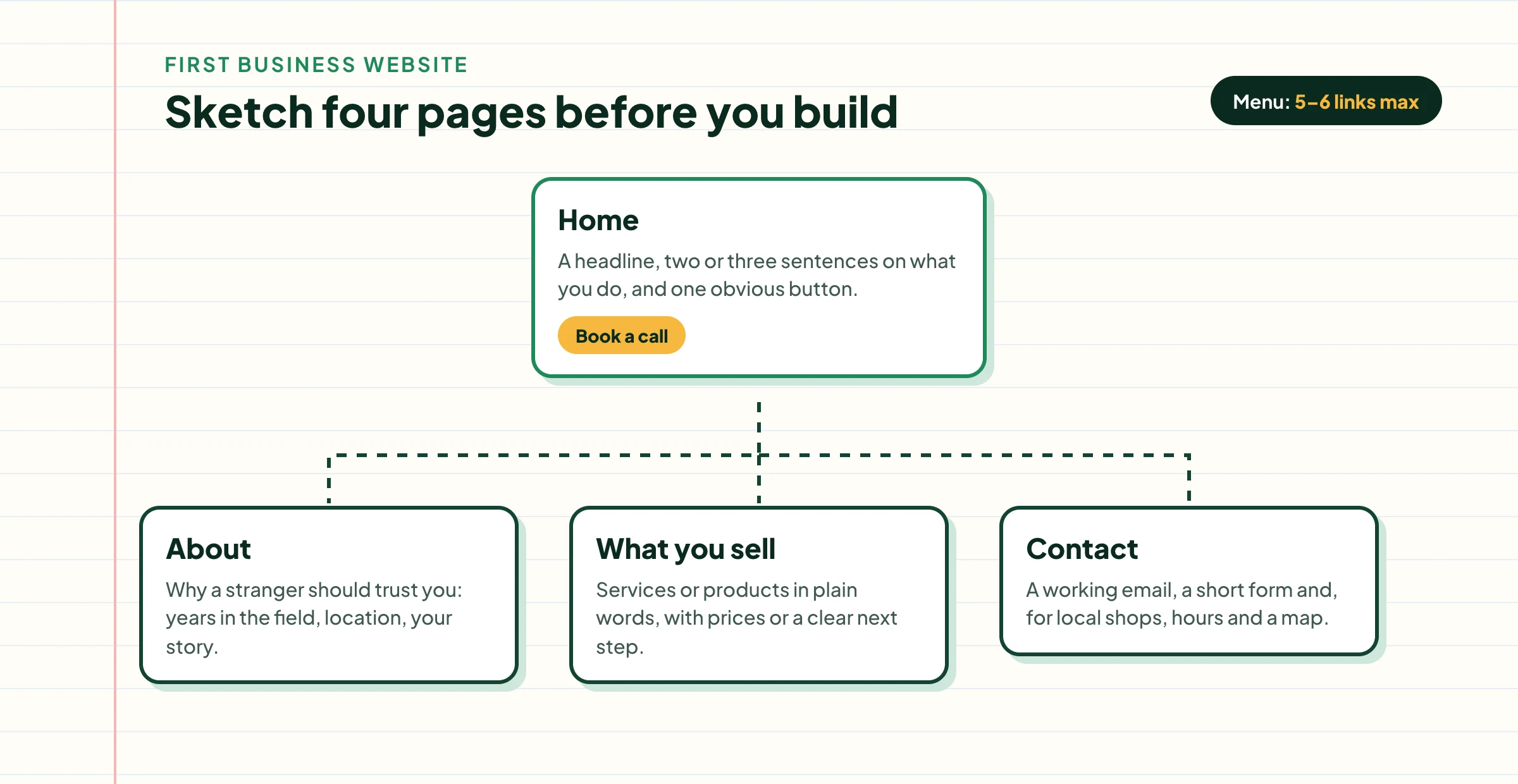
Your home page needs a headline, two or three sentences explaining what you do, and one obvious button. Your about page should answer a simple question: why should a stranger trust you? Real details help here, like how long you’ve worked in your field, where you’re based, or a short story about why you started.
Keep the menu short. If someone has to stop and think about where to click, some of them will just leave.
Write Like You Talk
Good website copy sounds like a person explaining their work across a table. Compare “Innovative solutions for modern businesses” with “Bookkeeping for freelancers who dread tax season.” The second line names the customer and the headache in a few words. The first fits almost any company out there, so it tells a visitor nothing.
Open with what the reader gets, not with your company history. Break text into short paragraphs, because people skim on screens. Finish every page by telling readers what to do next, whether that’s “Book a free call” or “See the price list.” Then read everything out loud. If a sentence makes you stumble while you say it, rewrite it.
Keep the Design Boring (In a Good Way)
You don’t need a custom look to seem professional. You need things to match. Pick one font for headings and another for body text. Choose a main color and one accent, then let white and gray handle the rest. Leave generous space around your text, since crowded pages are tiring to read.
Photos matter more than most people expect. A shot of your actual workshop, product, or face does more for trust than a polished stock image everyone has seen before. Also check that your text is big enough to read without squinting and that it stands out clearly against its background. Those details help every visitor, including people with weaker eyesight.
Check It on Your Phone
Over half of all web visits now happen on mobile, so this part can’t wait until the end. Most current themes and builders adjust automatically, but you still need to look for yourself.
The numbers: StatCounter’s worldwide data has shown mobile devices accounting for more than half of web traffic for most of 2026, so many visitors will see the phone version of your first business website before anything else.
Open the site on your own phone and spend a few minutes tapping around. Can you read the text without pinching the screen? Can your thumb tap the right button without catching something else? Do the images appear quickly? Does the menu open and close the way you’d expect? If anything annoys you, it will annoy visitors too.
Handle the Basic SEO Early
Search engine optimization (SEO) sounds like a specialist’s job, but the starter version is simple, and doing it now spares you a cleanup later.
Give each page its own title, ideally between 50 and 60 characters, with your main keyword placed naturally. Write a short description for each page that tells searchers what they’ll find, since that’s the text they see in the results. Use a single main heading per page and break the rest into subheadings, which helps both readers and search engines follow your structure.
Add short alt text to every image so screen readers and search engines understand what’s in it. Shrink large photos before uploading, because heavy files are a common reason small sites feel slow. Keep your page addresses readable, like yoursite.com/services instead of a string of numbers.
Finally, create a free Google Search Console account and submit your sitemap. It shows which searches bring people to you and warns you about technical problems. You don’t need to master anything beyond this at the start.
Tools that do the busywork: on WordPress, an SEO plugin such as Yoast SEO gives every page fields for its title and description and builds your sitemap for you. A crawler such as Screaming Frog checks the whole site for broken links and missing titles in a few minutes. When you are ready for more, read our guides to white-hat SEO tactics and how UX and SEO work together.
Google sums up what its systems look for as “helpful, reliable information that’s primarily created to benefit people.” Writing for your customers first, as in the steps above, is the safest SEO habit for a first business website.
Give Visitors Reasons to Trust You
Nobody wants to be the first customer of a business they know nothing about. A few small touches calm that worry. Put up a couple of testimonials with real names, and add a short list of past projects or clients if you have them. Show a working email address, not just a form. If you collect email signups or run analytics, include a privacy policy.
Also make sure your site loads over HTTPS. Most hosts and builders switch it on for free, and browsers now flag sites without it as not secure.
Real data: 97% of consumers read reviews for local businesses, according to BrightLocal’s 2026 Local Consumer Review Survey, and Chrome has marked every HTTP page as “Not secure” since July 2018 (Google Security Blog). Testimonials and HTTPS are small jobs with a large effect on how much visitors trust a first business website.
Answer Common Questions Automatically

Once your first business website starts bringing in enquiries, automated replies save hours. A chatbot or a set of saved answers can handle routine questions, such as opening hours, prices or delivery times, so you only step in when a conversation needs a person.
Messaging apps such as WhatsApp and Telegram let customers reach you quickly, without waiting on hold or picking up the phone. Keep a human route for anything a bot cannot answer well. For examples, see our guide to AI chatbots and WhatsApp bots.
Test, Launch, Then Keep Going
Before you announce anything, walk through the site like a stranger would. Click every link. Fill in your own contact form and confirm the message actually reaches you. Open each page on a phone and a laptop. Then hand it to a friend and ask them what the site is about after five seconds. If they hesitate, your main headline needs another pass. Read slowly for typos too, because a couple of spelling slips can make a business look careless.
After launch, share the link on your social profiles, put it in your email signature, and tell the people around you. Give it two weeks, then look at your analytics. Which pages get visits? Where do people drop off? What are they searching for when they find you? Those answers tell you what to rewrite or add next.
A light monthly routine keeps things healthy. Update your theme or plugins, make a backup, fix broken links, publish something new, and reread your most important page with fresh eyes.
Run through this launch checklist before you share your first business website:
Plan Your Content a Quarter Ahead
If you add a blog to your first business website, decide your topics for the next three months in one sitting. A simple content plan means fewer hours each week deciding what to write and who will write it, and a steady stream of posts brings in search traffic over time.
Two sources make this easier:
- Customer content: photos, reviews or stories your customers share with their permission.
- Team content: tips and behind-the-scenes posts from the people who do the work, who often know your customers’ questions best.
Our guide to increasing sales with content and email marketing shows how to turn those posts into leads.
Mistakes I See All the Time
Waiting for perfection tops the list. A decent site that’s live beats a flawless one that never leaves your laptop. The second most common slip is stuffing the menu with too many links, when five or six are plenty for a small business. Others include forgetting a clear call to action, ignoring how the site looks on a phone, skipping analytics, and copying a competitor’s wording. Study what others do, but write in your own voice.
First business website FAQ
How long does it take to build a first business website?
With a website builder or a ready-made WordPress theme, a simple first business website can be live within a day to a week. A custom site from a developer takes longer, because the design and features are made to order.
How many pages does a first business website need?
Most small businesses can start with four: a home page, an about page, a page for what you sell and a contact page. Add a blog later if you plan to write regularly.
Should I use WordPress or a website builder?
Choose a website builder if you want to be online quickly and would rather not manage hosting or updates. Choose WordPress if you want full control and expect the site to grow. Many owners start their first business website simple and move later.
How much SEO does a first business website need at launch?
Only the basics: a unique title and description for each page, one main heading, alt text on images, readable page addresses and a sitemap submitted in Google Search Console.
What makes a first business website look trustworthy?
Real testimonials with names, a visible email address, details about who runs the business, a privacy policy if you collect data, and HTTPS.
Wrapping Up
A first website is mostly a string of small decisions made in a sensible order. Decide what it’s for, choose tools that match your comfort level, write plainly, keep the design tidy, and set up the SEO basics. After that, publish it and let real visitors guide the next round of changes.
Every site you admire started out rough. The owners simply put it online and kept improving it. Do the same.
About this guide: written by Vafa Mahmoudi for Webnus, which builds WordPress themes and plugins used by small businesses. Data points link to their original sources (StatCounter, BrightLocal and Google). Webnus develops the Kata WordPress theme mentioned above. Last updated: November 2026, when we rebuilt this guide to building a first business website and refreshed the layout.