How do you market a hybrid event so both audiences register?
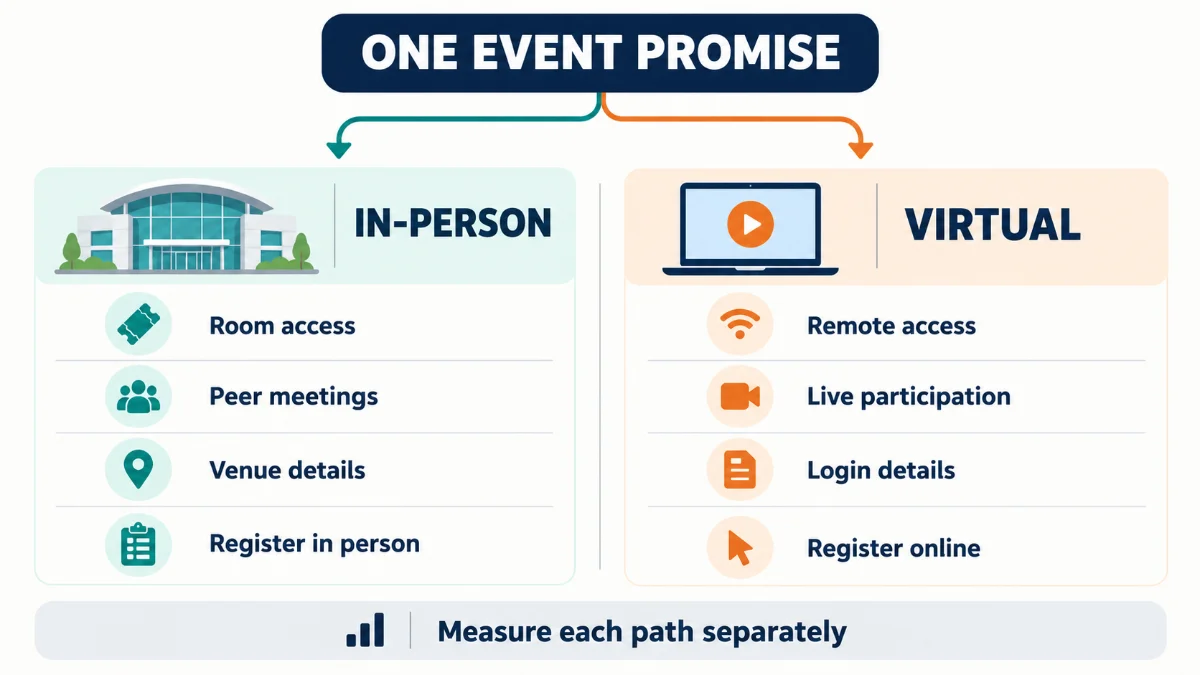
Hybrid event marketing works best when one event promise is adapted into two clear attendance offers. Tell in-person prospects why the room is worth the trip. Tell virtual prospects what they can access, how they can take part, and whether recordings or captions are available. Then put both choices on one event page that makes the differences easy to compare.
Track visits, mode selections, completed registrations, and attendance by source, and diagnose the two paths separately when results slip. Strong virtual registration can hide a weak in-person offer, and a healthy registration total can hide poor attendance. Production, venue, staffing, and platform choices belong in the hybrid event management plan; the marketing plan stays focused on demand, registration, and show rate.
A hybrid event creates two registration decisions. One person is weighing travel, schedule, price, and the value of being in the room. Another is deciding whether the remote experience deserves a place on their calendar.
Treat those people as one audience and the campaign gets easier to produce and harder to believe.
The model that works is simple: one event promise, two attendance offers, two registration paths, and one measurement plan. This guide shows how to build it and how to find the weak point when registrations or attendance fall short.
Build your hybrid WordPress event site with MEC
How should you position one event for two audiences?
Start with one outcome that matters to every attendee. Then explain why each attendance mode is a credible way to reach it.
Say a regional B2B conference promises to help marketing managers leave with a practical 90-day campaign plan. That’s the shared promise. The in-person offer may include a live workshop, peer introductions, and office hours with speakers. The virtual offer may include the same core sessions, moderated chat, accessible live captions, and recordings if the organizer has committed to providing them.
The promise stays stable. The evidence and practical value change by mode. Fill in a table like this before writing ads, email, or social posts:
| Offer element | In-person attendance | Virtual attendance |
|---|---|---|
| Main reason to register | Direct access to the room, people, and activities that require physical presence | Access to the core content and remote participation without travel |
| Common friction | Travel, accommodation, schedule, venue access, and higher price | Time zones, screen fatigue, unclear interaction, and uncertainty about access |
| Proof to show | Venue details, workshop format, networking plan, capacity, and speaker access | Platform preview, chat or Q&A format, caption plan, support route, and replay terms |
| Practical details | Address, arrival time, transport, accessibility, badge or ticket process | Login method, time zone, device requirements, captions, support, and access period |
| Honest urgency | Real capacity or a genuine booking deadline | A genuine live-session, bonus, or registration deadline |
| CTA | Register to attend in person | Register for virtual access |
Don’t promise parity if the experiences differ. A virtual ticket can be valuable without pretending it includes hallway conversations. An in-person ticket can justify travel without treating the online audience as a recording list.
Is hybrid the right format for this event?
Hybrid is a sound marketing proposition only when both attendance modes have a clear audience, a credible experience, and an owner. If one path exists only because the platform can stream video, the campaign will struggle to explain its value.
Before launch, answer these questions:
These are format and operations decisions. They belong in the wider hybrid event management process, but marketing needs the answers. A campaign can’t clarify an offer the event team has left vague.
Keep this section short in the marketing plan. Once the format is confirmed, move back to audience, registration, and attendance. Venue procurement, AV design, streaming production, staffing, and rehearsal need their own planning workflow.
What should a hybrid event landing page include?
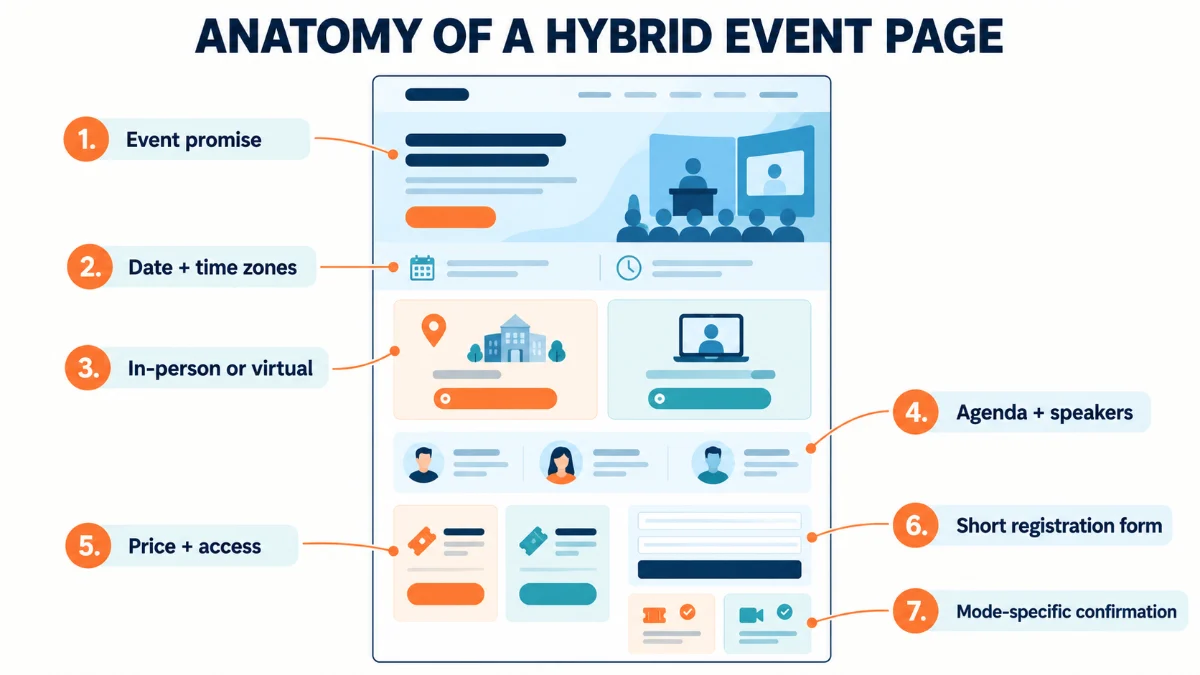
A hybrid event landing page should let visitors understand the event, compare attendance modes, and choose the right registration path without piecing together information from several pages.
Put the shared event promise near the top. Follow it with the date, the relevant time zones, the physical location, and a visible choice between in-person and virtual attendance. Each option needs its own price, access details, inclusions, limitations, and CTA.
The page should answer these questions before the form asks for personal information:
- What will the attendee learn, decide, or complete?
- Who is the event for?
- Which sessions and activities are available in each mode?
- How can each audience participate?
- What does each ticket include?
- When and where does the event happen?
- Are recordings available, and for how long?
- Are live captions or other accommodations available?
- What happens after registration?
- Who can help with access, payment, or technical questions?
Accessibility belongs in the offer, not in a last-minute technical note. The W3C guidance on live captions explains why captions matter for live synchronized media. If captions are available, say so clearly. If accommodation requests follow a specific process, put that route where a prospective attendee can find it before registering.
Every registration form field also needs a reason. Ask for the information required to complete the booking, deliver the selected experience, and communicate with the attendee. Save optional profiling questions for cases where the team will actually use the answers.
For search visibility, apply event information to the individual event page. Google’s Event structured data documentation requires a physical location for its event search experience and says purely virtual events aren’t supported there. A hybrid event has a venue, but the markup still needs to describe the real event accurately.
When should one event use separate landing pages?
One page is the sensible default when both modes share the same audience, promise, agenda, speakers, and brand. A single source reduces the risk of conflicting details and lets visitors compare their options.
Separate landing pages can make sense when the sales journeys truly differ: different languages, regional time zones, pricing models, agendas, buyer roles, or registration systems. In that case, keep a clear parent event page that explains the relationship and sends each visitor to the right path.
Don’t split the pages just to create more campaign destinations. Every extra page is another set of event details that has to stay accurate.
Which channels should reach each attendance mode?
Choose channels by audience fit, then align the message and the landing-page destination. Reach alone says little if the people clicking have no reason to choose the offer they see.
Here is a practical hybrid event promotion matrix:
| Audience | Message emphasis | Useful channels | Destination check |
|---|---|---|---|
| Local prospects | In-room access, workshops, peer meetings, venue convenience, and real capacity | Local email segments, regional partners, speakers, communities, organic social, and location-targeted paid media | The page should open with the in-person value or make that choice immediately visible |
| Remote prospects | Core content, time-zone fit, participation, captions, support, and replay terms if offered | Broader email segments, professional networks, speaker audiences, online communities, and paid media by role or interest | The page should show virtual access details without making the visitor search for them |
| Existing customers or members | Relevance to their current work, member access, account benefits, and the next practical outcome | Customer email, member newsletter, in-product or account communication where appropriate | The registration path should recognize eligibility and avoid contradictory pricing |
| Partner or sponsor audiences | The specific session, speaker, resource, or community benefit that connects the partner to the event | Partner email, co-authored posts, speaker profiles, sponsor channels, and community announcements | Each link should lead to a page that supports the promise used in the partner message |
Message-to-page consistency deserves a manual check. Read the ad, email, or post. Then open the destination as if you had no other context. The audience, outcome, attendance mode, date, and price should all be easy to confirm.
How can speakers, sponsors, partners, and staff help promotion?
Give collaborators a small distribution kit with a clear audience, a useful message, approved creative, a deadline, and a trackable link. A request to “share the event” leaves too many decisions to the person receiving it.
A useful kit can include:
- One short email for local prospects and one for remote prospects
- Two to four social posts matched to the collaborator’s audience
- Speaker or session artwork in the correct sizes
- The correct registration destination for each attendance mode
- Source parameters or another agreed tracking method
- A schedule that says what to share and when
- A contact for corrections and access questions
Keep the voice credible. A speaker can explain what their session will help an attendee do. A sponsor can invite a relevant community. Employees can share a specific reason they care about the event. Copy that makes every participant sound like the same corporate account wastes the trust that made these channels useful in the first place.
What should a hybrid event marketing timeline include?
A hybrid event marketing timeline should follow the decisions prospects make: understand the promise, trust the event, choose a mode, complete registration, and remember to attend. The exact calendar depends on the event’s price, audience, buying cycle, and complexity.
PCMA’s guidance on promotion timing also treats timing as a planning decision rather than one universal launch date. Build phases around what must be true before the next phase starts.
| Phase | Main job | Campaign work | Readiness check |
|---|---|---|---|
| 1 Foundation | Make the offer ready to explain | Confirm both mode offers, page ownership, pricing, registration, tracking, access, and support | Can a new visitor compare both choices and register? |
| 2 Launch | Reach the clearest initial audience | Send the announcement, publish core social assets, activate speakers and partners, and begin paid promotion if approved | Does every message match its destination? |
| 3 Proof | Reduce uncertainty | Release agenda details, speaker previews, examples of the experience, venue information, and remote participation details | Are the major objections answered with evidence? |
| 4 Decision period | Help interested prospects act | Segment follow-up by mode, address price or access questions, and use genuine deadlines | Are clicks turning into completed registrations? |
| 5 Final week | Protect attendance | Confirm calendars, venue arrival, login access, time zones, support, and last registration rules | Does each attendee have the right mode-specific information? |
| 6 Event and follow-up | Support attendance and the next action | Provide help, record attendance, send resources, and follow up by mode and session interest | Can the team connect registration source with attendance and follow-up? |
LinkedIn’s event marketing guidance also organizes the work before, during, and after an event. The practical point is ownership: someone has to handle reminders, access, and follow-up once people have registered.
Late registration needs an explicit rule. Someone who registers near the start time still needs the correct venue or login details without waiting through a slow manual approval.
How do you protect show rate after registration?
Registration records intent. Attendance proves the attendee reached the experience. The confirmation and reminder sequence connects the two, so send information according to the selected mode.
For in-person attendees, include:
- Venue name and full address
- Arrival and check-in time
- Transport or parking details when relevant
- Accessibility and accommodation contacts
- Ticket, badge, or identification requirements
- A calendar entry with the local time
For virtual attendees, include:
- Login link or a clear statement of when it will arrive
- Time zone and calendar entry
- Supported device or browser details when required
- Caption and participation information
- Technical support route
- Replay terms, if recordings are part of the offer
Send an immediate confirmation, then schedule reminders around the event’s buying cycle and complexity. Don’t copy the same reminder to both groups. A venue address does nothing for a remote attendee, and a webinar login link can confuse someone holding an in-person ticket.
If attendees can change modes, update the registration record, confirmation, reminders, payment status, and capacity count together.
Which hybrid event marketing metrics matter?
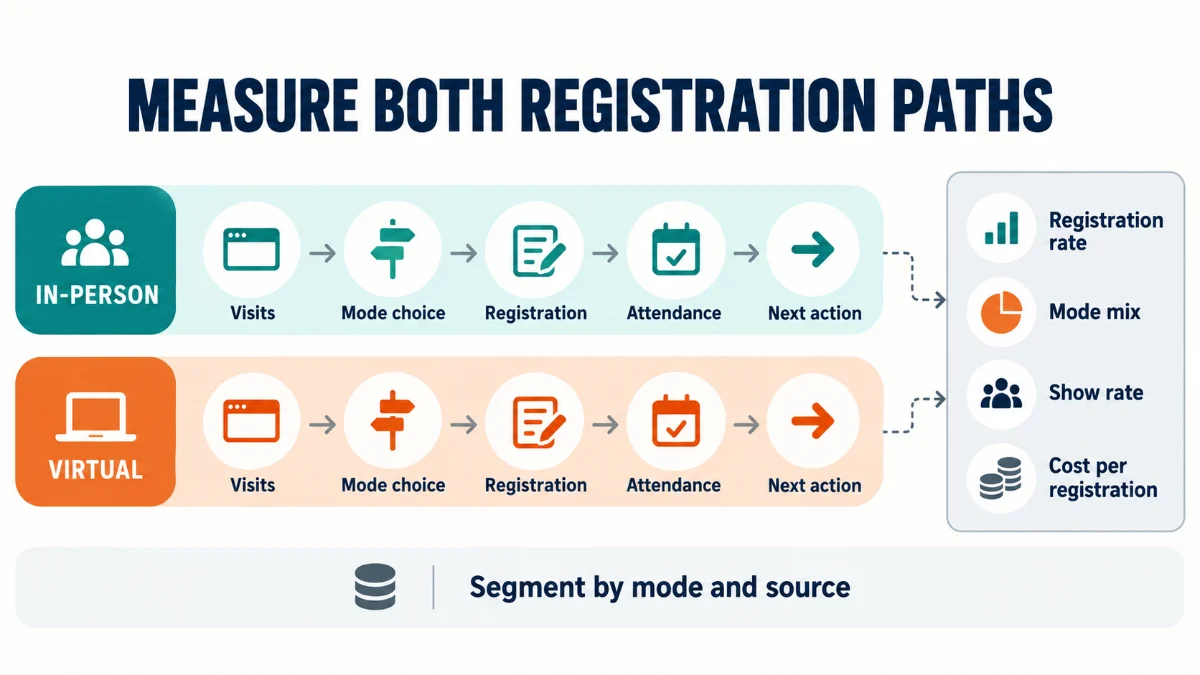
Track the few measurements you need to locate the weak stage: relevant page visits, attendance-mode selection, completed registration, attendance, and the next action. Segment them by mode and campaign source.
At minimum, calculate:
completed registrations ÷ relevant event-page visits × 100registrations for each mode ÷ total completed registrations × 100attendees ÷ completed registrations for that mode × 100campaign spend ÷ attributed registrations (only when spend and attribution data are reliable)attendees who complete the chosen next action ÷ attendees × 100In GA4, a completed registration can be recorded as an event and marked as a key event when it represents an important business action. Follow the current Google Analytics key-event guidance and avoid the old Universal Analytics term “goal.”
Don’t treat a click on the registration button as a completed registration. If the booking or payment happens after that click, track the completion point. Otherwise the report describes interest while the team believes it describes bookings.
How do you diagnose weak hybrid event registrations?
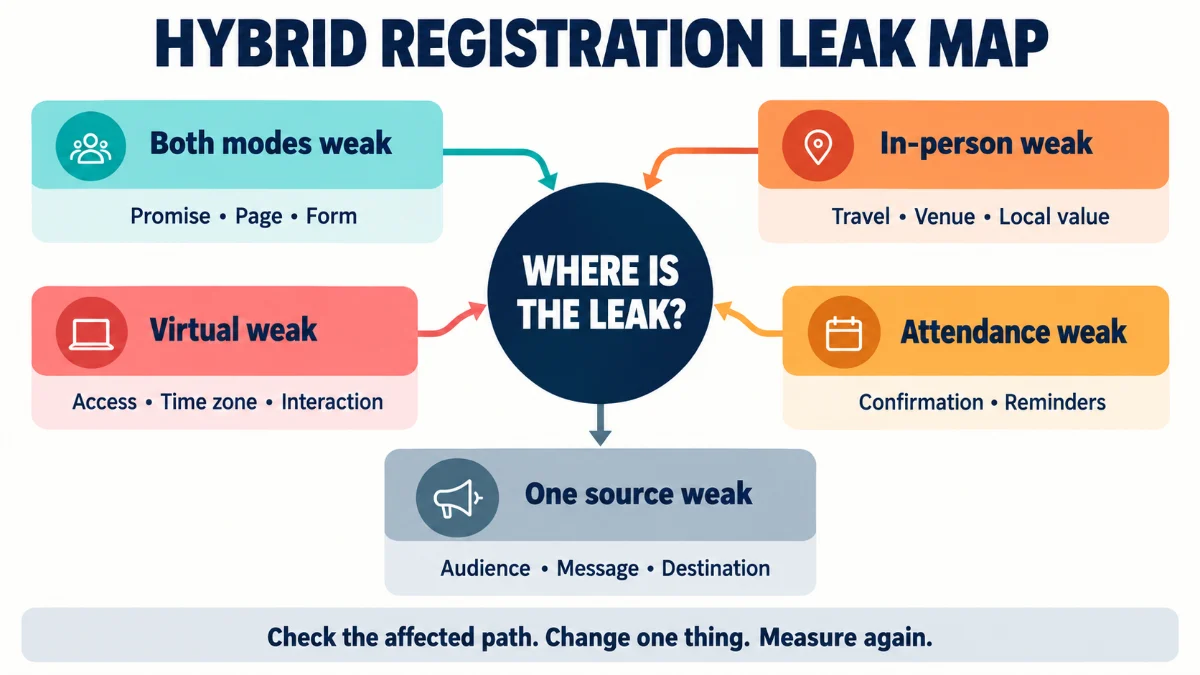
Look at the in-person and virtual paths separately before changing the whole campaign. The total can hide a weak offer, page, source, or reminder sequence. Use this two-path registration leak map:
| Signal | Likely problem | In-person check | Virtual check | Corrective action | Metric |
|---|---|---|---|---|---|
| Good traffic, weak registrations in both modes | Weak promise, poor proof, unclear CTA, or form friction | Review the page and form | Review the page and form | Clarify the outcome, proof, price, and next step. Remove fields that aren’t needed. | Visit-to-registration rate |
| Virtual converts, in-person doesn’t | Travel, date, venue, price, or local value is unclear | Audit venue details, access, networking, and capacity value | Confirm the shared event promise still matches the remote offer | Strengthen the local reason to attend and remove logistics uncertainty | In-person conversion rate |
| In-person converts, virtual doesn’t | The online experience looks secondary or access is vague | Confirm the shared event promise still matches the room experience | Audit interaction, replay, captions, time zone, and support | State the remote experience and access terms clearly | Virtual conversion rate |
| Registrations are healthy, attendance is weak | Confirmation, calendar, access, or expectation problem | Check arrival details and venue reminders | Check login and technical reminders | Segment confirmations and reminders by mode | Show rate by mode |
| One source sends traffic but few registrations | Audience, message, or destination mismatch | Compare local targeting with the page promise | Compare remote targeting with the page promise | Change the segment, promise, creative, or destination | Registrations and cost per registration by source |
The map prevents random optimization. More posts won’t repair unclear virtual access. A shorter form won’t fix a local offer that gives people no reason to travel. A longer reminder sequence won’t rescue a page that never earned the registration.
Work from the signal toward the closest plausible cause. Change one material part of the path, record the date, and compare the relevant metric.
Where does Modern Events Calendar fit?
On a WordPress site, the event tool can handle parts of the page, booking, attendee, and access workflow. It still needs the offer, campaign, analytics plan, streaming service, and event team around it.
Webnus develops Modern Events Calendar. The MEC Booking Settings documentation shows that the booking workflow supports ticket-related settings, booking forms, and conditional fields. Those options help a site owner present attendance choices and collect information relevant to the selected ticket without forcing every attendee through the same questions.
The MEC Virtual Events addon can show or email virtual access details and restrict them to booked users. That’s useful after someone picks the remote path. It doesn’t create the remote experience, write the marketing plan, or replace the streaming platform.
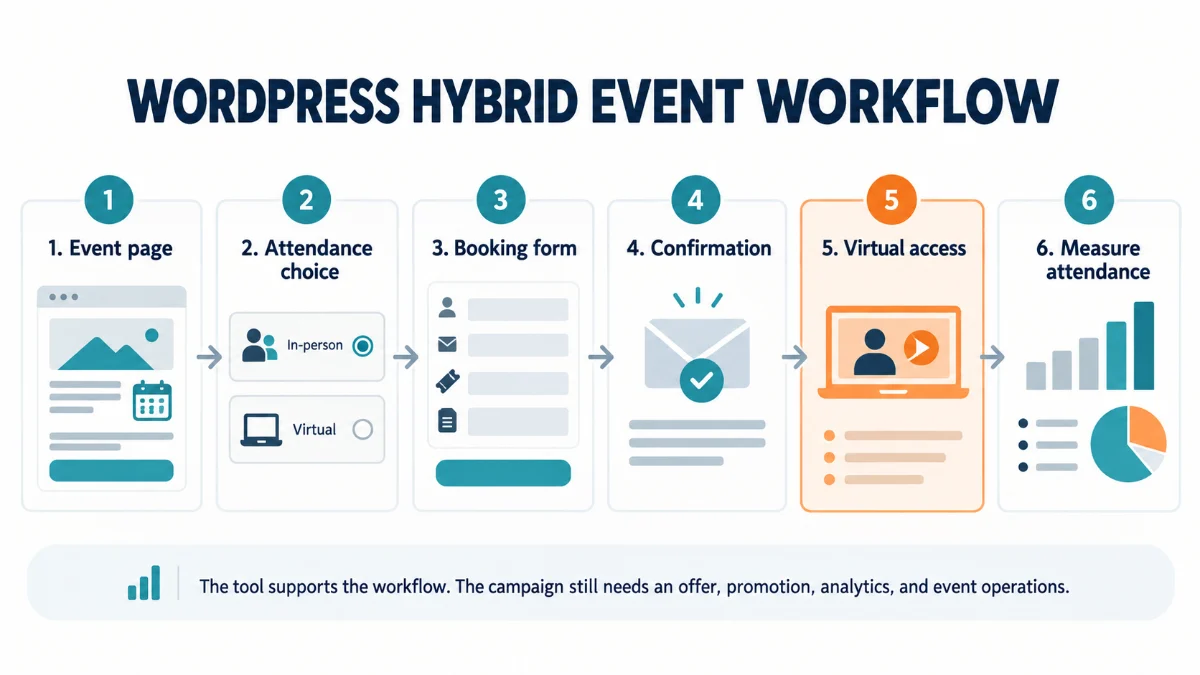
A practical WordPress workflow may look like this:
- Publish one event page with the shared promise and both attendance options.
- Use clearly named tickets or booking choices for in-person and virtual attendance.
- Show conditional booking fields only when the selected option requires them.
- Send mode-specific confirmation and access details.
- Record completed registration and attendance in the measurement plan.
Build the campaign sheet before adding more tactics
Write the shared event promise at the top of one page. Under it, describe the in-person offer and the virtual offer in plain language. Add the destination for each audience, the registration completion point, the reminder owner, and the core measurements the team will review.
That sheet makes weak decisions visible early, and it gives campaign writers, partners, event staff, and analysts the same reference.
When results arrive, resist the urge to change everything. Find the leaking path, inspect the nearest likely cause, and make the smallest useful correction. That’s how a hybrid event marketing strategy becomes a working registration system instead of a longer list of promotional ideas.
See how MEC handles hybrid event bookings
Frequently asked questions
How do you market a hybrid event?
Define one shared outcome, then give each attendance mode a clear reason to register. Build a page that compares both choices, match campaign messages to local and remote segments, track completed registrations by source and mode, and send different access reminders to each group.
Should in-person and virtual attendees receive the same message?
The shared event promise should be consistent, but the supporting message should change. In-person prospects need venue, travel, capacity, and room-specific value. Virtual prospects need access, time-zone, participation, caption, support, and replay details that accurately describe the remote experience.
How early should you promote a hybrid event?
There’s no dependable universal lead time. Price, audience familiarity, travel, internal approval, speaker schedules, and event complexity all affect the timeline. Start when both offers, the event page, the registration flow, tracking, and support are ready to handle the attention the campaign creates.
Which metric matters most for a hybrid event campaign?
No single metric explains the whole path. Start with visit-to-registration rate and show rate, segmented by attendance mode and campaign source. That combination separates a weak offer or registration page from a confirmation, access, or reminder problem.
How is hybrid event marketing different from hybrid event management?
Marketing covers audience, positioning, promotion, registration, reminders, and measurement. Management covers the wider work of producing the event: venue, platform, staff, speakers, AV, streaming, support, rehearsal, and day-of delivery.