Activation hors ligne
Dans cet article, nous vous guiderons pas à pas dans l'activation Modern Events Calendar sur les serveurs qui ne peuvent pas accéder à notre serveur de licences, ou lorsque vous avez acheté votre copie auprès d'un revendeur et que vous ne disposez pas d'un code d'achat.
Qui a besoin d'une activation hors ligne ?
La plupart des utilisateurs doivent activer MEC avec leur code d'achat, comme indiqué dans l' article Activation . L'activation hors ligne est prévue dans deux cas :
- Votre serveur a aucune connexion Internet sortante (hébergement protégé par pare-feu, isolé du réseau ou réservé à l'intranet), MEC ne peut donc pas vérifier un code d'achat en ligne.
- Vous avez acheté MEC par l'intermédiaire d'un revendeur et je n'ai pas reçu de code d'achat.
Un jeton d'activation hors ligne est une clé signée, valable pour un seul site, générée par notre équipe d'assistance spécifiquement pour votre adresse web. Il débloque les fonctionnalités Pro sur ce site précis pendant une période limitée, sans aucune connexion à nos serveurs.
Étape 1 — Copiez l'adresse de votre site
Un jeton hors ligne ne fonctionne que sur l'adresse du site pour lequel il a été émis. Afin de garantir que le jeton est bien celui du site concerné, MEC affiche l'adresse de votre site sur le formulaire de licence.
Accédez au tableau de bord WordPress > MEC > Tableau de bord et faites défiler jusqu'à la section Activation hors ligne . Vous verrez :
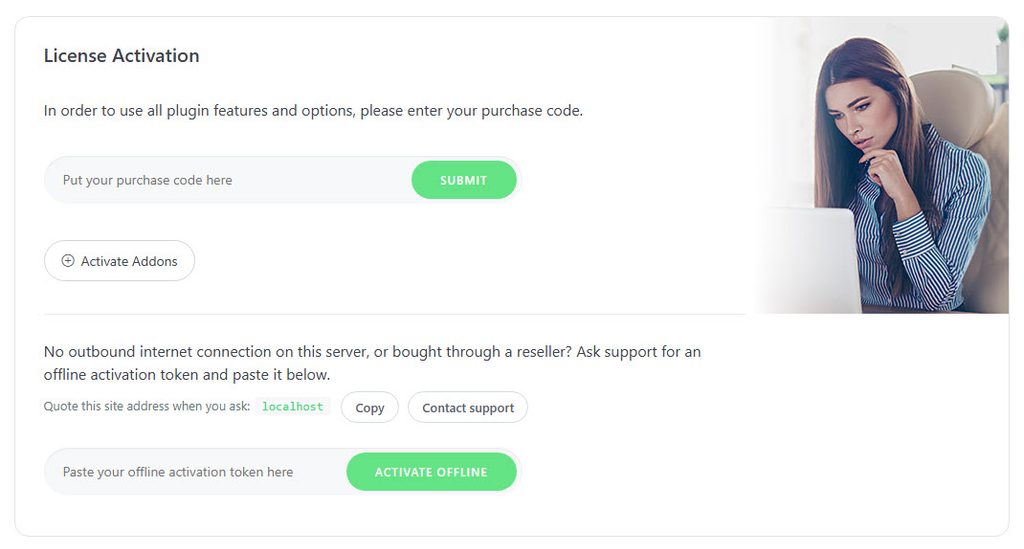
Veuillez indiquer l'adresse de ce site lorsque vous posez la question : yourdomain.com
Cliquez sur Copier bouton à côté. Si votre domaine est différent de ce que vous saisissez dans le navigateur (un sous-domaine, un chemin ou une chaîne de caractères égarée), cliquez dessus. www), veuillez toujours nous envoyer l'adresse exactement comme elle apparaît dans le système MEC — un jeton émis pour une adresse incorrecte sera refusé.
Étape 2 — Contacter l'assistance
Cliquez sur Contacter le Support bouton dans la même case, ou visitez webnus.net/supportet ouvrez un ticket qui comprend :
- L'adresse du site copiée à l'étape 1.
- Preuve d'achat (votre numéro de commande, facture ou reçu du revendeur).
Notre équipe vérifiera votre achat et vous enverra votre jeton d'activation hors ligne.
Étape 3 — Activer hors ligne
De retour dans le tableau de bord WordPress > MEC > Tableau de bord , collez le jeton dans le champ sous Collez ici votre jeton d'activation hors ligne et cliquez sur Activer hors ligne.
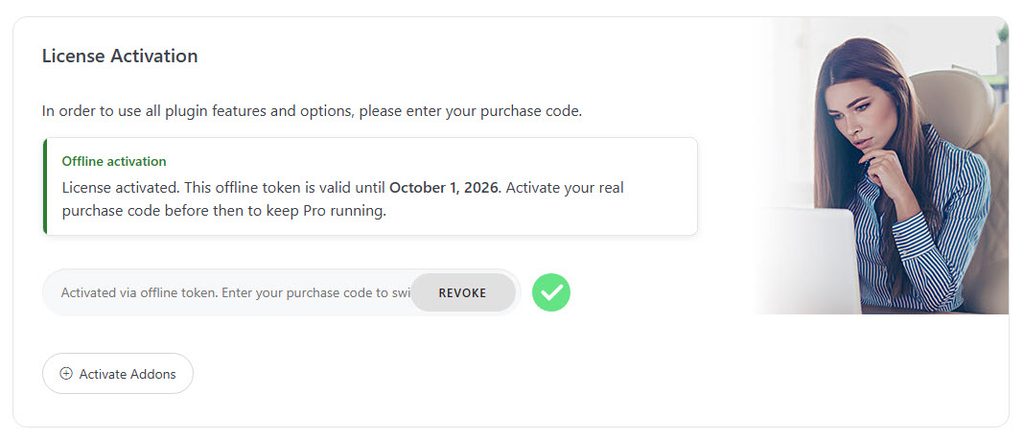
Si le jeton est valide et a été émis pour cette adresse de site précise, le MEC s'active immédiatement et les fonctionnalités Pro deviennent disponibles. Aucune connexion Internet n'est requise pour cette étape.
Expiration du jeton
Les jetons d'activation hors ligne sont valides pendant une période limitée (environ 30 jours) à compter de leur date d'émission. Pendant la durée de validité d'un jeton :
- Le tableau de bord affiche une notification indiquant la date d'expiration exacte de votre jeton : « Votre jeton d’activation hors ligne expire le {date}. »
- Le champ du code d'achat affiche l'indication « Activé via un jeton hors ligne. Saisissez votre code d'achat pour changer. »
Maintenir sa licence en vigueur
Avant la date d'expiration, saisissez votre code d'achat dans le champ prévu à cet effet et validez. Le site passera alors à une licence en ligne classique, renouvelable automatiquement et ne nécessitant plus de jeton.
Si vous avez reçu votre jeton parce que votre serveur n'a pas de connexion sortante, mais que la connexion est rétablie ultérieurement, il vous suffit de l'activer avec votre code d'achat ; rien d'autre ne change.
Après l'expiration du jeton
Une fois qu'un jeton hors ligne expire, les fonctionnalités réservées aux utilisateurs Pro cessent de fonctionner jusqu'à ce que le site soit à nouveau licencié :
- Sauvegarder un événement ne pas persister Données réservées aux pros (options de réservation, billets, frais, champs du formulaire de réservation, horaire, données de l'événement, galerie, notifications, etc.), et MEC affiche une notification d'administrateur indiquant précisément quelles fonctionnalités n'ont pas été enregistrées.
- Un message non désactivable sur le tableau de bord vous rappelle de souscrire une licence pour le site.
Vos événements et réservations ne sont jamais supprimés. Pour rétablir les fonctionnalités Pro, activez-les avec un code d'achat valide ou demandez au support de générer un nouveau jeton.
QFP
Puis-je utiliser un seul jeton sur deux sites web ?
Non. Un jeton est signé pour une adresse de site précise et est refusé partout ailleurs.
J'ai collé le jeton mais l'activation a échoué.
Comparez l'adresse du site affichée dans l'encadré « Activation hors ligne » avec celle que vous avez communiquée au support. Si elles diffèrent, répondez à votre ticket et demandez un jeton généré pour l'adresse affichée par MEC.
Est-ce que MEC contacte son serveur lorsque je suis sur un jeton hors ligne ?
MEC tente périodiquement de se connecter au serveur de licences. Si ces tentatives échouent (par exemple, sur un serveur isolé du réseau), un jeton valide et non expiré permet de maintenir les fonctionnalités Pro actives.