Skip to content
No results
Modern Events Calendar logo
  • Installation
    • Installation
    • Activation
    • Auto Update
    • Manual Update
    • Change License Domain
  • Settings
    • General
    • Archive Page
    • Slugs/Permalinks
    • Currency
    • View All
  • Single Event
    • Single Event Settings
    • How to Add Event In MEC Plugin?
    • MEC Single Sidebar
    • Custom Fields
    • View All
  • Event Modules
    • Speakers
    • Organizers
    • Locations
    • Map
    • View All
  • Booking Settings
    • Booking Module
    • Booking Elements
    • Booking Form
    • Payment Gateways
    • View All
  • Event Submission
    • General
    • Access Level
    • FES Sections
    • Required Fields
    • View All
  • Integrations
    • Mailchimp
    • Paid Memberships Pro
    • BuddyPress
    • LearnDash
    • View All
  • Notifications
    • Booking Notification
    • Booking Confirmation
    • Booking Reminder
    • Admin Notification
    • View All
  • Addons
    • Elementor Single Builder Addon
    • Ticket and Invoice Addon
    • Event Seat Addon
    • Virtual Events Addon
    • View All
  • Other
    • Appearance Settings
    • Translation
    • Knowledge
    • Troubleshooting
    • Developer
Modern Events Calendar logo

  • Categories
    • Installation
      • Installation
      • Activation
      • Auto Update
      • Manual Update
      • Change License Domain
    • General Settings
      • General
      • Archive Pages
      • Slugs/Permalinks
      • Currency
      • View All
    • Single Event
      • Single Event Settings
      • MEC Single Sidebar
      • How to Add Event In MEC Plugin?
      • Custom Fields
      • View All
    • Event Modules
      • Speakers
      • Organizers
      • Locations
      • Map
      • View All
    • Booking Settings
      • Booking Module
      • Add a Booking System
      • Booking Form
      • Organizer Payment Settings
      • View All
    • Event Submission
      • General
      • Access Level
      • FES Sections
      • Required Fields
      • View All
    • MEC Integrations
      • Mailchimp
      • BuddyPress
      • LearnDash
      • Paid Memberships Pro
      • View All
    • Notifications
      • Booking Notification
      • Booking Confirmation
      • Booking Reminder
      • Admin Notification
      • View All
    • Addons
      • Elementor Single Builder Addon
      • Ticket and Invoice Addon
      • Event Seat Addon
      • Virtual Events Addon
      • View All
    • Other
      • Appearance Settings
      • Translation
      • Knowledge
      • Troubleshooting
      • Developer

Submit a Ticket
Modern Events Calendar logo

Toggle
  • Cover View Skin Shortcode
  • Cover View Layout
  • Cover View Shortcode Options
  • Cover View FAQ
    • How do I add the Cover View to a page?
    • Which event does the Cover View show?

Shortcodes

Cover View Skin Settings

 Cover View Skin in the Modern Events Calendar is excellent for featuring your top programs and events. It brings attention to an event.

Cover View Skin Shortcode

You can use shortcodes in your internal pages to have this on your website. The shortcodes are located in M.E. Calendar > Shortcodes.
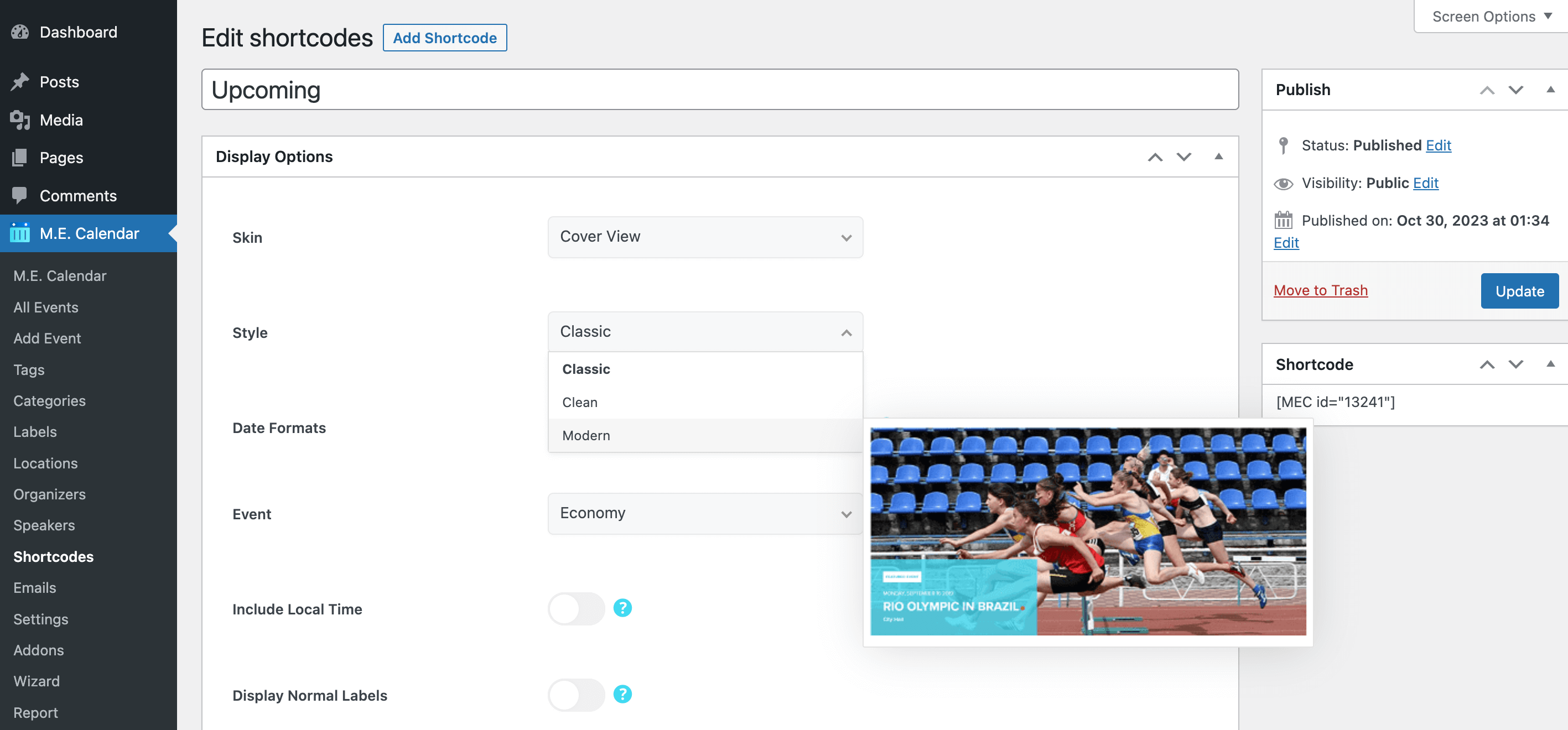
Cover View Skin

Cover View Layout

Here is the demo of Cover View Skin in the Modern Events Calendar:

  • Cover View – Classic
  • Cover View – Modern
  • Cover View – Clean

Cover View Shortcode Options

These are the options you see in M.E. Calendar > Shortcodes after choosing the Cover View skin. MEC Pro and some addons can add more styles and options.

OptionWhat it doesValues
StyleLayout style of this view.Classic / Clean / Modern
EventThe event this view features.Any published event
Include Local TimeAlso shows each event's time in the visitor's own time zone.On / Off
Display Normal LabelsShows event labels such as "Featured" or "Canceled".On / Off
Display Reason for CancellationShows the cancellation reason on canceled events.On / Off
Date FormatsDate formats used by the selected style, written with PHP date characters.Text (e.g. j, M, Y)

Cover View FAQ

How do I add the Cover View to a page?

Go to M.E. Calendar > Shortcodes, add a new shortcode, choose Cover View as the skin, set the options above and publish it. Then copy the generated shortcode (for example [MEC id="123"]) into any page, post or widget.

Which event does the Cover View show?

It shows one event, the one you pick in the Event option. To feature another event, create another shortcode.

Share

Related Articles

  • General Calendar View Skin Settings
  • Tile View Skin Settings
  • Timeline View Skin Settings
  • Masonry View Skin Settings
  • Agenda View Skin Settings
Login Submit
0 Comments

No Comment.

Still no luck? We can help!

If you did not find what you were looking for, please submit a ticket in our support system.

Submit a Ticket
Webnus Banner
Modern Events Calendar

Please read our Terms and Conditions and Privacy Policy.

4.2 Great

About 11 Review us on Trustpilot

Copyright © 2026. All rights reserved. Webnus Inc.