



Kata’s Subscription Form widget adds an email signup form to any page you build with Elementor. When a visitor submits the form, the email address is sent to your Mailchimp audience, so you can send newsletters from Mailchimp.
Before You Start: Use Mailchimp, Not FeedBurner
The widget’s Source URL option lists two services: Feedburner and Mailchimp. Google turned off FeedBurner’s email subscriptions in 2021, so a FeedBurner form no longer sends emails to anyone. Choose Mailchimp. If an existing page still uses a FeedBurner form, switch it to Mailchimp using the steps below.
You need a Mailchimp account with at least one audience. The free Mailchimp plan is enough for this.
Step 1: Get Your Mailchimp Form URL
- Log in to Mailchimp, open the Forms menu and select Other forms.
- Select Create new form, then Create embedded form.
- Give the form a name, pick the audience that should receive the signups and select Continue to builder.
- Make sure the form has an Email Address field, then select Continue and Copy Code.
- Paste the code into a text editor and find the
actionattribute of the<form>tag. Copy only the address between the quotes. It looks like this:https://yourname.us21.list-manage.com/subscribe/post?u=...&id=...
Mailchimp’s menus change from time to time. If you can’t find these options, Mailchimp’s guide Add a Signup Form to Your Website shows the current steps.
Step 2: Add the Subscription Form Widget
Open the page in Elementor, search for Subscription Form in the widgets panel and drag it where you want the form to appear.

Step 3: Connect the Form to Mailchimp
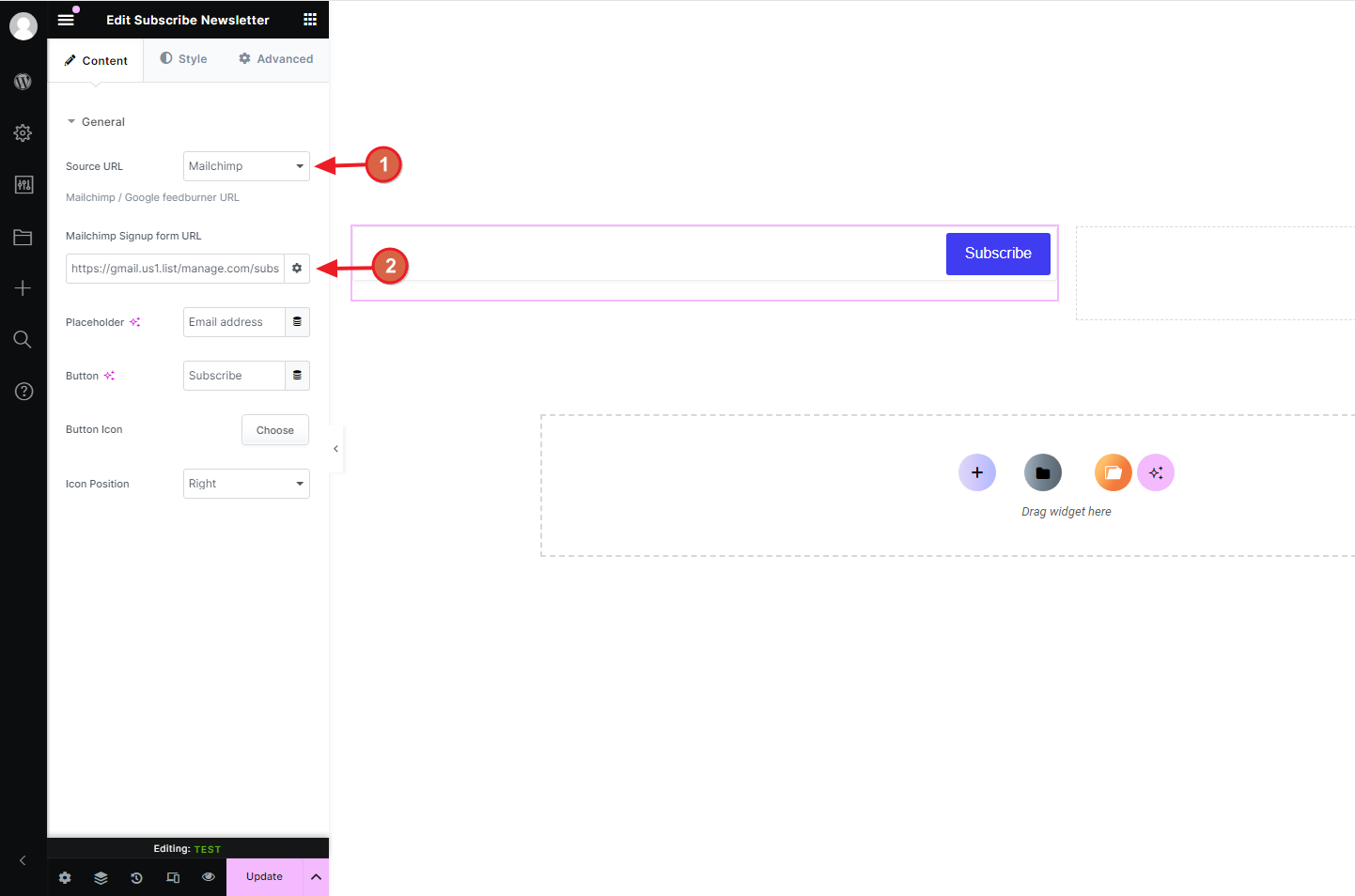
- In the widget’s General section, set Source URL to Mailchimp.
- Paste the address you copied in Step 1 into Mailchimp Signup form URL.
- Change the Placeholder text and the Button label if you like, and choose a button icon and its position.
- Update the page.
Step 4: Style the Form
Open the Styler section of the widget to style the wrapper, the email field, its placeholder, the button and the button icon. Kata icons are SVG, so change their color from the SVG tab in Styler.

Step 5: Test the Form
Open the page while logged out and subscribe with an email address you can check. The form opens Mailchimp in a new tab to confirm the signup. If your audience uses double opt-in, Mailchimp sends a confirmation email first, and the contact appears in your audience after you confirm it.
Troubleshooting
- Nothing happens or Mailchimp shows an error: check that you pasted only the
actionaddress, not the whole embed code. - The signup goes to the wrong list: the address belongs to one audience. Create the embedded form again for the right audience and paste its address.
- The form still mentions FeedBurner: set Source URL to Mailchimp and update the page.