

Author Builder
The Kata Author Builder is a specialized tool within the Kata theme, designed specifically for managing and customizing the display of authors’ posts and blog content. This tool allows users to easily design and manage author-related pages with customizable settings and styles, all without requiring any coding knowledge.
Use Cases for Kata Author Builder:
Section titled “Use Cases for Kata Author Builder:”This tool is ideal for news websites, online magazines, multi-author blogs, and platforms featuring content created by different contributors. It helps highlight authors’ identities, enriching the user experience and adding a professional touch to your website.
To create an Author page using the Author Builder in the Kata theme, follow these steps:
1- Enable the Author Builder
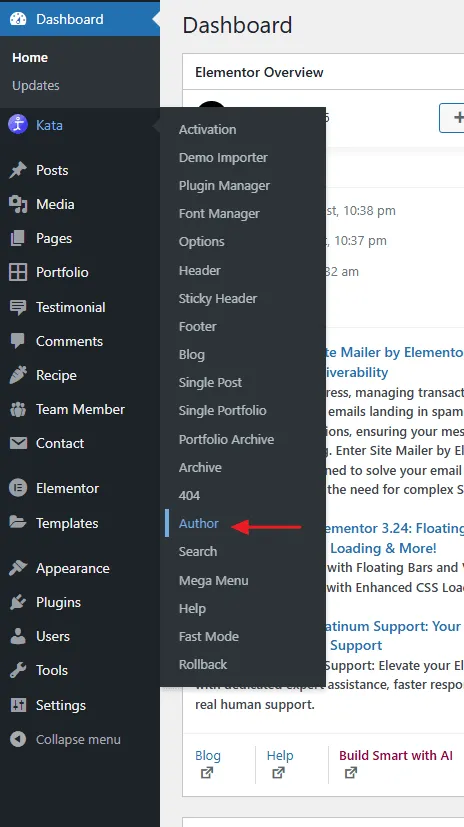
Section titled “1- Enable the Author Builder”In the WordPress dashboard, navigate to the Kata menu and click on the Author submenu.
2- Create a New Kata Author Or edit the existing Kata Author
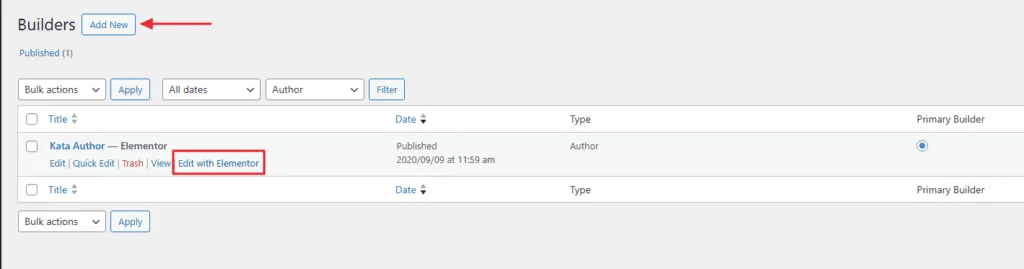
Section titled “2- Create a New Kata Author Or edit the existing Kata Author”You’re redirected to the Builders page. Click on Add New to start designing a new Author.
Provide a name for your Author (e.g., “Main Author” or “Kata Author”) for easy identification. Save your Author to proceed.
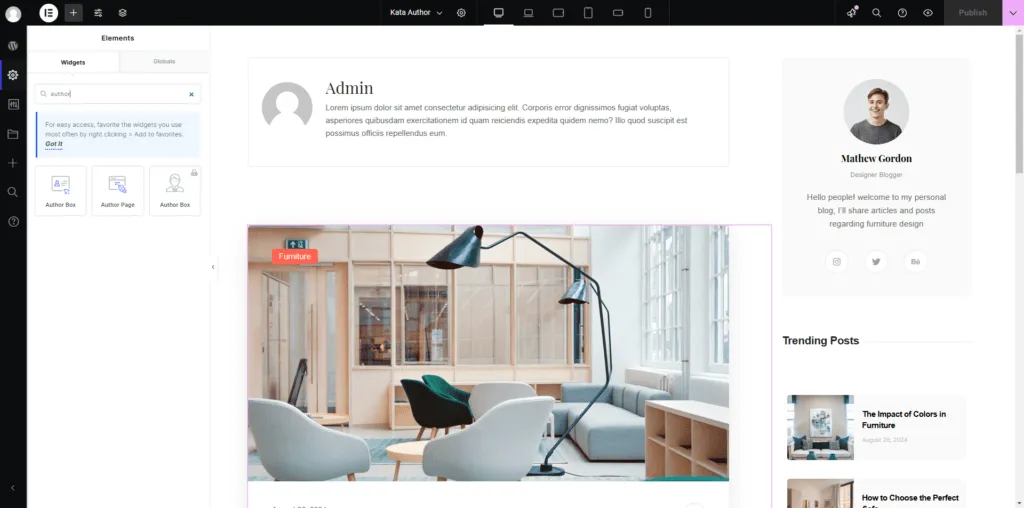
If you already have an Author, click on “Edit with Elementor” to open Elementor’s editor, where you can add various elements and customize your Author design.
3- Configure Author Details
Section titled “3- Configure Author Details”Name: Enter the author’s full name.
Profile Picture: Upload a profile image for the author.
Bio: Write a short biography or description of the author.
Social Media Links: Add URLs for the author’s social media profiles (e.g., Twitter, Facebook, LinkedIn).
Contact Information: If applicable, include email or other contact details.
4- Assign Posts
Section titled “4- Assign Posts”Link the author to specific posts or categories if needed, ensuring their contributions are displayed correctly.
5- Customize the Author Page
Section titled “5- Customize the Author Page”Utilize the customization options in the Styler to design the author page, including adjustments to colors, fonts, and layout.
6- Save and Publish
Section titled “6- Save and Publish”Once all details are entered and customized, click Save or Publish to finalize the new author profile.
This process allows you to effectively manage and present author information on your website using the Kata Author Builder.