



You can customize every WooCommerce pages using Elementor page builder
ShopPress Builder offers this option and it allows your users to simply filter products by Category, Brand, Color, Rating, Tag, Size and Price, and find what they are looking for in a matter of seconds.
Off-Canvas panel widget is a fly-out content panel for showcasing contents like WooCommerce Filter, Wishlist, Cart etc. This panel can be in various formats like, Drop-Down, Popup and Slide-in.
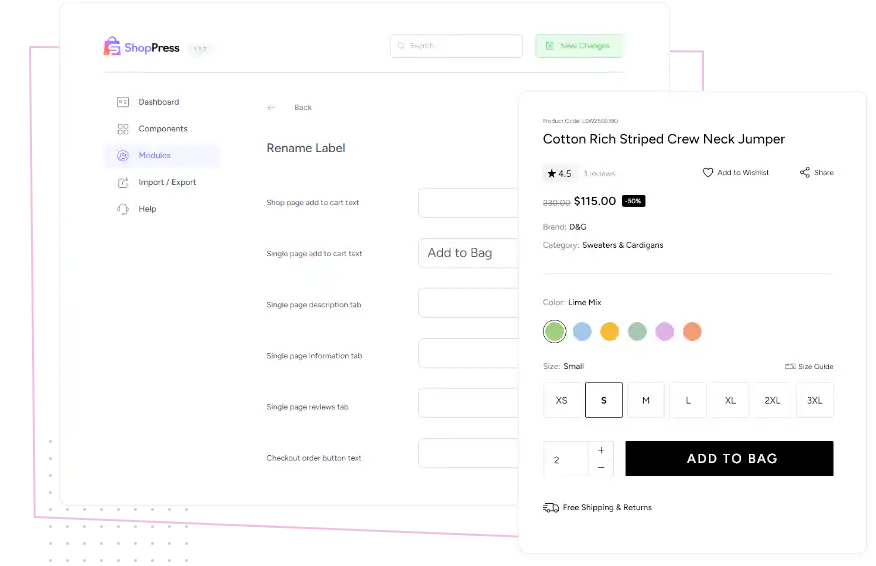
Enables translating and customizing pre-defined WooCommerce strings like add to cart text, single product tabs, checkout form text and etc.

If you are looking for a way to customize the text on your website, you might be interested in this module. It offers a range of options to modify different strings, such as the Shop page add to cart text, Single page add to cart text, and Single page description tab. By using this tool, users can easily tailor the text to their specific requirements. Whether you need to adjust the wording to match your branding, make it more appealing to your target audience, or simply improve the user experience, this module makes it possible.
ShopPress Rename Label lets you change default WooCommerce text without code or translation files. You can rewrite the add to cart text on the shop and product pages, the description, additional information and reviews tab titles, and the place order button. Rename Label is included in both ShopPress Free and ShopPress Pro.
| Text | Where it appears |
|---|---|
| Add to cart (shop page) | Product cards in the shop |
| Add to cart (product page) | The single product page |
| Description tab title | Product tabs |
| Additional information tab title | Product tabs |
| Reviews tab title | Product tabs |
| Place order button | Checkout page |
Full guide: read the documentation →
Yes. It is included in ShopPress Free and ShopPress Pro.
No. Rename Label changes these strings directly.
Yes, separately for the shop page and the product page.
Yes, in the Pre-Orders module settings.
Last updated: November 2026

ShopPress fully compatible with most of the popular WooCommerce themes and plugins, is all you need to run a shop. For more information please refer to ShopPress knowledge-base.

Subscribe to our newsletter and receive our news and promotions
You can unsubscribe at any time